



Copy link to clipboard
Copied
I am working in Dreamweaver cc on a Mac.
I'm trying to learn Bootstrap.
When it comes to a class and an id in a div is this how correct?
- A div's class is an identifier name within a div for the css to find in order to give the div css style attributes, such as color, padding, ect....

What is a <nav> tag? It looks like it does the same thing as a <div>



 1 Correct answer


<nav> is the semantic HTML5 tag for navigation. Semantic tags give meaning and purpose to the div. And semantic tags can be re-used on a page if needed.
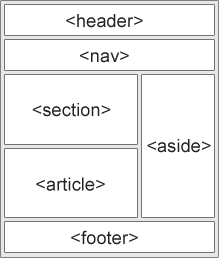

 7
Replies
7
7
Replies
7


Copy link to clipboard
Copied
the questions that you ask are above Bootstrap... they are on the basis of learning what is HTML...
classes are a way to give an access to elements (as group) by the CSS and/or the Javascript.... you also have an other type of attribute , id, that also allow to do that, but that time not as a group of elements, but by a unique element...
now to understand the difference in between <div> and <nav>... you have to understand that both are block element, so in appearance they can seams to act the same... and anyway they act the same... but that is in a pure structural way...
now in a semantic way they are completly different, because <div> is a block element that group all the nested childs that it contains as a <simple-division-compare-to-the-rest-of-the-page>, and <nav> group all the childs that it contains as elements refereing to a <navigation-links-container>
HTML is a pure structural meta language, so it divide content in elements. Those element by nature can be of two ways... blocks, or inline...
i.e a <p> paragraph is a block in within an <article> article, which is an other block in the page <body>.... block are independent and can be move to be displayed...
inline are solidary from their container... i.e a <strong> element in a phrase is inline with this phrase, as will be a link <a> or a <br> back return...
now all those element block and inline must have a signification for the reader (browser, third part application, screen reader... and so on)... so we need to place a meaning to those elements in a more semantic way... and that is where the meaning of all tags reside...
read this fabulous article from John Allsopp... https://alistapart.com/article/semanticsinhtml5
Can this help you? does it answer to your question ? or was it beside it ?
Copy link to clipboard
Copied
<nav> is the semantic HTML5 tag for navigation. Semantic tags give meaning and purpose to the div. And semantic tags can be re-used on a page if needed.
Copy link to clipboard
Copied
https://forums.adobe.com/people/Nancy+OShea wrote
<nav> is the semantic HTML5 tag for navigation. Semantic tags give meaning and purpose to the div. And semantic tags can be re-used on a page if needed.
So I no longer have to use <div></div> for the structure of my website in HTML 5? I can use the tags above?
I mean, if I want to use <div> I can but in HTML 5 the tags above are usable too?
Sorry, I'm slow sometimes. 
Copy link to clipboard
Copied
Right. Semantic tags are recommended by the W3C specs for improved accessibility and search results. See link below.
HTML elements reference - HTML | MDN
Copy link to clipboard
Copied
https://forums.adobe.com/people/Nancy+OShea wrote
Right. Semantic tags are recommended by the W3C specs for improved accessibility and search results. See link below.
Great! So I can use the correct semantic tags and then rely on CSS to tell those semantic tags where to stay on the html, like the graphic you provided above.
Copy link to clipboard
Copied
Right. HTML = content and structure. CSS makes it all pretty.
Having said that, Bootstrap doesn't presume to know which semantic tags you should use. You'll need to make those decisions on your own. But Bootstrap will save you a lot of dreary CSS coding because it contains a whole library of classes for you to use.
<body class="container">
<header class="row">
<div class="jumbotron">
<h1>Hello World!</h1>
<h2>Welcome to Bootstrap</h2>
</div>
</header>

Copy link to clipboard
Copied
Youll just be doing a lot of rather dreary research as to which class to use and what its attributes are rather than getting on with the coding.

Get ready! An upgraded Adobe Community experience is coming in January.
Learn more
 AdChoices