


- Home
- Dreamweaver
- Discussions
- Re: Soooo confused....[DW and Filezilla uploading ...
- Re: Soooo confused....[DW and Filezilla uploading ...

Copy link to clipboard
Copied
I have redone my website in DW. The files are the way they are suppose to be HOWEVER, when I upload them through filezilla, they revert back to an older version. Is this a DW problem or a Filezilla problem??????? TIA


 1 Correct answer


The links are still broken because they all point to files on your local computer. The only correct link is the one to your home page. Also you still have spaces in file names which is not allowed in HTML5 code.
<tr>
<td><div align="center"><a href="index.html">Home</a></div></td>
<td><div align="center"><a href="file:///C|/Users/Owner/Desktop/Web Sites/Twisted Flow Show Supply TFSS/products.html">Products</a></div></td>
<td><div align="center"><a href="file:///C|/Users/Owner/Desktop/Web Sites/Twisted Flow Show Supply TFSS/awards.html
...
 22
Replies
22
22
Replies
22

Copy link to clipboard
Copied
Without a URL, it's impossible to say for sure. My first guess is either you're not uploading to your server's root folder or your browser has a sticky cache that must be cleared.
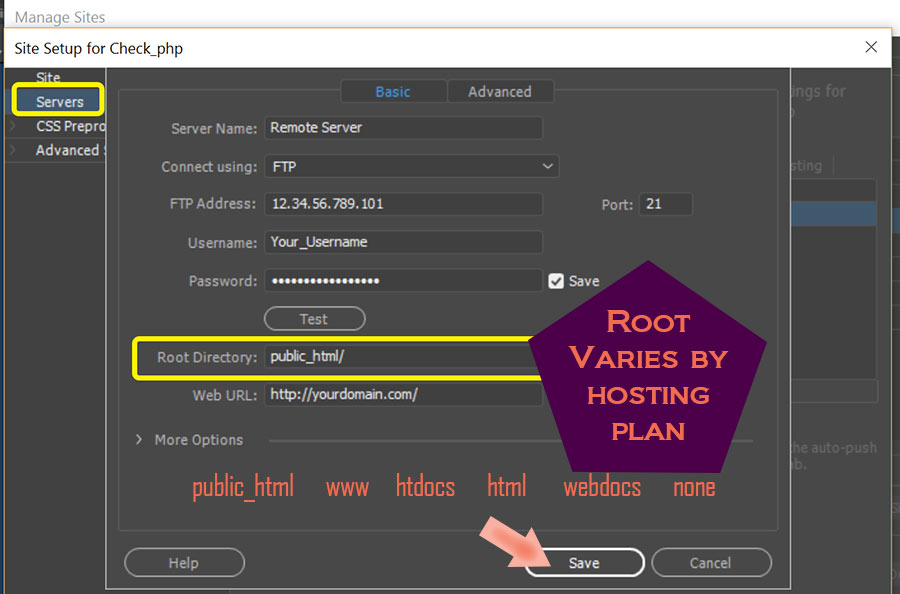
Is there some reason you're not using DW's built-in FTP feature?
Go to Site > Manage Site > Server's Tab. Enter your site's log-in credentials and root folder. If unsure what to enter here, ask your hosting provider.

Copy link to clipboard
Copied
Like Nancy says it usually a simple case of not transferring the files to your public root folder. If you are still struggling post a screenshot of filezilla connected to your remote so we can see what you are doing.
Copy link to clipboard
Copied
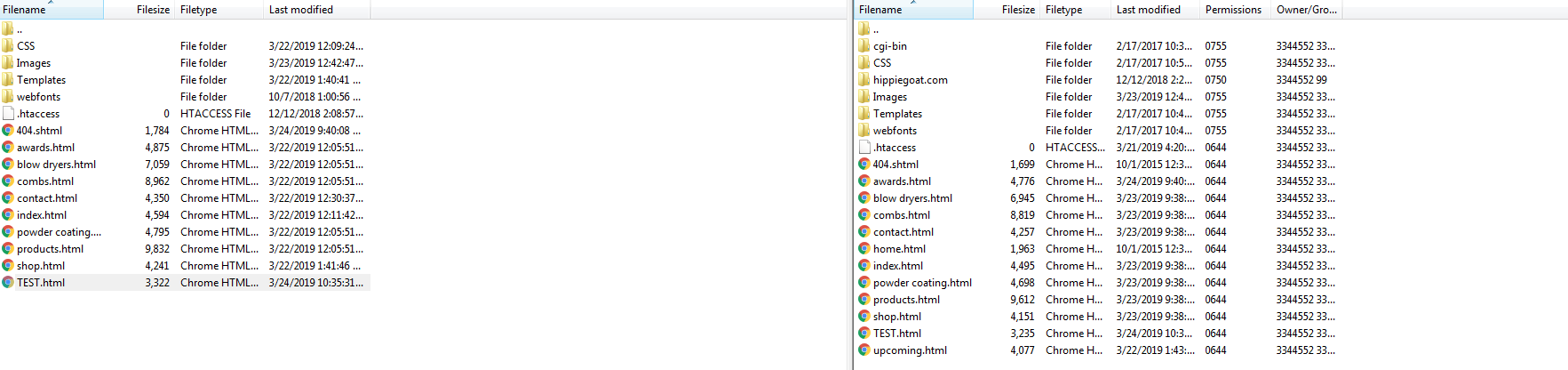
Here is my Filezilla Screen when logged on to my account.
Copy link to clipboard
Copied
Comparing local files on the left with remote files the files on the right, file sizes are different, so I'd summize you haven't uploaded the new files or you've uploded them to wrong folder?
You look like you are in the right local project folder (Twisted Flow Show Supply TFSS) and the correct remote public_html folder
You should be able to right click on a file or folder in the bottom left local pane and choose 'upload' from the context menu, you should then be prompted to overwrite the remote fie ....
Copy link to clipboard
Copied
I have highlighted the files on the left and dragged and dropped them. It takes roughly 3 to 4 minutes to upload. So I'm not understanding why the new files are not copying across. I just tried Energize's suggestion and the files are still showing two different sizes. I have never had this happen so I'm still completely stumped.
THANK YOU John for your info. I needed this info!! 

Copy link to clipboard
Copied
Create a completely new file - name it test.html, drag that across to the remote server - does it show in the list of files?
Only reason I say this is I once had a similar situation where I was uploading files, with identical names, to an old server location - the host had somehow transfered the files to another server and never told me about it so I was uploading to what I thought was a live server but it was effectively dead but still had the old files on it. It's highly unlikely to be the case IF you can create a brand new file with a brand new name and it appears in the location that you think you are uploading to.
It eliminates one possibility.
Copy link to clipboard
Copied
It did copy it across; however, it copied it across as a different size. GRRRRR
Copy link to clipboard
Copied
jgoetz03 wrote
It did copy it across; however, it copied it across as a different size. GRRRRR
So when you view these remote files in a browser what is the outcome - they don't show anything at all, they show only part of what they should show. None of the updates to the files have been made?
Copy link to clipboard
Copied
This is how the website, www.twistedflow.com looks...the old version without the non working stuff and missing stuff on certain pages
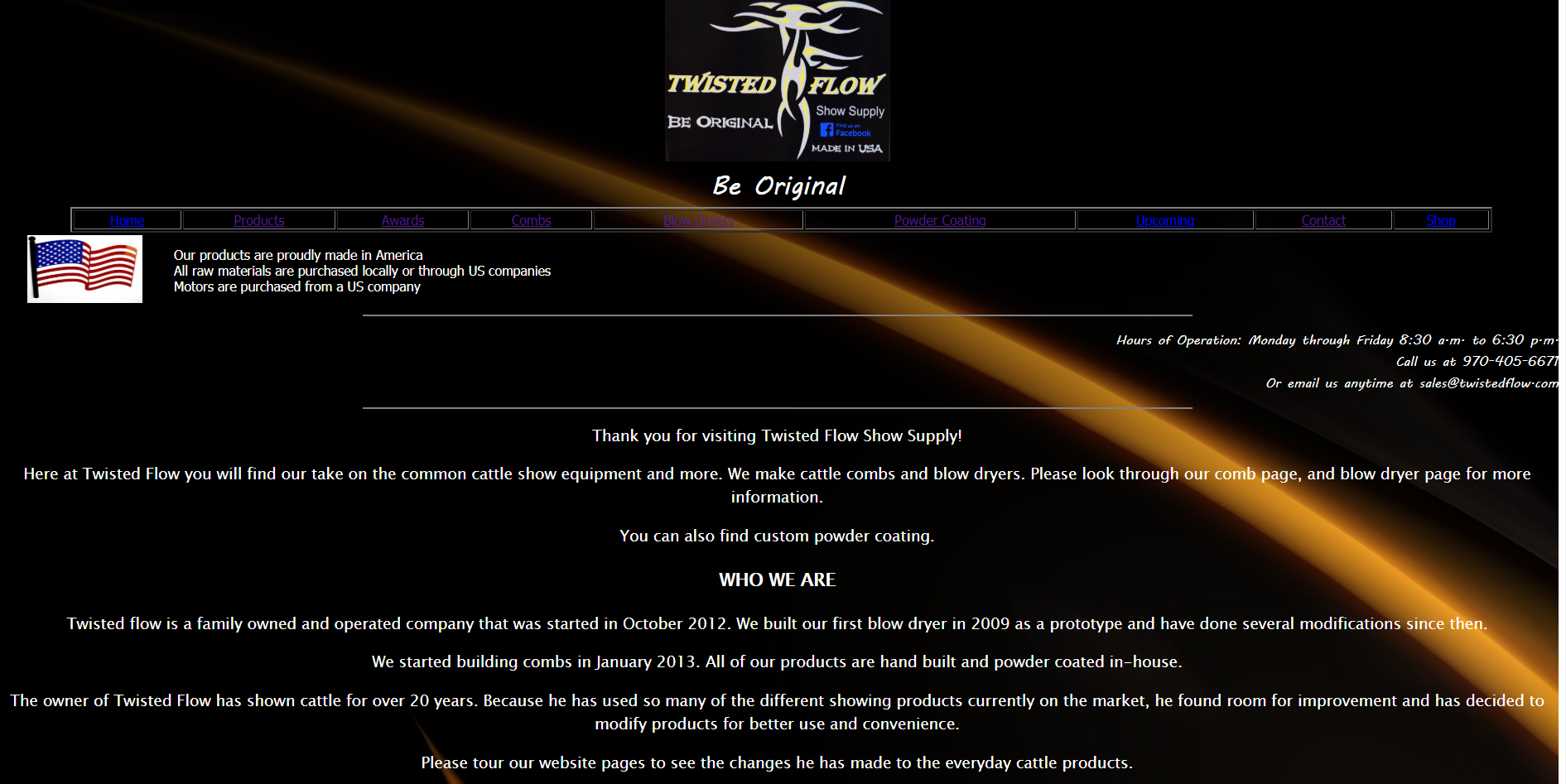
This is how I want it to look.....this is inside of DW

Copy link to clipboard
Copied
jgoetz03 wrote
This is how the website, www.twistedflow.com looks...the old version without the non working stuff and missing stuff on certain pages
The page at www.twistedflow.com looks identical to screen shot No 2 in my browser. I think you most likely have a case of browser caching. Have you looked at the page in a different browser?
Failing that change the name of your css file to layout3.css and upload it to the server in the CSS folder Dont forget to change the link to the css file in your page as well and re-upload the page.
CSS/TFFS layout2.css
Its also advisable to use underscores for file names - CSS/TFFS_layout3.css
Some browsers may not like spaces in file names, this could possibly be another reason you are not seeing the page as you expect.
Copy link to clipboard
Copied
Here is my current code configuration on the template page of my website
<!doctype html>
<html>
<head>
<meta charset="utf-8">
<!-- TemplateBeginEditable name="doctitle" -->
<title>Twisted Flow Show Supply</title>
<!-- TemplateEndEditable -->
<!-- TemplateBeginEditable name="head" -->
<!-- TemplateEndEditable -->
<style>
.menu td {
text-align: center;
padding: 0 15px;
}
.menu a {
color: yellow;
text-decoration: none;
}
.menu a:hover {
color: white;
text-decoration: underline;
}
.menu a.active {
color: red;
}
</style>
<link href="file:///C|/Users/Owner/Desktop/Web Sites/Twisted Flow Show Supply TFSS/CSS/TFFS layout2.css" rel="stylesheet" type="text/css">
<style type="text/css">
body {
background-image: url(../Images/flame-background.jpg);
}
</style>
</head>
<body>
<div class="container">
<div class="logo">
<div align="center"><img src="../Images/website logo.JPG" width="351" height="214" alt="TWSS website logog"></div>
<div class="sang">
<div align="center">Be Original</div>
<div class="navigation"><table width="100%" border="2">
<tr>
<td><div align="center"><a href="../index.html">Home</a></div></td>
<td><div align="center"><a href="file:///C|/Users/Owner/Desktop/Web Sites/Twisted Flow Show Supply TFSS/products.html">Products</a></div></td>
<td><div align="center"><a href="file:///C|/Users/Owner/Desktop/Web Sites/Twisted Flow Show Supply TFSS/awards.html">Awards</a></div></td>
<td><div align="center"><a href="file:///C|/Users/Owner/Desktop/Web Sites/Twisted Flow Show Supply TFSS/combs.html">Combs</a></div></td>
<td><div align="center"><a href="file:///C|/Users/Owner/Desktop/Web Sites/Twisted Flow Show Supply TFSS/blow dryers.html">Blow Dryers</a></div></td>
<td><div align="center"><a href="file:///C|/Users/Owner/Desktop/Web Sites/Twisted Flow Show Supply TFSS/powder coating.html">Powder Coating</a></div></td>
<td><div align="center"><a href="file:///C|/Users/Owner/Desktop/Web Sites/Twisted Flow Show Supply TFSS/contact.html">Contact</a></div></td>
<td><div align="center"><a href="file:///C|/Users/Owner/Desktop/Web Sites/Twisted Flow Show Supply TFSS/shop.html">Shop</a></div></td>
</tr>
</table></div>
<p align="center"><img src="../Images/american flag.jpg" alt="American Flag" width="138" height="82" align="middle"></p>
<p align="center">Our products are proudly made in America <br>
All raw materials are purchased locally or through US companies <br>
Motors are purchased from a US company
</p>
<div class="information">
<div align="right">
<hr width="1000" size="2" noshade>
<p>
</p>
</div>
<div class="content"><!-- TemplateBeginEditable name="ContentArea" --><!-- TemplateEndEditable --></div>
</div>
<div class="footer">
<hr width="1000" size="2" noshade>
<h2><a href="https://www.facebook.com/twistedflowshowsupply"><img src="file:///C|/Users/Owner/Desktop/Web Sites/Twisted Flow Show Supply TFSS/Images/Facebook Link.jpg" width="176" height="52" alt="Facebook Link" longdesc="https://www.facebook.com/twistedflowshowsupply"></a> <em>more photos of products are available on Facebook</em>!</h2>
<p>Copyrighted 2019. All rights reserved.</p>
<p>Website designed and managed by Janelle Sack.</p>
<p>Patent Information:<BR>
Blow Dryer: 8,631,767<BR>
Combs: D704,905 and other patents pending</p>
<p>Policies and Notifications<br>
Twisted Flow is no responsible for fires caused by altering the design of the dryer or the hoses.<br>
Not responsible for damages caused by the 1.5"
end whip being longer than 6' </p>
</div>
</div>
</div>
</div>
</div>
<p> </p>
</body>
</html>
Copy link to clipboard
Copied
The link to your css file is incorrect. It points to the file on your computer:
<link href="file:///C|/Users/Owner/Desktop/Web Sites/Twisted Flow Show Supply TFSS/CSS/TFFS layout2.css" rel="stylesheet" type="text/css">
It should be like below, I think, as its a .dwt template file. I assume that your website files are in the 'TFSS' folder.
<link href="../CSS/TFFS layout2.css" rel="stylesheet" type="text/css">
If you have broken links like the above and below that would be as a result of possibly not defining your website correctly at the outset of the project.
<a href="file:///C|/Users/Owner/Desktop/Web Sites/Twisted Flow Show Supply TFSS/shop.html">Shop</a>
Copy link to clipboard
Copied
Here is the new code after taking out that broken CSS file and reattaching it (with the mouse in the code file, I right clicked, CSS styles, attach style sheet, selected file). Is this CORRECT?
<!doctype html>
<html>
<head>
<meta charset="utf-8">
<!-- TemplateBeginEditable name="doctitle" -->
<title>Twisted Flow Show Supply</title>
<!-- TemplateEndEditable -->
<!-- TemplateBeginEditable name="head" -->
<!-- TemplateEndEditable -->
<style>
.menu td {
text-align: center;
padding: 0 15px;
}
.menu a {
color: yellow;
text-decoration: none;
}
.menu a:hover {
color: white;
text-decoration: underline;
}
.menu a.active {
color: red;
}
</style>
<style type="text/css">
body {
background-image: url(../Images/flame-background.jpg);
}
</style>
<link href="../CSS/TFFS layout2.css" rel="stylesheet" type="text/css">
</head>
<body>
<div class="container">
<div class="logo">
<div align="center"><img src="../Images/website logo.JPG" width="351" height="214" alt="TWSS website logog"></div>
<div class="sang">
<div align="center">Be Original</div>
<div class="navigation"><table width="100%" border="2">
<tr>
<td><div align="center"><a href="../index.html">Home</a></div></td>
<td><div align="center"><a href="file:///C|/Users/Owner/Desktop/Web Sites/Twisted Flow Show Supply TFSS/products.html">Products</a></div></td>
<td><div align="center"><a href="file:///C|/Users/Owner/Desktop/Web Sites/Twisted Flow Show Supply TFSS/awards.html">Awards</a></div></td>
<td><div align="center"><a href="file:///C|/Users/Owner/Desktop/Web Sites/Twisted Flow Show Supply TFSS/combs.html">Combs</a></div></td>
<td><div align="center"><a href="file:///C|/Users/Owner/Desktop/Web Sites/Twisted Flow Show Supply TFSS/blow dryers.html">Blow Dryers</a></div></td>
<td><div align="center"><a href="file:///C|/Users/Owner/Desktop/Web Sites/Twisted Flow Show Supply TFSS/powder coating.html">Powder Coating</a></div></td>
<td><div align="center"><a href="file:///C|/Users/Owner/Desktop/Web Sites/Twisted Flow Show Supply TFSS/contact.html">Contact</a></div></td>
<td><div align="center"><a href="file:///C|/Users/Owner/Desktop/Web Sites/Twisted Flow Show Supply TFSS/shop.html">Shop</a></div></td>
</tr>
</table></div>
<p align="center"><img src="../Images/american flag.jpg" alt="American Flag" width="138" height="82" align="middle"></p>
<p align="center">Our products are proudly made in America <br>
All raw materials are purchased locally or through US companies <br>
Motors are purchased from a US company
</p>
<div class="information">
<div align="right">
<hr width="1000" size="2" noshade>
<p>
</p>
</div>
<div class="content"><!-- TemplateBeginEditable name="ContentArea" --><!-- TemplateEndEditable --></div>
</div>
<div class="footer">
<hr width="1000" size="2" noshade>
<h2><a href="https://www.facebook.com/twistedflowshowsupply"><img src="file:///C|/Users/Owner/Desktop/Web Sites/Twisted Flow Show Supply TFSS/Images/Facebook Link.jpg" width="176" height="52" alt="Facebook Link" longdesc="https://www.facebook.com/twistedflowshowsupply"></a> <em>more photos of products are available on Facebook</em>!</h2>
<p>Copyrighted 2019. All rights reserved.</p>
<p>Website designed and managed by Janelle Sack.</p>
<p>Patent Information:<BR>
Blow Dryer: 8,631,767<BR>
Combs: D704,905 and other patents pending</p>
<p>Policies and Notifications<br>
Twisted Flow is no responsible for fires caused by altering the design of the dryer or the hoses.<br>
Not responsible for damages caused by the 1.5"
end whip being longer than 6' </p>
</div>
</div>
</div>
</div>
</div>
<p> </p>
</body>
</html>
Copy link to clipboard
Copied
But you still have a bazillion bad links in your document. They all point to files on your local hard drive which nobody can see except you. If you put this code on the web, nothing will work.
a href="file:///C|/Users/Owner/Desktop/Web Sites/Twisted Flow Show Supply TFSS/powder coating.html">
Go to Site > Manage Sties or New Site. Enter your local site folder. Example, C:\MyTestSite\ See screenshot.

Copy link to clipboard
Copied
Like this? This is what is was when I pulled up the site setup.

Copy link to clipboard
Copied
Can anyone else help me? Please. TIA
Copy link to clipboard
Copied
What more do you need help with?
Copy link to clipboard
Copied
The webpages still are not working correctly....AHHHH.
I think at this point it might just be easier to redo the entire thing.

Copy link to clipboard
Copied
To clear the browser data (Chrome), press CTRL+SHIFT+DEL. You will get the following dialog

Then re-load the page.
Copy link to clipboard
Copied
Thank you! My links once I click on them are not working.
www.twistedflow.com
I will double check that the links are correct inside the main DW files.
Copy link to clipboard
Copied
The links are still broken because they all point to files on your local computer. The only correct link is the one to your home page. Also you still have spaces in file names which is not allowed in HTML5 code.
<tr>
<td><div align="center"><a href="index.html">Home</a></div></td>
<td><div align="center"><a href="file:///C|/Users/Owner/Desktop/Web Sites/Twisted Flow Show Supply TFSS/products.html">Products</a></div></td>
<td><div align="center"><a href="file:///C|/Users/Owner/Desktop/Web Sites/Twisted Flow Show Supply TFSS/awards.html">Awards</a></div></td>
<td><div align="center"><a href="file:///C|/Users/Owner/Desktop/Web Sites/Twisted Flow Show Supply TFSS/combs.html">Combs</a></div></td>
<td><div align="center"><a href="file:///C|/Users/Owner/Desktop/Web Sites/Twisted Flow Show Supply TFSS/blow dryers.html">Blow Dryers</a></div></td>
<td><div align="center"><a href="file:///C|/Users/Owner/Desktop/Web Sites/Twisted Flow Show Supply TFSS/powder coating.html">Powder Coating</a></div></td>
<td><div align="center"><a href="file:///C|/Users/Owner/Desktop/Web Sites/Twisted Flow Show Supply TFSS/contact.html">Contact</a></div></td>
<td><div align="center"><a href="file:///C|/Users/Owner/Desktop/Web Sites/Twisted Flow Show Supply TFSS/shop.html">Shop</a></div></td>

Copy link to clipboard
Copied
Suggestion: Use the Windows Snipping Tool to take clear screenshots easily
https://support.microsoft.com/en-au/help/13776/windows-use-snipping-tool-to-capture-screenshots

Get ready! An upgraded Adobe Community experience is coming in January.
Learn more
 AdChoices