


- Home
- Dreamweaver
- Discussions
- Re: Unwanted spacing in source code
- Re: Unwanted spacing in source code

Copy link to clipboard
Copied
Hello:
I now see unwanted spaces appearing in my source code, wit regard to links. Here's what appears in the markup. . .
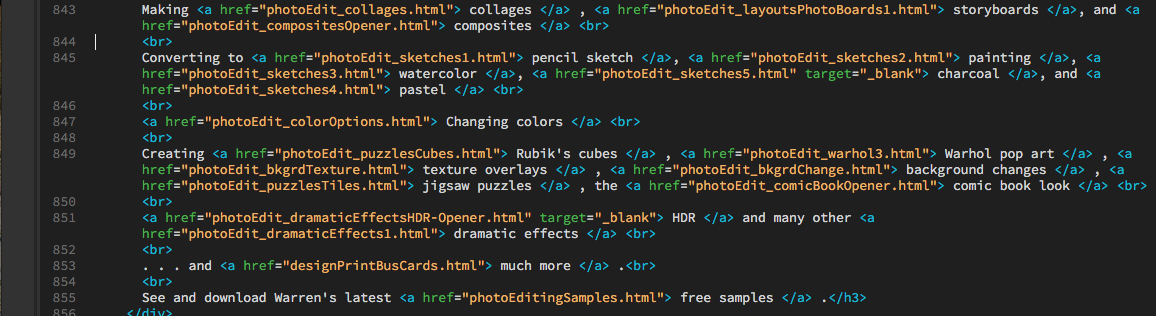
You can the effect that this creates on my page. Look in the left column, near the bottom, in the group of hyperlinks in the "WCD's Photo Editing Pages."
http://www.warrencampdesign.com/coloringPages.html
I've looked in the Preferences panel and the Tag Libraries but can't find anything related to this problem.
I thank you in advance for showing me how to prevent such unwanted spacing from occurring.
Warren


 1 Correct answer


Oh, I see, you're talking about the spaces in the tag content, after the opening <a> and before the closing </a>...
<a href="photoEdit_puzzlesCubes.html"> Rubik's cubes </a> , <a href...
...and how that should be...
<a href="photoEdit_puzzlesCubes.html">Rubik's cubes</a>, <a href...
The only way those spaces can get there in my experience is if you add them. Are you saying DW is placing those spaces by itself when you create the links?

 4
Replies
4
4
Replies
4

Copy link to clipboard
Copied
You're going to need to be more specific as to what you are seeing and what you think you should be seeing.
If you're talking about the long spaces after the <a on line 851 that drop to the next line, this is expected behavior. Widen your code window and you'll see what's happening. Basically the entire href attribute is being pushed to the next line, rather than splitting it up between two.
This has no affect on how a browser will display your page. It's still technically one line of code without space, it's just displayed that way in code view.
Copy link to clipboard
Copied
Thanks for connecting with me on this on, Jon.
Please open the page, scroll down looking in the left margin, in the group of ±18 hyperlinks under "WCD's Photo Editing Pages." You'll see that a space has been added before each separating comma; that space has also been linked.
The screen shot shows that spacing, especially on line 849.
Hope that specificity helps.
Warren
Copy link to clipboard
Copied
Oh, I see, you're talking about the spaces in the tag content, after the opening <a> and before the closing </a>...
<a href="photoEdit_puzzlesCubes.html"> Rubik's cubes </a> , <a href...
...and how that should be...
<a href="photoEdit_puzzlesCubes.html">Rubik's cubes</a>, <a href...
The only way those spaces can get there in my experience is if you add them. Are you saying DW is placing those spaces by itself when you create the links?
Copy link to clipboard
Copied
Hello, again, Jon:
Yes, you've now realized the concern. I didn't intentionally put a space after the </a> end tag. I suspect that it began to happen two weeks ago when I asked (on the forum) about weird "source formatting" actions. Nancy suggested a few recommendations:
(a) Deselect the indent option in the Code Format pane of the Preferences panel;
(b) go to View > Code View Options > Auto Indent, and deselect that;
(c) and in Tag Libraries to change all the tags Contents field from "Formatted and Indented" to "Formatted but Not Indented." I did that to all tags having that option in the Contents field.
Might my last effort [item (c)] took a long time, as Nancy intimated it would. Did I err by changing one of the tag library itms that I shouldn't have changed?
FYI: I don't see this inserted space concern occurring any longer with my new work; but many pages reveal those linked spaces so I must do a lot of hunt-and-peck cleanup. I don't want to start that cleanup process until I know what caused this and can be sure that it won't happen again.
Thanks, Jon.
Warren

Get ready! An upgraded Adobe Community experience is coming in January.
Learn more
 AdChoices