


- Home
- Dreamweaver
- Discussions
- Delete Remote Files not on Local Drive
- Delete Remote Files not on Local Drive

Copy link to clipboard
Copied
When I try to syncronize files with my remote and testing servers Dreamweaver asks if I want to delete files not on the local instance.
However when I check this and then press preview rather than marking the files as delete it marks them as get.
Is there a way to fix this?
thanks.


 1 Correct answer


I tried both versions 'Entire Site' and 'Selected Folders' and both worked identically.
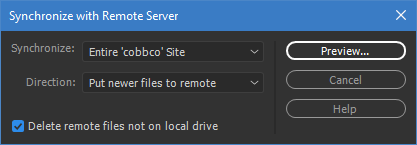
My Dreamweaver is 10155 Build ver 18.1 on a Windows system.
You could try Unusual behavior in Dreamweaver? Try restoring preferences.

 12
Replies
12
12
Replies
12


Copy link to clipboard
Copied
can you please describe step by step what is happening... I never encounter any trouble with this feature ?
Copy link to clipboard
Copied
Step 1 - Create new Site
Step 2 - use get function to pull all files from Server to Local
Step 3 - Delete Index.php (Or Any other File on Local)
Step 4 - Use Sync (Check Delete files on remote, not on local)
Step 5 - Press Preview
Index.php is now marked as get... Not as delete.

Copy link to clipboard
Copied
The whole purpose of file synchronization is so you have the same files locally and on remote.
I frequently have local files that are not on the remote server and vice versa. That's how I want it. So I NEVER use file sync.
Copy link to clipboard
Copied
We want to be able to sync the files so that the directories are Identical.
There is a checkbox that says Delete files on not on Local but it does nothing.
Instead every time we go to use sync it tries to download a copy of the files not on the local.
We develop on our local, push to the testing and then publish to the live.
However we cannot use the sync function as it does not sync the files it uploads and downloads newer versions of other files but it does not delete redundant files.
How can I get the functionality to delete the remote files not on the Local?
Copy link to clipboard
Copied
I thought that I would put it to the test in an effort to replicate the problem. I added a test folder with one file named myfiles.php and uploaded to the remote. I then renamed the file to theirfiles.php and performed a sync with the following result.
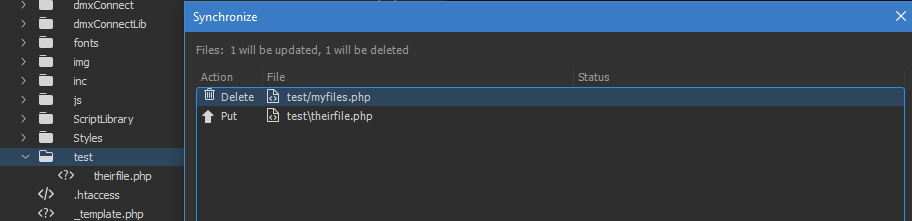
In other words, I could not replicate the problem.

Copy link to clipboard
Copied
I'm not sure how you managed to achieve this but this is exactly the functionality I want.
I spent over an hour on the online chat with Adobe this morning and the person I was speaking to remoted in and watched my transfers and witnessed the issue.
This was under Case No: ADB-1824795-P0H8
I was eventually told that this was not a bug and that this functionality was expected in versions of dreamweaver CC she suggested rolling back to CS6 which I did still with no luck.
I have no idea what is going on but this functionality is extremely important for our web development work.
Copy link to clipboard
Copied
I'm not sure how you managed to achieve this but this is exactly the functionality I want.
I spent over an hour on the online chat with Adobe this morning and the person I was speaking to remoted in and watched my transfers and witnessed the issue.
This was under Case No: ADB-1824795-P0H8
I was eventually told that this was not a bug and that this functionality was expected in versions of dreamweaver CC she suggested rolling back to CS6 which I did still with no luck.
I have no idea what is going on but this functionality is extremely important for our web development work.
Sorry I posted the above from the wrong account.
Copy link to clipboard
Copied
I tried both versions 'Entire Site' and 'Selected Folders' and both worked identically.

My Dreamweaver is 10155 Build ver 18.1 on a Windows system.
You could try Unusual behavior in Dreamweaver? Try restoring preferences.
Copy link to clipboard
Copied
as Ben I never encounter problem managing file between two locations... Sometimes , for the needs of the project, I use 4 different machines
- A - pure local server
- B - testing server for the team to develop and branch modules
- C - validation machine, for clients and partners
- D - production machine
so to synchronise all this, rightly, the complexity is to be handle by us and not by the machine... so for simplicity I will not take the case of extraction ... we will assume that only one group supports synchronization management...
until today and still today, I do not have any problems during the synchronization as well in the case where the file listings are heterogeneous (do not include the same files) or identical (by deleting the isolated files ) ... in one direction or the other (putting / getting)
it is important to cloak the files and folders that must remain machine-specific then the machines must be synchronized according to their level of modification pair by pair ... and especially take into account which machine has the latest version updated ... and not all of them are necessarily on the same files
if for example a developer has in his own local environment the latest updated JavaScript, we must be careful when a designer will synchronize his new local graphics, with the validation server and then with the production server ... of course ensure that the developer has already synchronized its own sources ...
it is in this sense, that having several intermediary servers, and especially working as a team, that complexity appears.
it is important to have a protocol that is fairly rigid and well respected by all ... and then we must be surrounded by ad hoc tools ... Dreamweaver offers two ... archiving / extraction (which has its own limits) and / or the use of GIT


Copy link to clipboard
Copied
Hi,
Thanks for reporting. could you please try solutions mentioned in link Troubleshoot Adobe Dreamweaver synchronization issues (Mac OS and Windows) and see if it resolves the issue or clearing preferences as mentioned by BenPleysier
Thanks
Copy link to clipboard
Copied
if you want the local deleted file to also be deleted on remote server.. you first will have to place all local files to remote file (not acquire anymore)... that way you will have the possibility to check the box allowing to delete all remote files not present in local , in your case... the index.php
Copy link to clipboard
Copied
The Reason this wasn't working is because we had marked the transaction as get and put newer files.
As a result the site was trying to Get the file from the server.
Using just a put newer files operation results in the expected behavior.

Get ready! An upgraded Adobe Community experience is coming in January.
Learn more
 AdChoices