Known Participant
October 8, 2018
Answered

Dreamweaver 18.2 line height / leading of code view

  • October 8, 2018
  • 2 replies
  • 2493 views

Hi everyone, just wondering if anyone can tell me if I can change the default line height in the code view?

I've switched to Lucida Console because I find Courier new a hideous choice for a coding font, but it looks the leading is some kind of fixed rather than a relative value.

So since Lucida Console at 11pt is taller than Courier New at 11pt, the leading is now tiny and headache-inducing.

I haven't been able to find anything on this, googling just throws up a bunch of articles on CSS and Design View, of course 😕😕
    This topic has been closed for replies.
    Correct answer Paul-M

    If you want to change the line-height in code view manually:

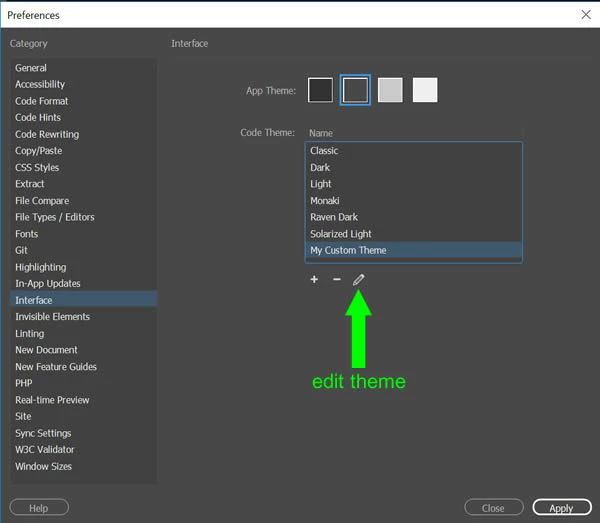
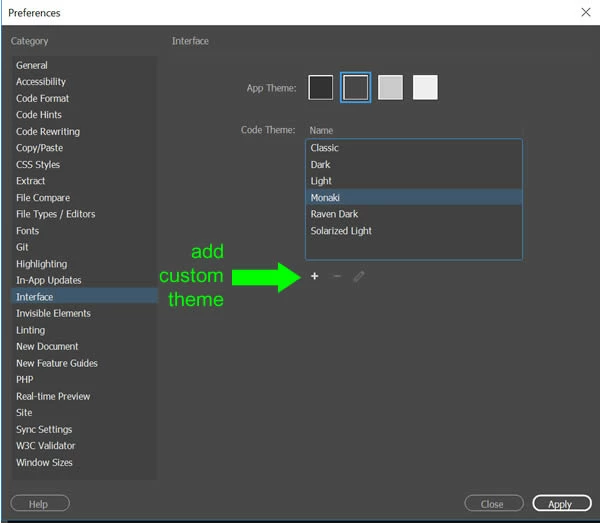
    1) Create a custom code theme in edit > preferences > interface

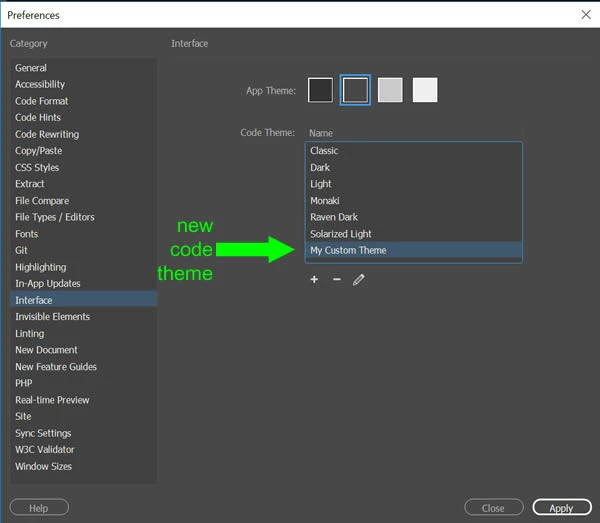
    2) Select your newly created code theme and click 'edit' (pencil icon)

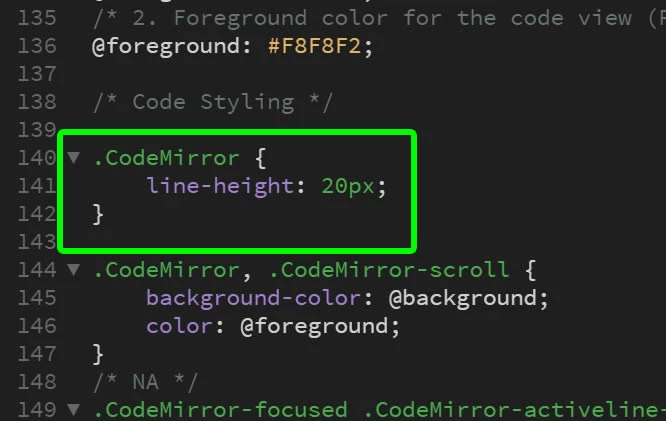
    3) Add the desired line-height property to main.less for the .CodeMirror selector

    for example:

    .CodeMirror {

    line-height: 12px;

    }

    4) Save/close the file main.less and make sure you new custom code theme is selected in edit > preferences > interface

    2 replies

    Paul-MCorrect answer
    Legend
    January 9, 2019

    If you want to change the line-height in code view manually:

    1) Create a custom code theme in edit > preferences > interface

    2) Select your newly created code theme and click 'edit' (pencil icon)

    3) Add the desired line-height property to main.less for the .CodeMirror selector

    for example:

    .CodeMirror {

    line-height: 12px;

    }

    4) Save/close the file main.less and make sure you new custom code theme is selected in edit > preferences > interface

    Paul-M - Community Expert
    Known Participant
    February 12, 2019

    OH yessssssss you champ! Thanks.

    Nancy OShea
    Community Expert
    Community Expert
    October 8, 2018

    I use Source Code Pro with a large font size.   You can also click in code view window and hit Ctl++ to make code bigger or Ctrl+- (minus) to make it smaller.  Ctrl+0 (zero) will revert to normal zoom.   AFAK, there is no option to change line heights

    Nancy O'Shea— Product User & Community Expert
    Known Participant
    October 24, 2018

    Bummer. 11pt is exactly the height I want for the font itself (14 is gigantic for me ), but the leading is just awful.

    It's not the end of the world as mostly I don't use DW for coding (mainly because of things like this), but I was hoping to swap back because my current choice (Brackets) doesn't do autocomplete quite as well.

    I have to admit "You can't" isn't the answer I was hoping for, but I suppose technically my question has an answer.

    Nancy OShea
    Community Expert
    Community Expert
    October 24, 2018

    rickibarnes  wrote

    11pt is exactly the height I want for the font itself (14 is gigantic for me ), but the leading is just awful.

    Check your OS display settings.  If 14pt font looks gigantic to you, I think your zoom level needs to be reset to NORMAL or 100%.

    Nancy O'Shea— Product User & Community Expert