
Participant
December 1, 2021
해결됨

Can't use Fireworks after Windows 11 upgrade - license issues

  • December 1, 2021
  • 6 답변들
  • 12099 조회

I just bought a new computer and it has Windows 11. I tried loading Fireworks, but like everyone else, I got the issue with serial numbers. I had to basically uninstall Creative Suite, log out and log back in. Ridiculous.

That got me past the first issue. Now I have a new issue.
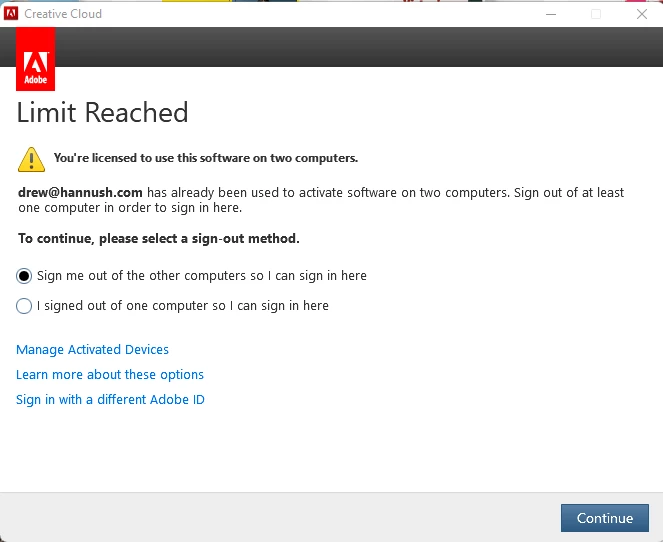
I am only signed into 2 computers. But I humor them and choose to have them sign me out. Then I get an error that says my operating system is out of date and needs to be upgraded before I can do anything!

I'm on the latest version I can possibly be on. So has anyone else successfully installed Fireworks on Windows 11?

If so, how!

Thanks for any help!

(PS, option 2 just brings me back to this same screen)

최고의 답변: Paul-M

This is a Windows 11 solution for the 'Limit Reached' issue :

1) Download the Adobe Creative Clouder Cleaner Tool from here

2) Remove Fireworks by running the cleaner tool (run as administrator) => select language => agree to terms type'Y' => select 1. All => 2. Adobe Fireworks CS6

3) Go to C:\Program Files (x86)\Common Files\Adobe\OOBE\ and rename or delete the folder 'PDApp'

4) Go to C:\Users\username\AppData\Roaming\Adobe\ and rename or delete the folder 'CS6ServiceManager'

5) Now open the Creative Cloud app and turn off automatic updates; click your profile icon (top right) => Preferences => Apps => make sure Auto-update is off (if you leave Auto-update on, Fireworks will be updated, and you'll most likely end up with the same issue again).

6) Reboot your system for good measure

7) Download this offline Fireworks installer that I saved  unzip it and install Fireworks **NOTE** Choose 'Try' when presented with options, you may additionally be asked to sign in with your Adobe credentials.

😎 When you launch Fireworks for the first time, you may be prompted to sign in with your Adobe credentials, if you then see a button 'license this software' click it, and you should be good to go.

6 답변

Legend
August 5, 2022

If anyone is on a Windows machine and still struggling with the 'Limit Reached', let me know, and I'll walk you through the fix.

Paul-M - Community Expert
Participant
August 5, 2024

Do you know if this still works. I just reformatted my pc and when I went to put this back on it fails everytime. Latest windows build.

Paul-M답변
Legend
August 5, 2022

This is a Windows 11 solution for the 'Limit Reached' issue :

1) Download the Adobe Creative Clouder Cleaner Tool from here

2) Remove Fireworks by running the cleaner tool (run as administrator) => select language => agree to terms type'Y' => select 1. All => 2. Adobe Fireworks CS6

3) Go to C:\Program Files (x86)\Common Files\Adobe\OOBE\ and rename or delete the folder 'PDApp'

4) Go to C:\Users\username\AppData\Roaming\Adobe\ and rename or delete the folder 'CS6ServiceManager'

5) Now open the Creative Cloud app and turn off automatic updates; click your profile icon (top right) => Preferences => Apps => make sure Auto-update is off (if you leave Auto-update on, Fireworks will be updated, and you'll most likely end up with the same issue again).

6) Reboot your system for good measure

7) Download this offline Fireworks installer that I saved  unzip it and install Fireworks **NOTE** Choose 'Try' when presented with options, you may additionally be asked to sign in with your Adobe credentials.

😎 When you launch Fireworks for the first time, you may be prompted to sign in with your Adobe credentials, if you then see a button 'license this software' click it, and you should be good to go.

Paul-M - Community Expert
Participating Frequently
August 25, 2022

Thank you for this detailed process and the associated links.


I went a step further and went to the Fireworks.exe file and right-clicked to run the Windows compatibility test. I needed to do this because the menus and some interface items were teeny-tiny small and completely out of proportion to the rest of the program. I tested a few options and then found one that made the fonts a little too big, but not so big that they interfere with the use of the program. I saved that compatibility setting so that whenever I use Fireworks it will come up that way.


If anyone at Adobe is listening, I think those of us who continue to struggle with the idea of leaving Fireworks behind would benefit greatly from an option in Photoshop and/or Illustrator that set up the interface to be similar to Fireworks - the tool bars, etc. to be familiar to the Fireworks user so that we could become more comfortable in Photoshop and Illustrator.


One last thing: when you've got Fireworks up and running again, be sure to go back to your Creative Cloud app and re-enable automatic updates :).


Thank you, again, Paul!

Nancy OShea
Community Expert
Community Expert
August 25, 2022
quote

If anyone at Adobe is listening...  Fireworks [users] would benefit greatly from an option in Photoshop and/or Illustrator that set up the interface to be similar to Fireworks


By @ernienet

========

Don't count on it.  This won't happen for two reason.

#1 Nobody can hear you. Adobe hasn't monitored this space for years, since FW was discontinued. 


#2 Photoshop & Illustrator are very sophisticated, pro-level tools with millions & millions of subscribers who don't care about FW.  It would be a hurclean task to dumb those apps down for a hundred or so FW users.  Too much pain & too little gain.


Best advice, get your feet wet now with other tools before you're forced to.  FW won't last much longer. 


Photoshop is for rasters.  Illustrator is for vectors. Substance is for 3D.


Nancy O'Shea— Product User & Community Expert
Participant
August 3, 2022

This issue is currently driving me mad, I have tried all of the things listed in this thread to no joy, I constantly see the same issues of the Limit Reached screen and then the out of date system / browser.

Does nobody have a proven process of resolving this?

Nancy OShea
Community Expert
Community Expert
August 3, 2022

Fireworks ended 10 years ago, long before Win10 much less Win11 came out.  I know it's frustrating.  But short of using an old computer that's compatible with legacy software, there's not much more to suggest.


Fireworks alternatives.

ADOBE TOOLS:
===========
- Illustrator CC: https://www.adobe.com/products/illustrator.html
- Photoshop Elements: https://www.adobe.com/products/photoshop-elements.html
- Photoshop CC: https://www.adobe.com/products/photoshop.html

OTHER TOOLS (raster & vector):
===========
- Affinity Photo & Affinity Designer: https://affinity.serif.com
- CorelDRAW Graphics Suite: https://www.coreldraw.com/
- GIMP: https://www.gimp.org/
- Gravit Designer: https://www.designer.io/en/
- Inkscape: https://inkscape.org/
- Krita: https://krita.org/
- Paint.NET: https://www.getpaint.net/
- PaintShop Pro: https://www.paintshoppro.com/
- PhotoPea: https://www.photopea.com/
- Photo Pos Pro: https://www.photopos.com/PPP3_BS/Default.aspx
- Pixlr: https://pixlr.com/
- Vctr: https://vectr.com/

Hope that helps.


Nancy O'Shea— Product User & Community Expert
Participant
June 12, 2024

Wrong! The tools you list are NOT Fireworks alternatives. Photoshop is one of the most bloated software products ever developed. Fireworks represented a lean and mean graphics editor for amateur users. Photoshop may be a godsend to highly trained highly paid graphics professioals but Fireworks was quick and easy and cheap for the everyman needing to do some clipping or cropping or flitering. Not even comparable.

Participant
April 7, 2022

I have the same issue - I've tried to uninstall Fireworks and the Creative Cloud apps and then reinstall.
I tried a manual install of Fireworks as well.  Same issue.


Strangely, I had it working for months.  I'm not sure what kicked me into this state.

Nancy OShea
Community Expert
Community Expert
April 7, 2022


quote

I'm not sure what kicked me into this state.


By @Navid5CB9

=========

When did you upgrade to Win 11?


Nancy O'Shea— Product User & Community Expert
Participant
April 7, 2022

This computer came with Win11.  

Note: To see if this affected other products, it did.  Muse has the same issue when launched from the Cloud app.


just now: 
I logged out of Creative Cloud.  

Then I manually installed Fireworks using the installer sign in (not the Cloud app) I was able to have it send me a text message and license this.  I have Fireworks open and all is fine.  


Then I close Fireworks and open it again, and the dreaded Limit Reached dialog comes up and I'm hosed again.


I figure we have one time use via installation and then that's it.


Can you find us a hard key license code perhaps that will prevent this entire process by circumventing the Adobe sign in process.


You could provide the key to us and save a lot of $ trying to debug this.


Community Expert
December 28, 2021

In addition to what @Paul-M said, the idea of the cleaner tool should allow you to solve your problem.


However, if this is not the case, there is no harm in manually removing the Fireworks preferences, https://helpx.adobe.com/fireworks/kb/restore-preferences-fireworks-cs5.html .


You can also try by disconnecting and reconnecting your account from CC Desktop.

Participating Frequently
December 30, 2021

Sadly, the cleaner tool didn't.  It does clean off Fireworks, but after re-install... you're right back to "You're licensed on 2 computers already" (when I'm literally only licensed to 1) and "You're not updated" (when I'm running Windows 11) ... both of which block your access to the application. 😞

Nancy OShea
Community Expert
Community Expert
January 4, 2022

@JmanPHXaz,

The online deactivation of devices only works with Creative Cloud plans


If you're running pre-Creative Cloud legacy-ware, you'll need to call Adobe Support and ask for an activation count reset.   But FW has been unsupported for 10 years so they can't help you with anything more than that. 


CONTACT ADOBE SUPPORT:
================
Online Chat: https://helpx.adobe.com/contact.html?rghtup=autoOpen
Phone M-F, during normal business hours: https://helpx.adobe.com/contact/phone.html


Due to staff shortages related to omicron, wait times may be longer than normal.  Be patient.


Nancy O'Shea— Product User & Community Expert
Legend
December 1, 2021

Have you tried logging in here: https://account.adobe.com


Then go to Activated Devices: https://account.adobe.com/activated-devices


You should then be able to deactivate any devices not in use.


I'm on Windows 11 and not experiencing the same isssue, I know that's no help to you, but at least we know it is workable.

Paul-M - Community Expert
Participant
December 13, 2021

Thanks Paul for trying to help. Good to know it works somewhere. I did deactivate all of my computers and reestablished. Unfortunately it didn't work for me. I'll keep trying. Maybe I have something else interfering.


Thanks,

Drew

Legend
December 13, 2021

Only other thing I can suggest at this point Drew is trying to do a complete Adobe cleanup and starting again using the cleaner tool ... I would definately look at installing Fireworks with an offline installer instead of using the Creative Cloud app. You can download an offlline installer from here, read the instructions before downloading, as you need to access this page first and login with your Adobe credentials to set an Adobe cookie before downloading, they are links to official Adobe installers, so safe to use.

Paul-M - Community Expert