
Participating Frequently
March 16, 2017
Question

error installing Flash Player using MSI installer

  • March 16, 2017
  • 1 reply
  • 996 views

Hi Maria,

i have the same Problem and activated verbose Mode. The Installer stops on following line. It happens on NPAPI and ActiveX. You can wait here for hours:

MSI (s) (74:60) [11:23:35:920]: Executing op: CustomActionSchedule(Action=NewCustomAction1,ActionType=3090,Source=C:\Users\myuser\AppData\Local\Temp\{08A17A35-5362-453D-B788-AB76F5899684}\InstallPlugin_25_0_0_127.exe,Target=-install -msi -prev 0,)

If you try reboot the computer, you get an errormessage:
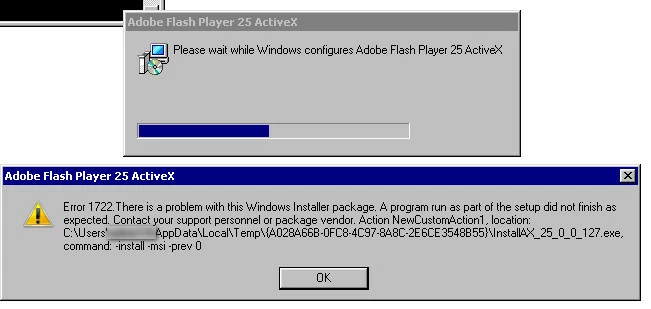
This topic has been closed for replies.

1 reply

_maria_
Community Manager
Community Manager
March 16, 2017

Hi fuwe​,

Please run the MSI installer again and create a log file with the v+x options (verbose + additional debugging) enabled.

When the installation hangs, close out of the installation process and upload the verbose MSI log file and the FlashInstall.log files from C:\Windows\System32\Macromed\Flash AND C:\Windows\SysWOW64\Macromed\Flash directories to cloud.acrobat.com/send using the instructions at How to share a document and post the link to the uploaded files in your reply.

<edit>

I branched your post to a new topic as it doesn't appear to be related to the discussion topic you posted to (Flash msi 25.0.0.127 problem​).  The OP reported their installation appeared to complete (no error reported), while you are reporting an error

--

Maria

fuweAuthor
Participating Frequently
March 16, 2017

I uploaded the Logfiles and send you the Cloud Link via PM. Hope this helps!

_maria_
Community Manager
Community Manager
March 16, 2017

Hi fuwe ,


I received your PM with the link to the uploaded log files. I'll forward the logs to the installer engineer for review.

<edit> What operating system, including version, is this on?

--

Maria