Copy link to clipboard
Copied
I would like to autonumber figures.
What I am doing:
I have created a paragraph style to autonumber figures. F:Figure <n+1>:
I have then applied the paragraph style in a text frame.
The numbering increments within the same text frame , but when I create another text frame the numbering starts at 1 (does not increment). I need the figure number to increment from one text frame to another text frame.
What I would like to do is create a text frame apply my paragraph format and get Figure 1:
and then create another text frame for a different image, apply my paragraph style and get Figure 2:
and so on.
Where am I going wrong?
Thanks in advance, Marc
Marc,
Your screenshot shows no necessity to put the figure title INSIDE the anchored frame, the layout allows a position BELOW the anchored frame. I do not like to use tables for non-table purposes unless there is no other option. Mike Wickham’s suggestion seems to be a method used quite often, but IMO you can achieve the same with two paragraph formats:
Copy link to clipboard
Copied
You don't have to create a new text frame for each new image in your document, unless you have a very special type of layout. In that case, you can connect the text frames and thus create a single text flow. The numbering will then increment.
--
Yves Barbion
www.scripto.nu
Copy link to clipboard
Copied
Marc,
In addition to Yves’ comment, you maybe want to post a screenshot of your layout, so we can see why you think you need separate text frames for each figure title.
- Michael
Copy link to clipboard
Copied
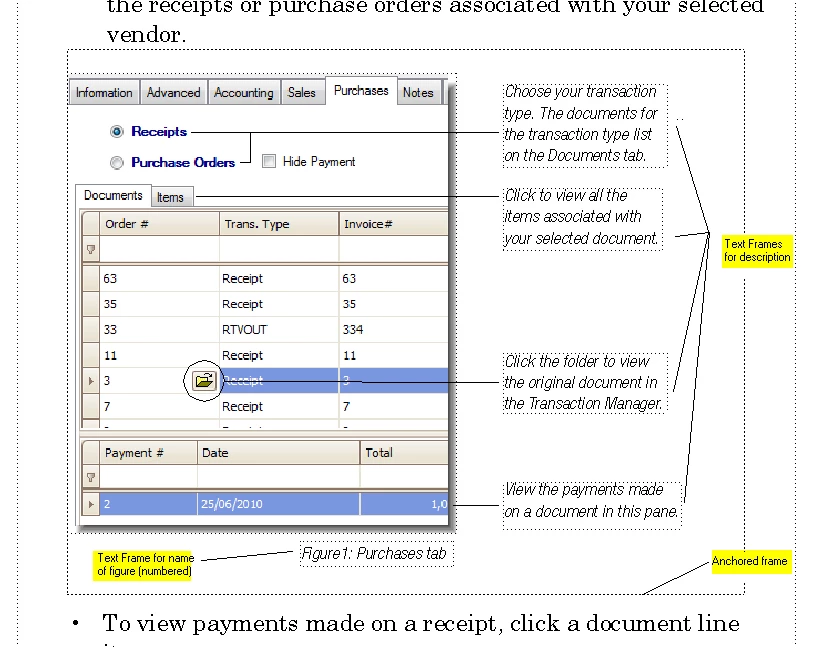
Thank you both Yves and Michael for your replies. The process for incorporating images into my documents is to do the following:
It numbers fine. But, when I go through the process again with a new image and label the image, the number does not increment.
Thanks for your help, Marc
Copy link to clipboard
Copied
Create a one-cell table in an empty paragraph. In the Table Designer, set
Title to "Below Table." Your image and callouts will go inside the table
cell. The table title will hold the caption. Create a Caption paragraph
format and assign it to the table title area.
One-cell tables with title work great for images and captions because they
always stay together. It works even better if you create a special paragraph
tag to hold these tables. I use one called "Invisible." In it, I have Space
Below Pgf set to -2.0 pt. The table format I use has Space Above set to -2.0
pt. And check the "Fixed" line spacing box in the Paragraph Designer. This
keeps extra white space from appearing above the table, which is especially
obvious if the table falls at the top of a column. I use "F:Fig. <n+>.\sn"
as the numbering scheme and it increments fine for me.

Copy link to clipboard
Copied
Marc,
Your screenshot shows no necessity to put the figure title INSIDE the anchored frame, the layout allows a position BELOW the anchored frame. I do not like to use tables for non-table purposes unless there is no other option. Mike Wickham’s suggestion seems to be a method used quite often, but IMO you can achieve the same with two paragraph formats:
As Sheila suggested, it is highly desirable (= necessary) to keep paragraphs in a common text flow that somehow are connected. The figure title is supposed to be connected to other title because you want them numbered, therefore they must exist in the same text flow.
Now it is up to you to decide which layout to use, but you have to change your current approach. Or drop figure numbering.
- Michael

Copy link to clipboard
Copied
Marc,
You might, and I emphasize might, be able to use your approach IF all the text frames you are using for labeling and figure numbering are in the SAME text flow. I do not know whether on can put these into a common text flow (same flow tag) that is different from the main body flow. If possible, you will likely have to be diligent about the order in which you create the frames, so the text flows the way you want, and you may have to insert empty paragraphs, etc, to get the correct content to appear in the correct frame. Furthermore, Sheila's caveat about the TOC and TOF may still apply. All very tedious.
I suggest you take Michael's approach and put the figure caption in a paragraph that is in the main text flow. The other labels can be as you have done them, because they are not numbered and do not affect the main flow.
Van
Copy link to clipboard
Copied
One thing to consider with any of the alternative layouts suggested is whether there might be an impact on the creation of generated files such as a Table of Contents or List of Figures.
FrameMaker has rules about the order that it "gathers" text in disconnected frames and text in tables as compared to text that's in the body flow (Flow "A") when it creates generated documents like a TOC or LOF, which can sometimes result in entries appearing out of order in the generated files.
Sheila
Copy link to clipboard
Copied
Marc
Mike and Michael have already described good approaches. I use a dedicated "graphic" table format for graphics with callouts, as in your case. If my graphics don't have callouts, I don't use a table.
I have attached a screen shot of how I'd do it:

I hope this helps. If you want to have the FrameMaker file which contains this example, just send me an email: yves.barbion@scripto.nu
Feel free to reuse the components which you find useful.
Cheers
--
Yves Barbion
www.scripto.nu
Copy link to clipboard
Copied
I also put a white line behind my callout lines for the same reason
Cool tip!
Copy link to clipboard
Copied
mvk66 wrote:
I would like to autonumber figures.
What I am doing:
I have created a paragraph style to autonumber figures. F:Figure <n+1>:
I have then applied the paragraph style in a text frame.
The numbering increments within the same text frame , but when I create another text frame the numbering starts at 1 (does not increment). I need the figure number to increment from one text frame to another text frame.
What I would like to do is create a text frame apply my paragraph format and get Figure 1:
and then create another text frame for a different image, apply my paragraph style and get Figure 2:
and so on.
Where am I going wrong?
Thanks in advance, Marc
Several folks have already suggested that you should contain all your content in a single text flow, for example, Flow: A, because FrameMaker autonumbering only works within a flow.
Do you have a compelling reason to create your anchored frames for each graphic-and-callout unit, in independent text frames, rather than working in the conventional model of anchored frames within a single text flow?
If your layout requires independent text frames, you can connect text frames manually on a master page, on a body page, and across body pages that are consecutive or non-consecutive; connecting body page text frames across pages is often used for articles that begin on a starting page, then "jump" to one or more continuation pages. Manually-connected text frames are all in the same flow, so sequential paragraph numbering works as expected.
For more information, search Google for "framemaker connect text frames" without quotes. This will find entries in FrameMaker online Help, as well as in these forums, and even this tutorial article: http://www.informit.com/articles/article.aspx?p=24085.
You can use any of the methods suggested here to include sequentially-auto-numbered paragraphs with your graphics. Summarizing:
* Type caption text into an auto-numbered paragraph and insert an anchored frame to hold the graphic into the same paragraph.
* Create one placeholder paragraph format to hold an anchored frame. Insert the anchored frame into the placeholder paragraph. Insert the graphic and callouts into the anchored frame.
Variation 1: Create a text frame within the anchored frame and apply an auto-numbered paragraph format to the paragraph in the text frame. Type the caption.
Variation 2: Type the caption in an auto-numbered paragraph format that follows the anchored frame; use the keep with next/previous property for one or both of the pair of paragraphs.
* Create and insert a single-cell table into a placeholder paragraph. Insert an anchored frame into the cell. Insert the graphic and callouts into the anchored frame. To number the graphic and avoid the problem of generated lists, like a TOC, from displaying the caption in the wrong order, use an auto-numbered paragraph before or after the table. (Creating the caption from a table title that uses an auto-numbered paragraph format above or below the table, or from an auto-numbered paragraph in a cell inserted above or below the cell that contains the graphic, may mis-sort the caption entry in generated lists.
HTH
Regards,
Peter
_______________________
Peter Gold
KnowHow ProServices
Copy link to clipboard
Copied
Thanks everyone for the help.
I guess I just assumed I needed to createa text frame for the image name.
I have now taken the image name out of a seperate text frame and placed it in the main text frame. I applied an autonumbered paragraph format ( with keep with before check off) and it looks and works great.
Thanks again, Marc
Copy link to clipboard
Copied
I don't know if this will help, but I design my documents so that all text flows from frame to frame, even if graphics, call-outs, etc.. are included. The trick is to (well, this is how I do it):
Option A: Add blank lines below the last paragraph above your text to vertically space graphic.
Option B: Use paragraph attributes to add space above.
You should now have your graphic anchored to the line and can treat your graphic frame as a text character.
If you need callouts, arrows, or other surrounding stuff:
I am using CS5, but I have used this methode in lower versions.
I hope this helps.
Copy link to clipboard
Copied
None of these solutions is adeqate if you want to position a captioned photo at will. They all require you position it center, left, or right.
Get ready! An upgraded Adobe Community experience is coming in January.
Learn more