
Exit
  • Global community
    • Language:
      • Deutsch
      • English
      • Español
      • Français
      • Português
  • 日本語コミュニティ
  • 한국 커뮤니티
0

Can a graphic be anchored to a line of text but be OUTSIDE the text frame?

Explorer ,
Aug 17, 2022 Aug 17, 2022

The idea here is to have a symbol that helps the reader find key statements but I want it to be outside the text box. I know I could indent ALL the text to kind of fake the margin, but I already have indents going 7 levels deep on a book with a two-column page, so I'd rather not sacrifice space nor do I want to have to adjust all the indents for each tag to compensate. Is this something that can be done in FM, or am I asking too much here?
532
Translate
Report
Community guidelines
Be kind and respectful, give credit to the original source of content, and search for duplicates before posting. Learn more
community guidelines

correct answers 1 Correct answer

Community Expert , Aug 17, 2022 Aug 17, 2022

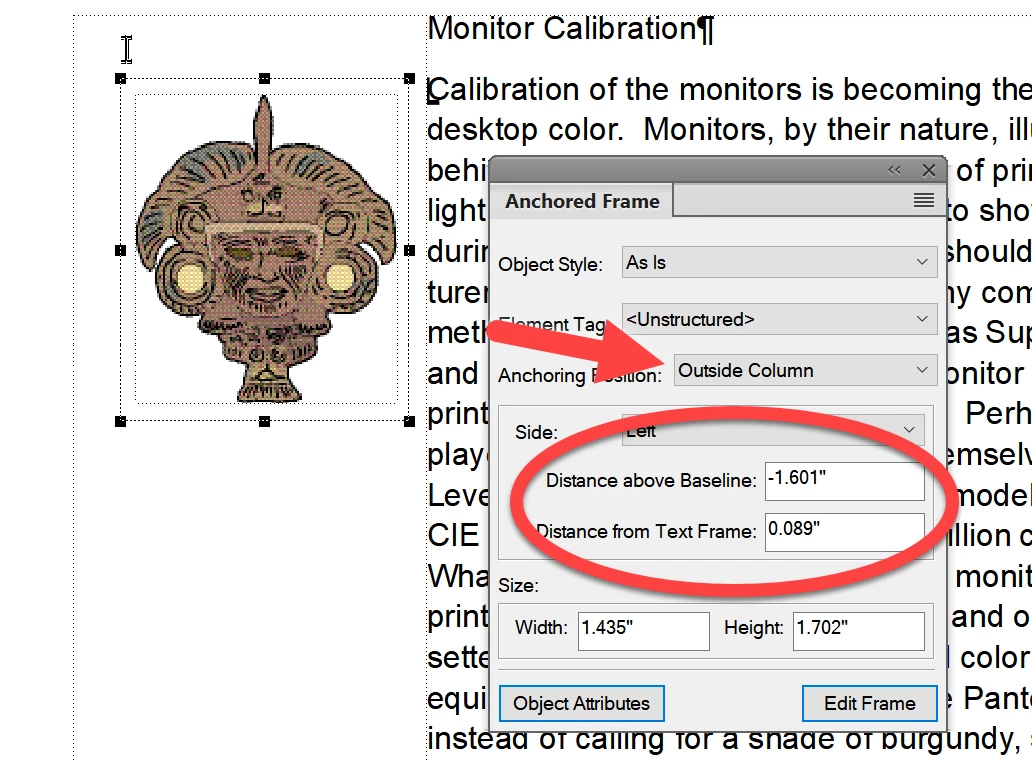
Yes. Look at your Anchored Frame panel under Insert.

image.png


Translate
Contributor ,
Aug 17, 2022 Aug 17, 2022

Sure. I do it all the time.

Translate
Report
Community guidelines
Be kind and respectful, give credit to the original source of content, and search for duplicates before posting. Learn more
community guidelines
Explorer ,
Aug 17, 2022 Aug 17, 2022

How do you do it?

Translate
Report
Community guidelines
Be kind and respectful, give credit to the original source of content, and search for duplicates before posting. Learn more
community guidelines
Contributor ,
Aug 17, 2022 Aug 17, 2022

Just as David Creamer shows, with Distance from Text Frame.

In my case, I edit a standards document, and I annotate each change with an anchored frame in the margin that shows the issue number relating to the change.

Translate
Report
Community guidelines
Be kind and respectful, give credit to the original source of content, and search for duplicates before posting. Learn more
community guidelines
Community Expert ,
Aug 17, 2022 Aug 17, 2022

Yes. Look at your Anchored Frame panel under Insert.

image.png


David Creamer: Community Expert (ACI and ACE 1995-2023)
Translate
Report
Community guidelines
Be kind and respectful, give credit to the original source of content, and search for duplicates before posting. Learn more
community guidelines
Explorer ,
Aug 17, 2022 Aug 17, 2022

Sounds great, but I'm not seeing any blue boxes, just the black frame of the picture box.

Translate
Report
Community guidelines
Be kind and respectful, give credit to the original source of content, and search for duplicates before posting. Learn more
community guidelines
Community Expert ,
Aug 17, 2022 Aug 17, 2022

Sorry--edited my reply to reflect correct process.

David Creamer: Community Expert (ACI and ACE 1995-2023)
Translate
Report
Community guidelines
Be kind and respectful, give credit to the original source of content, and search for duplicates before posting. Learn more
community guidelines
Community Expert ,
Aug 17, 2022 Aug 17, 2022

In which version of FrameMaker do you  work? In FM-16 (2020) I have only the 6 corner black  handles as before. And the Anchored Object Options dialogue does not exist in this form.

Also in FM it is not possible to have coloured borders and coloured text symbols (an old  whish of me!)

Translate
Report
Community guidelines
Be kind and respectful, give credit to the original source of content, and search for duplicates before posting. Learn more
community guidelines
Explorer ,
Aug 17, 2022 Aug 17, 2022

Well, that's a bummer.

Translate
Report
Community guidelines
Be kind and respectful, give credit to the original source of content, and search for duplicates before posting. Learn more
community guidelines
Explorer ,
Aug 17, 2022 Aug 17, 2022
LATEST

Excellent! Thanks!


Translate
Report
Community guidelines
Be kind and respectful, give credit to the original source of content, and search for duplicates before posting. Learn more
community guidelines