
Known Participant
October 15, 2013
Question

Can not update the applications that are part of the Technical Communition Suite (TCS) 4.

  • October 15, 2013
  • 5 replies
  • 2540 views

The updates... menu is grayed out for all applications that are part of this suit. I know that FrameMaker (FM) 11.0 has updates that should be installed. I have downloaded a patch (11_0_1) for FM and it will not install. I get this message:
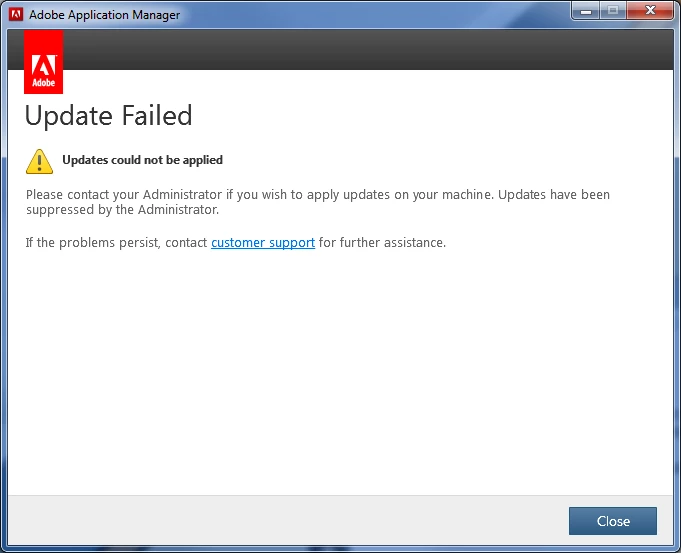
I have Admin rights on the computer and have selected Run As Admin.. when I attemp to install the patch.

I have TCS 3.5 also loaded and do not have any issues with loading updates.

OS: Windows 7

Any ideas as to why I can not install updates for the applications that are part of TCS 4?


This topic has been closed for replies.

5 replies

Community Manager
April 3, 2014

Hi,

Greetings from Adobe.

Please go to C:\Program Files (x86)\Common Files\Adobe\AAMUpdaterInventory\1.0

There will be a .dat file by the  name - AdobeUpdaterAdminPrefs.dat

Capy this file and paste it on your desktop.

Open that file in Notepad from desktop.

Change the value in <Suppressed> tag to ”0”  from "1"

<Preferences>

                <Suppressed>0</Suppressed>

</Preferences>

After saving the bat file replace it back with the original file at location: C:\Program Files (x86)\Common Files\Adobe\AAMUpdaterInventory\1.0

close the window and then try to install the patch again.

Regards,

Mayank

Known Participant
April 2, 2014

I don't know if it applies in this case, but you can't upgrade individual products in a suite (e.g., upgrade Captivate from 6 to 7 in TCS 3.5), because Adobe considers them different products.  Maybe that's what's happening here?  Adobe doesn't recognize the individual products on your machine.

Have you tried checking for an update of TCS 3.5?

Inspiring
April 2, 2014

Hi guys,

I'm having the very same issue here.

Multiple installations of TCS4 and single FM11 installations.

Same version as mentioned above (11.0.0.380).

Systems are Win 7 (64).

We've got FM9 running in parallel on those machines, as a side note.

The error code we get is: U44M1P7

Before anybody asks, we don't even get installations logs in the  C:\Program Files\Common Files\Adobe\Installers folder.

All other Adobe products installed on out machines update via updater without causing any problems - this is solely a FM11 problem.

Applying the patches manually doesn't work either.

I hope you guys got some solution to this already.

-Alex

Jeff_Coatsworth
Community Expert
Community Expert
April 2, 2014

@Gorly – same advice – contact Adobe Support – install issues are usually freebie calls.

01MZ3Author
Known Participant
October 16, 2013

Rave thanks for the suggestion but downloading and installing the updates manually give the same Update Failed message.

Arnis Gubins
Inspiring
October 16, 2013

What is the current point version of your FM installation (from the Help > About)?

01MZ3Author
Known Participant
October 16, 2013

Arnis, the current FM version is 11.0.0.380.

Rave
Community Manager
Community Manager
October 15, 2013

Hi 01MZ3,

Please try downloading and installing updates manually from : http://www.adobe.com/downloads/updates