thomasd70479717
Participant
November 7, 2018
Answered

cannot access help files in FrameMaker 19

  • November 7, 2018
  • 3 replies
  • 978 views

I am unable to select anything on the Help menu in FM 19. When I click on the menu, it displays, but when I try to select anything it closes. Is anyone else experiencing this difficulty?

    This topic has been closed for replies.
    Correct answer LinSims

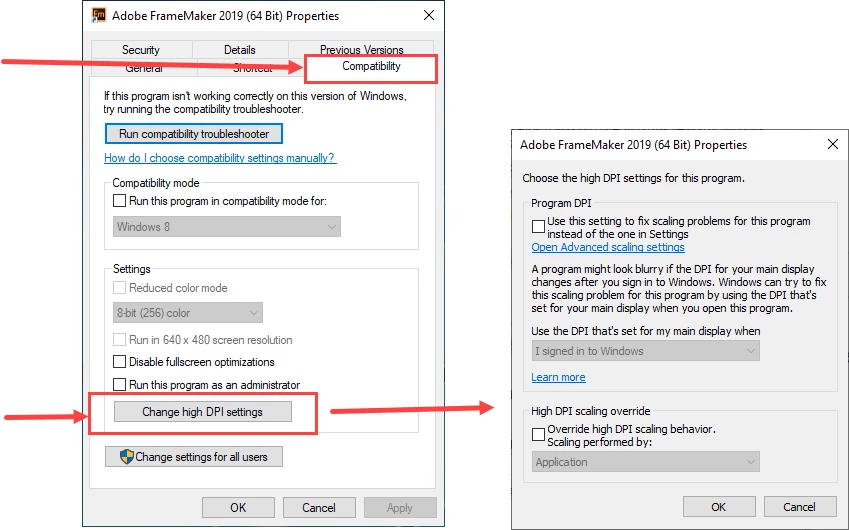
    Dell UltraSharp U2410 is 1920 x 1200 / 60 Hz, and that's fairly standard anymore, or even on the lower end. If it were a 4K monitor, you'd be looking here. Access this by right-clicking on the shortcut and selecting Properties from the pop-up menu. It's at the bottom. I don't have a 4K monitor so I can't tell you where to go from there ...
    3 replies

    LinSims
    Community Expert
    LinSimsCommunity ExpertCorrect answer
    Community Expert
    April 11, 2019

    Dell UltraSharp U2410 is 1920 x 1200 / 60 Hz, and that's fairly standard anymore, or even on the lower end. If it were a 4K monitor, you'd be looking here. Access this by right-clicking on the shortcut and selecting Properties from the pop-up menu. It's at the bottom. I don't have a 4K monitor so I can't tell you where to go from there ...

    Participant
    April 11, 2019

    That worked! Thanks!

    Participant
    April 11, 2019

    I just installed 2019 and the top-level menu items jump the menu item to the left. I cannot get to selections under the Help top-level menu at all.

    Jeff_Coatsworth
    Community Expert
    Community Expert
    April 11, 2019

    lauraj6856310​ did you apply all the patches that have come out since FM2019's release?

    Participant
    April 11, 2019

    I applied latest patches (15.0.3.603). I can view and select the Help menu items now, but the top level menus are really twitchy! It shouldn't be so hard to view and select a menu item. Is there something I can set to change this?

    K.Daube
    Community Expert
    Community Expert
    November 9, 2018

    I currently have only a beta version (15.0.2.xxx) with no such problem. I can not remember that in the released version (15.0.0.393) or updated version (15.0.1.430) this problem existed.

    ➔ It may be worth to uninstall and install again.

    Klaus Daube