


Copy link to clipboard
Copied
When I insert cross reference the default color is black. Is there a way to change the cross reference color to blue such that every time I insert the cross reference the font color is blue automatically


 1 Correct answer


You can insert Character tags/styles into the cross reference definition. Create the character style first, then insert the styles are at the end of the building blocks.
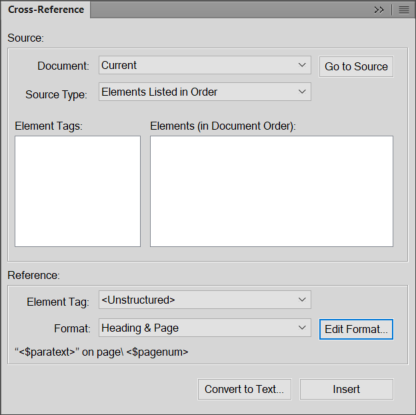

If you need more info on how to do that, let me know.

 8
Replies
8
8
Replies
8

Copy link to clipboard
Copied
You can insert Character tags/styles into the cross reference definition. Create the character style first, then insert the styles are at the end of the building blocks.


If you need more info on how to do that, let me know.

Copy link to clipboard
Copied
Dave,
You are a.) up early, and b.) type way faster than I do! 
~Barb
Copy link to clipboard
Copied
Hi shruthib13016439,
Are you trying to change the X-ref marker color or the X-ref text color? You can do either one with a character format.
Text color: edit the Cross-Reference definition and add a character tag in < > in front of the current definition. The available options appear at the very bottom of the building blocks list.
Marker color: use Find/Change: Marker-of type: Cross-Ref and set Paste to change the character format.
Note: editing the X-ref definition will change all X-ref text at one time. If you are trying to change the marker color, you have to run the find/change that after you add more markers.
If you need more details, let me know.
~Barb

Copy link to clipboard
Copied
Hey Barb. You have been an absolute genius in the past so I totally trust you! And yet, I can't make this work. I created a Character Tag (<Hyperlink - BLUE>) and tried to add it as a Building Block in the Edit Format part of the Cross Ref pod. Then I used the Find/Change pod and chose Marker-Of Type but Cross-Ref wasn't an option. So it was like I could apply that change to ONE cross-ref but not all. Gah!
Any other suggestions?
Thanks as always.
Meredith
Copy link to clipboard
Copied
Hi Meredith:
First of all, thank you for your trust. That totally makes my day.
So the question is how to assign a character tag called Hyperlink - BLUE to all the x-refs using a specific format?
- Create new character format and add it to the Character catalog.
- Choose the x-ref format, click on Edit Format.
- Click an insertion point at the beginning of the Definition line.
- Scroll to the bottom of the building blocks list and click to add the character tag to the beginning of the definition.
- Click on Change, Done and Replace.

This will update every occurrence of that x-ref format. No need for Find/Change.
~Barb
Copy link to clipboard
Copied
Yes! As is often the case, sometimes with FrameMaker, it's all about just undoing and redoing to get it to work.
Genius, as always, Barb. I thank you for the sanity check and hope you have a blissful, FM-free weekend!
m
Copy link to clipboard
Copied
You too, Meredith!
~Barb
Copy link to clipboard
Copied
Here is a PDF example of the code:
http://ideastraining.com/PDFs/FrameXRef_format.pdf


Find more inspiration, events, and resources on the new Adobe Community
Explore Now
 AdChoices