
Exit
  • Global community
    • Language:
      • Deutsch
      • English
      • Español
      • Français
      • Português
  • 日本語コミュニティ
  • 한국 커뮤니티
0

Context Rule fails to recognise Element Attribute (FM2019)

Enthusiast ,
Mar 10, 2022 Mar 10, 2022

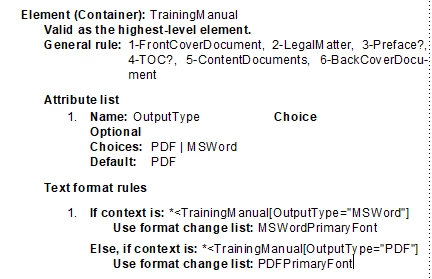
I have the following Element set up in my EDD:
2022-03-11_15h23_13.png

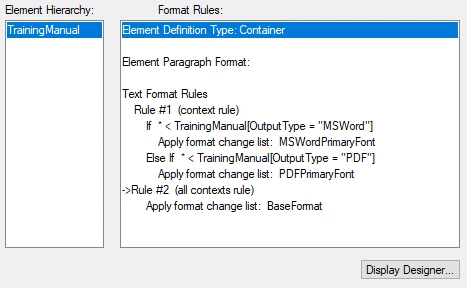
When I use the TrainingManual Element, no matter which Attribute option I select, the Context Rule is ignored:
2022-03-11_15h27_04.png


I've used similar Attributes on other Elements without any problems. I'm at a loss as to what I'm missing and why it's not working.


718
Translate
Report
Community guidelines
Be kind and respectful, give credit to the original source of content, and search for duplicates before posting. Learn more
community guidelines

correct answers 1 Correct answer

Advisor , Mar 13, 2022 Mar 13, 2022

Quintin,

   Two possibilities occur to me:

1) If the TrainingManual element is in the book, changing the attribute will not affect formatting within book components, until you update the book. (This design allows one file to be used as a component in different books. For example, you may have one book with OutputType set to MSWord and another with OutputType set to PDF. You can update either book to set the formattig in all its book components accordingly.)


2)  Rule 2 might overwrite formattin

...
Translate
Enthusiast ,
Mar 10, 2022 Mar 10, 2022

Turns out I had to remove the *<TrainingManual from the Rule. However, I now find that the Context Rule is re-evaluated when I change the Attribute to another selection.

Translate
Report
Community guidelines
Be kind and respectful, give credit to the original source of content, and search for duplicates before posting. Learn more
community guidelines
Advisor ,
Mar 11, 2022 Mar 11, 2022

FrameMaker is a WYSIWYG application. Whenever you change the structure, by adding, deleting, moving, or renaming elements, or an attribute. FrameMaker reapplies relevant format rules. In many cases, the reapplication does not change the appearance, but that is always a possibility.

     --Lynne

Translate
Report
Community guidelines
Be kind and respectful, give credit to the original source of content, and search for duplicates before posting. Learn more
community guidelines
Enthusiast ,
Mar 13, 2022 Mar 13, 2022

I just realised my second statement is incorrect (and possibly confusing). I meant to say that the Context Rule is not re-evaluated when I change the Attribute:

2022-03-14_08h39_58.png

2022-03-14_08h41_39.png

Translate
Report
Community guidelines
Be kind and respectful, give credit to the original source of content, and search for duplicates before posting. Learn more
community guidelines
Advisor ,
Mar 11, 2022 Mar 11, 2022

Quintin,

   Your original context specification was:

       * < TrainingManual[OutputType = "MSWord"]

Since you used this context specification in a format rule for the TrainingManual element, you were testing for a TrainingManual that occurred within another TrainingManual where the outer TrainingManual had set the OutputType to MSWord.

   If TrainingManual elements do not nest, a rule with this context specification will never fire. To test an attribute value of the element being formatted, just use an attribute test. The entire context specification would be:

     [OutputType = "MSWord"].

  By the way, you could use the original context specification to format any subelement of a Training Manual with the specified attribute.

     --Lynne

Translate
Report
Community guidelines
Be kind and respectful, give credit to the original source of content, and search for duplicates before posting. Learn more
community guidelines
Advisor ,
Mar 13, 2022 Mar 13, 2022

Quintin,

   Two possibilities occur to me:

1) If the TrainingManual element is in the book, changing the attribute will not affect formatting within book components, until you update the book. (This design allows one file to be used as a component in different books. For example, you may have one book with OutputType set to MSWord and another with OutputType set to PDF. You can update either book to set the formattig in all its book components accordingly.)


2)  Rule 2 might overwrite formatting made in rule 1.


--Lynne

Translate
Report
Community guidelines
Be kind and respectful, give credit to the original source of content, and search for duplicates before posting. Learn more
community guidelines
Enthusiast ,
Mar 13, 2022 Mar 13, 2022
LATEST

Hi Lynne,

I've figured that out 😊. I've opted not to go down the rabbit hole of using an Attribute. Instead, I've reworked our EDD so that, instead of the Font Family being specified in every FormatChangeList, I've added a ContextRule to the Element to apply either a BaseFont or AltFont FormatChangeList, then follow the rest of the ContextRules to apply element-specific formatting. This way we just need to change the FontFamily in the two ChangeFormatLists - this will make it easier if there is a change in corporate font in the future.

Thanks,

Quintin

Translate
Report
Community guidelines
Be kind and respectful, give credit to the original source of content, and search for duplicates before posting. Learn more
community guidelines