April 18, 2012
Answered

FM 10 Crashing when applying conditional text tag

  • April 18, 2012
  • 9 replies
  • 8086 views

Hello everyone.

For some reason, FM keeps crashing when I try to apply a conditional text tag to a table (entire table). The funny thing is I have been doing this same thing for three months now with no problems before today, even have two tables in the same document with different tags applied to them and they are working fine.  But when I try to add this one, I crash. I have rebooted my computer and made sure all my drivers are up to date, but now I'm at a loss.  Any help?

Thanks.
This topic has been closed for replies.
Correct answer Bob_Niland

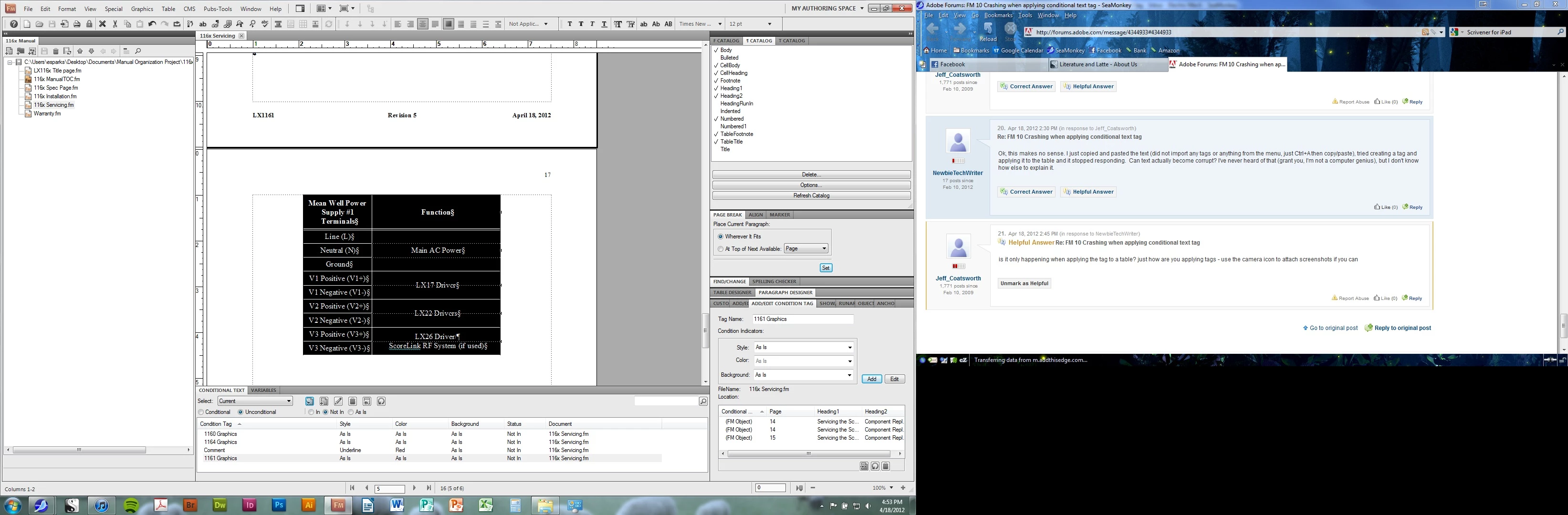
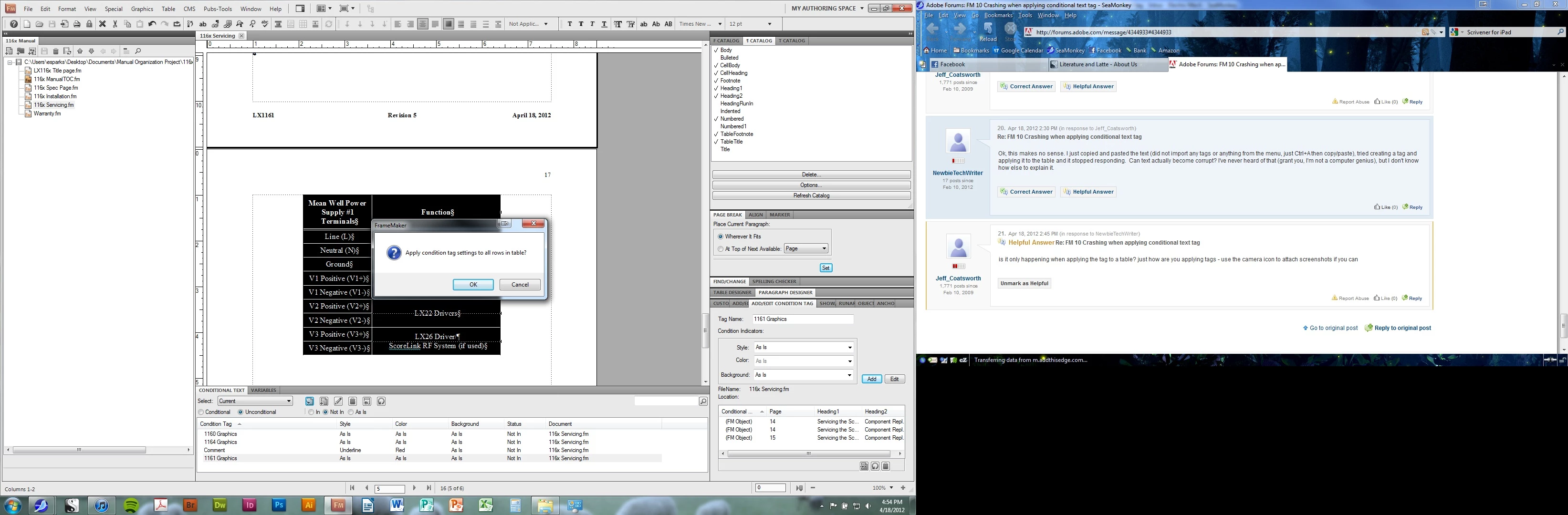
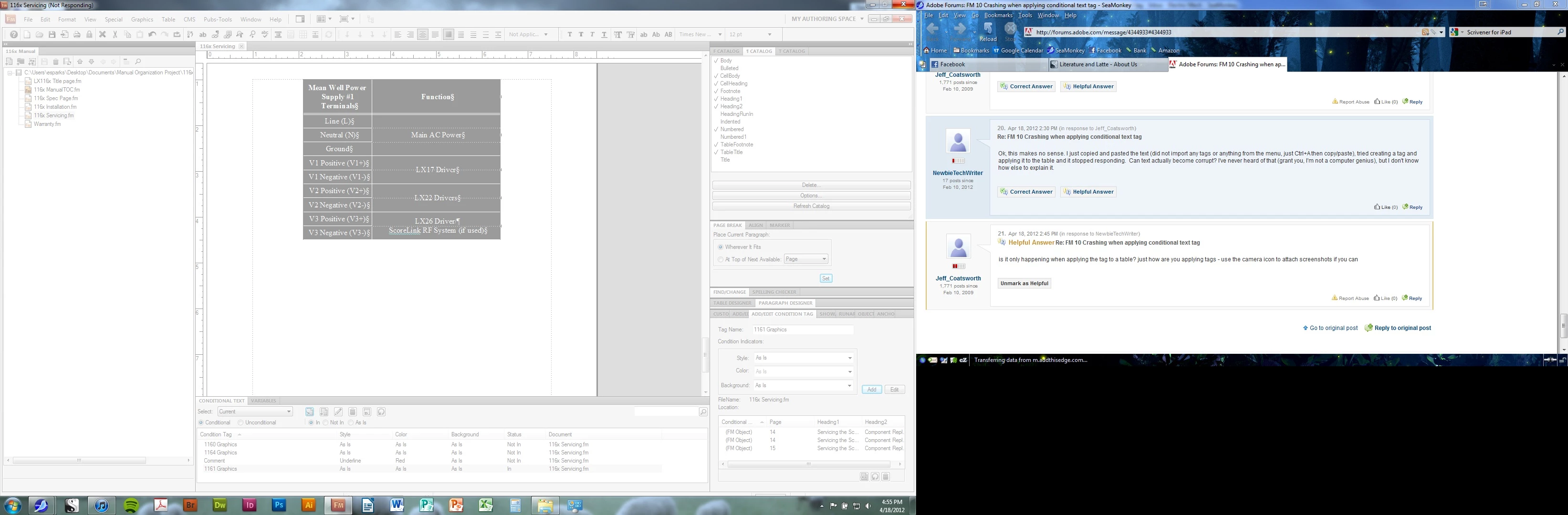
Yes, I can apply the tag to the pictures in the document, its only when applying to the table. I am selecting all rows in the table with the mouse and then selecting the tag, clicking the radio button "in" and then clicking the "Apply" button.  It then asks "apply condition tag settings to all rows in table?" I hit "ok" and then it freezes, screen shots provided.

Pic 1: My project at table causing problems.

Pic 2: Me selecting the table and choosing to apply tag.

Pic 3: Me affirming I want to apply the condition to all rows.

Pic 4: Program stops responding.


> I am selecting all rows in the table with the mouse and then ...

What happens if you apply the CC to just the table anchor in Flow A.

When you are conditionalizing an entire table, tagging just the anchor is usually easier, and in your case, might be more stable.

9 replies

July 26, 2012

Same thing is happening to me. We just upgraded to FM 10.  I have had this book conditionalized in FM 9 without any issues for a logn time. Now, crashes all over the place. I did have to do a MIF wash but with so many of our sources conditionalized, this is really a pain to keep having this happen over and over again.

Known Participant
July 10, 2012

I just ran into this same problem myself in Frame 10. The document is a legacy installation guide I've been maintaining for 15 years. For some reason, conditionalization applied to a table row has caused Frame to crash whenever I try to do anything with conditionalization in that chapter only. For example, if I select "Show All" to try and reveal this particular row which is currently hidden, it will crash the application. Is this considered to be a known issue at this time? Does anyone know a workaround for it?

These same conditional tags have existed in this document for at least 5 years, so there's nothing new there. The table row itself was just added in this product release though. I took a copy of the chapter file from the release prior to this one, and I can use conditionalization normally there, but as soon as I try to recreate this new table row, and apply the appropriate conditional tag to it (and save it) the behavior returns.

I've tried completely stripping all conditionalization from the chapter, and recreating it...same thing happens.

Jeff_Coatsworth
Community Expert
Community Expert
July 10, 2012

If it’s crashing with a new document sample, file a bug report with Adobe. Make sure you’re sending in the error logs to the Adobe engineers too.

DebbyT01
Known Participant
July 24, 2012

Does anyone know if the newly released Frame 11 addresses this? From what I understand, this bug was reported three years ago...

Thanks!

Harry28586
Participating Frequently
April 18, 2012

Newbie,

I got your email and will get back to you on it,however meanwhile we can try this small step,may be it might work.

Make sure you have the backup of all your books somwhere on the computer.

Open the folder where Framemaker is installed in the Adobe folder in Program Files.

Make sure you close Framemaker before doing this.

There is a file that says "maker.ini",rename that file to "maker_old.ini".

Now launch Framemaker and open the book manually selecting the location its saved in the computer through Framemaker by clicking on the "open" icon.

Apply the tag now and take a look if it still crashes.

Could be a possibilty Framemaker might not lauch after renaming that file,if that happens,kindly rename it back to the original name "maker.ini".

Thanks

Harpreet.

SQUIDDS
Participating Frequently
April 18, 2012

That could be a bug - we found the similar phenomenum and we sent it to Adobe India.

- GEorg

April 18, 2012

Ok, did some testing. I can still create and apply tags in other documents. Is it possible the document has become corrupt and I'm simply going to have to redo this whole document?

-Newbie

Jeff_Coatsworth
Community Expert
Community Expert
April 18, 2012

possibly - keep the troubled doc open, create a new blank doc and use the File > Import > Formats screen to bring over all formatting from the troubled doc into the new fresh one. Save the new doc and then do a Ctl-A in the old doc to select everything, Ctl-C to copy it and Ctl-V to paste it into the new fresh doc.

April 18, 2012

Ok used import format to get tags and copied and pasted into new document.  Now the new document is doing it. But if I create a new document and just type in "lorem ipsum..." and apply tags, it works fine.  Just tested if I can create and apply new tags in other documents in the same book, and it worked fine. It's just this one document, but apparently when import formatting or when I copy and paste the info I'm bringing over the problem into a new document.

Harry28586
Participating Frequently
April 18, 2012

Hi Newbie,

you need not to pay as if now.

Try the number again or just email me at tcssup@adobe.com and  we will get back to you.

Thanks

Harpreet.

Harry28586
Participating Frequently
April 18, 2012

Newbie,

If you still have some issue,you can call us on 800-833-6687 and choose framemaker .

Thanks Harpreet.

April 18, 2012

My FM versions is:

10.0.2.419

Tried Importing, I get the tags, but not the text or pics associated with them.

What is MIF-washing? The name "Newbie" was chosen for a reason. I'm the first person in my compnay to use FM and I have been teaching myself from books and forums on the internet.

Also, tried calling the number, and it said it would be a $39 fee for help - I may ask my boss for permission to do that eventually, but not now.

Thanks,

NewbieTechWriter

Jeff_Coatsworth
Community Expert
Community Expert
April 18, 2012

It's a little early for this, but is there a chance re-installing FM would work? Of course, I would have to re-install BookVars as well, hopefully they will let me re-download it.


What sort of crash is happening? Are you getting any specific error codes? If so, have you sent them in to fmerror@adobe.com<mailto:fmerror@adobe.com>? Is it happening on any document or just one particular one?

Jeff_Coatsworth
Community Expert
Community Expert
April 18, 2012

have you tried MIF-washing your doc?

Harry28586
Participating Frequently
April 18, 2012

Hi Newbie,

Which version of Framemaker you have?

Sometime what happens is the conditional text tag is corrupted and in that situations we delete and make a new conditional tag with the same formatting,however with a new name and than apply it.

If it still does not work,you can copy the complete document in a new document,keep both the document open,click on file-->import-->formats and copy all the formats from the old document to the new document and then apply the tag.

That should make it work.

Thanks

Harpreet.

April 18, 2012

Thank you for your replay Harpreet,

Unfortunately, it was a brand new tag, but I tried making it again and renaming it, still crashing. As far as importing the document, even if i kept the tags, wouldn't I lose what the tags were applied to? This document is one of many in a book for multiple products that are in the same family, and I don't want to lose all other model information for just one model.

Thanks,

NewbieTechWriter

EDIT:

I have FM 10, but not sure how to check which specific version.  I was prompted to update when i first installed, but not since, so I guess I'm up to date, not reallys ure though.

Harry28586
Participating Frequently
April 18, 2012

Newbie,

I dont think you will loose somethig as it only imports all the formats,we can atleast try with only one document and test it if that works.

Also try and update the Framemaker 10,it thats not updated.

Thanks

Harpreet.