

Barb Binder
Community Expert
Community Expert
November 15, 2012
Answered

FM 11 :: Black stroke to the right of random images

  • November 15, 2012
  • 1 reply
  • 2380 views

Background

I'm running FrameMaker 11.0.1.383. I'm grabbing screen shots with Snapx Pro X, which open into Photoshop CS6. I'm annotating the shot and saving the file as a .psd, then importing the .psd into a new frame in Framemaker. The frame has no fill and no stroke.

The problem

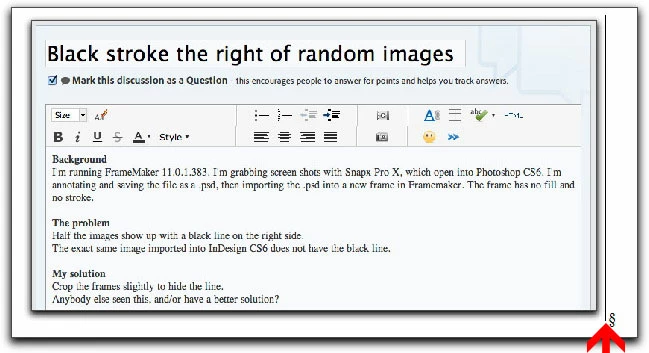
About half the images show up with a black line on the right side.

The exact same image imported into InDesign CS6 does not have the black line.

My solution

Crop the frames slightly to hide the line.

Anybody else seen this, and/or have a better solution?
Thanks! Barb

This topic has been closed for replies.
Correct answer Arnis Gubins

@Arnis, it's a eBook, so I'm fine with the RGB colorspace. I'm taking (and annotating) a bazillion screen shots so I don't want to use a format that will flatten my vector layers because if I get a correction I'll have to set up the whole shot again and then re-annotate. Using the .psd format means my files are editable.

@Error7103, I tried evening out my pixel columns, same result.

Thanks to both of you!


Barb,

You can still "Save As" PNG from the original PSD in Photoshop to allow future editing.

Have you tested this to check if it is actually the PSD filter that's creating the issue? If you see this black line with another file format created from the PSD, I would suspect something in the image file tto begin with.

1 reply

Bob_Niland
Community Expert
Community Expert
November 15, 2012

Sounds like a longstanding issue that may not be a Frame issue, but a Distiller or (my bet) Acrobat reader issue.

Happens at some zoom levels when the raster image has one or more horizontal pixel lines that are, or have been clipped to or masked to or broken into an odd number of visible pixels.

See:

Photoshop Images displaying a horizontal {vertical} line

Edges of images show up in PDF

Barb Binder
Community Expert
Community Expert
November 15, 2012

But the line is showing up in FrameMaker, before I ever get around the making the PDF! (That's a FrameMaker 11 screen shot up there.) I read the string on the horizonal line, and played with flattening the file, but got the same results.

I'm leaning on the side of it being a FrameMaker issue: the same .psd image does not produce that line in InDesign so it's not in the .psd file, and while yes, the line shows up in Acrobat (I'm viewing it on Pro X), it's also visible in FM when the borders are hidden.

Thanks for trying!

~Barb at Rocky Mountain Training
Arnis Gubins
Arnis GubinsCorrect answer
Inspiring
November 15, 2012

@Arnis, it's a eBook, so I'm fine with the RGB colorspace. I'm taking (and annotating) a bazillion screen shots so I don't want to use a format that will flatten my vector layers because if I get a correction I'll have to set up the whole shot again and then re-annotate. Using the .psd format means my files are editable.

@Error7103, I tried evening out my pixel columns, same result.

Thanks to both of you!


Barb,

You can still "Save As" PNG from the original PSD in Photoshop to allow future editing.

Have you tested this to check if it is actually the PSD filter that's creating the issue? If you see this black line with another file format created from the PSD, I would suspect something in the image file tto begin with.