May 20, 2011
Answered

FM10 TOC Tab Leaders not showing in generated output

  • May 20, 2011
  • 1 reply
  • 2282 views

Hi,

I'm evaluating FM10, in the hopes of persuading  the PTB to purchase it. Things are going along swimmingly, but I can't  get the dot tab leaders in my TOC to work properly.

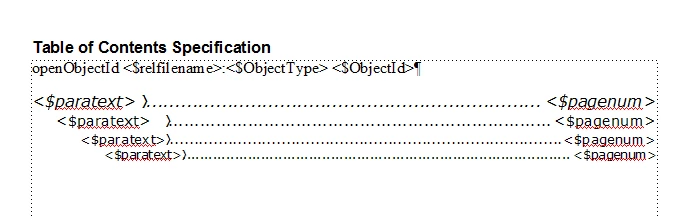
I have my Reference TOC page set up as shown below:

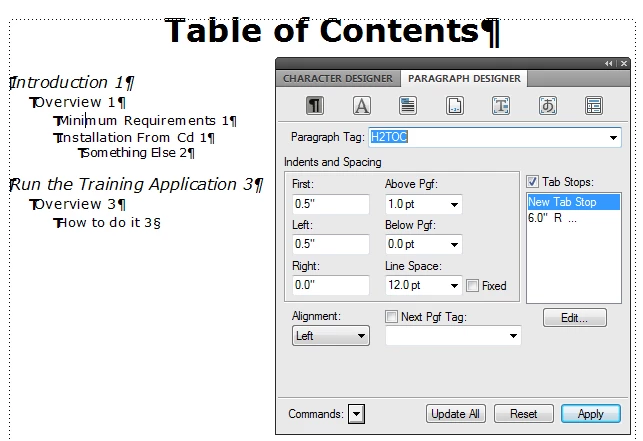
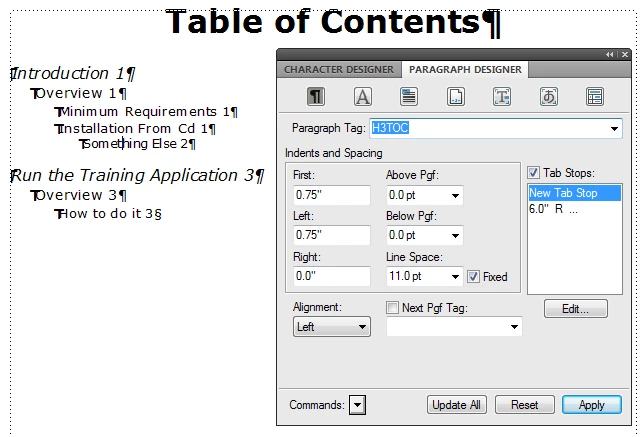
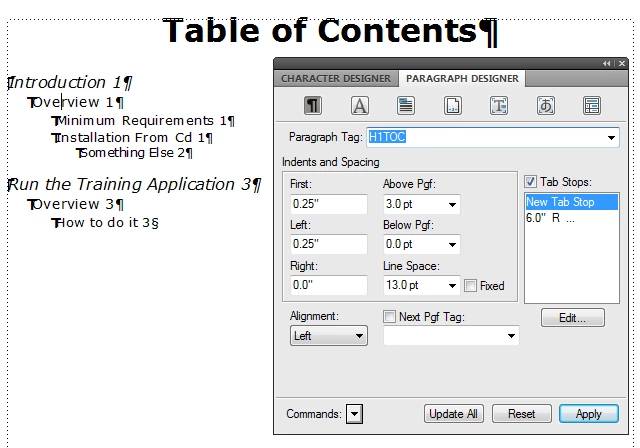
and the Paragraph designer (for example, for the second item in the image) set up like this:

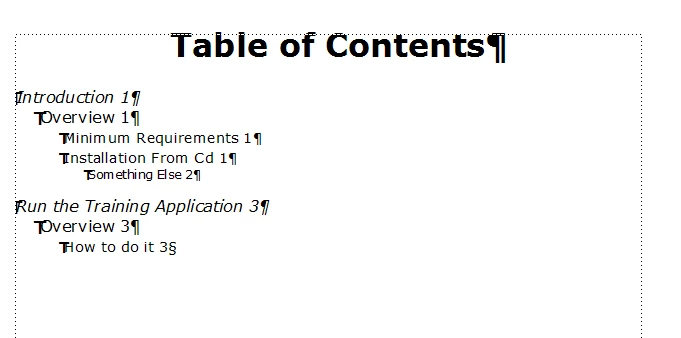
But this is what gets generated:

What am I doing wrong?

Any assistance would be helpful. I'm tearing my hair out over this, and I don't have much to tear!

Thanks,

Andy

    This topic has been closed for replies.
    Correct answer

    Van,

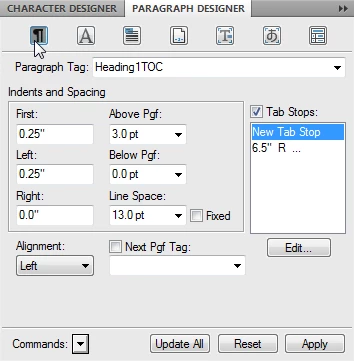
    Um... Yup. In fact, in the captures below, you can see I've set the tab at 6.0", "just in case."
    So... I don't think that's it.

    This is REALLY frustrating... and I'm waiting for a callback from Adobe support at this point.

    Thanks,

    Andy


    Hi Andy

    A few questions for you that might lead you to a solution:
    1. Have you added the tab stops in the TOC formatting in References page after creation of the TOC document or it was created by you in the source document itself? If you have edited the tab stops after creation of the TOC document then I would suggest saving the TOC document in same folder as source document and then recreating the TOC from the source document.
    2. Have you tried same steps in another version of Frame or in FM10 on another machine ? Does it work correctly on any of these?

    I tried to create TOC similar to the example given by you. These are the steps done by me :
    1. Open a source document having paragraphs with paragraph tags Heading1, Heading2 and Heading 3
    2. Switch to Reference pages and go to the Table of Contents Specification - edit the specification as given by you.
    3. Switch back to Body pages and generate the TOC for paragraph styles Heading1, Heading2 and Heading3
    4. TOC document gets generated and opens in Frame with desired content and tab leaders.

    Were your steps any different from the above? If yes, what were they?

    - Kshipra

    1 reply

    Jeff_Coatsworth
    Community Expert
    Community Expert
    May 20, 2011

    I think you're missing the tab (\t) between your <$paratext> and <$pagenum> tags. The tab stop needs to be customized to use the dots at the position. Check the wiki at scriptorium.com on "dot leaders" - there's a section on doing exactly what you want to do in their FM8 guide - nothing has changed in FM10 with this.

    Participating Frequently
    May 20, 2011

    Jeff_Coatsworth wrote:

    I think you're missing the tab (\t) between your <$paratext> and <$pagenum> tags. The tab stop needs to be customized to use the dots at the position. Check the wiki at scriptorium.com on "dot leaders" - there's a section on doing exactly what you want to do in their FM8 guide - nothing has changed in FM10 with this.

    I think this is one of those D'oh issues. The tab character is in the reference page TOC specification prototype paragraph formats. "\t" is one way to specify a tab character, but typing the tab character in the text and turning on Text Symbols, displays the tab like this: ">."

    If the screen shots are to the same scale, then the trained observer (aka one who's stumbled over this arcane issue many times) can see that the reference page text frame is wider than the body page text frame, and the tab stop setting - right aligned 6.5" from the left margin - is too far to the right to fit in the narrower body-page text frame, so the tab is not expanded to the tab stop position. The effect is the same as if no \t or > tab was inserted in the prototype.

    If you think this is a bug, consider that it's a fixed bug, from the earlier releases, up to around FM7 or 8, when a tab stop set to the right of the text frame's border was expanded up to the border.

    HTH

    Regards,

    Peter Gold

    KnowHow ProServices

    May 23, 2011

    Andy,

    Kshipra's post got me thinking.

    FACT: your generated TOC does NOT show tabs.

    MY EXPERIMENT: I deleted ALL my reference pages from one of my documents and saved the file. THEN I created a TOC, which also creates a bare bones TOC reference page. BOTH the TOC and the its reference page did NOT show tabs. At this point, one typically opens the paragraph designer for each -TOC tag and add the appropriate tab or tabs. Usually best to do this on the reference page and then update all to make sure it also changes the body page. NOTE: IF you are creating a TOC for a single document AND you create a standalone TOC, then the reference page with your updates is ONLY in the standalone TOC file. So, at this point, one needs to copy these new paragraph formats AND the reference page back into the document itself; this ensures that the next generated TOC will have the correct formatting.

    SO, if you are sticking with H1, H2, and H1TOC, H2TOC, etc, make sure that ALL the documents in your book have the same reference page and the same set of paragraph formats. If you are using only a single document, make sure the document has the correct reference page and paragraph tags. ALSO make sure the H1TOC tag on the reference page is EXACTLY the same as the H1TOC tag on the body page. Maybe you added the tab to the tag on the BODY page and did not do a global update to get it back on the reference page; however, your screen shots seem to indicate the opposite (now I am getting confused). Maybe when you switched from Heading1,etc, to H1, etc, something did not get updated globally.

    TOCs have been working in FrameMaker for a long time that I cannot believe it is a bug in v10. There has to be some little thing that is off.

    Van


    YES!!!

    The Reference page formats in the various chapters were NOT the same as in the generated TOC. I copied the formats into the chapters and re-generated the TOC, and it worked!

    That's what comes of not having used FM for about 5 years...

    Thanks to all, particularly Kshipra (who got the 10 points on this one) and Van (the runner-up)!

    Thanks again,

    Andy