Inspiring
September 18, 2018
Answered

Formatting Head5 TOC Entries
  • September 18, 2018
  • 3 replies
  • 1074 views

Hello,

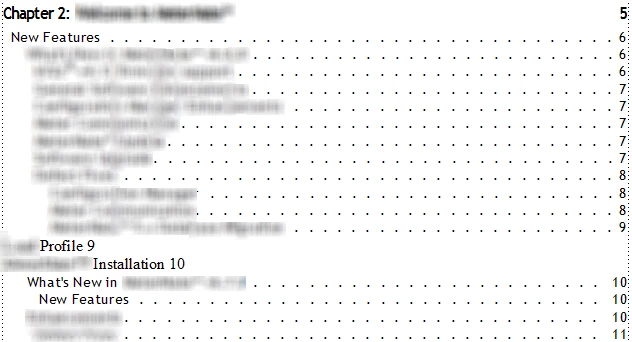
Above is a screenshot of the TOC file in my book. The Head5 entries are in a different font, and the page numbers are not right-aligned with a lead.

I was able to fix the font issue using Character Designer and then "Update All" in Paragraph Designer.

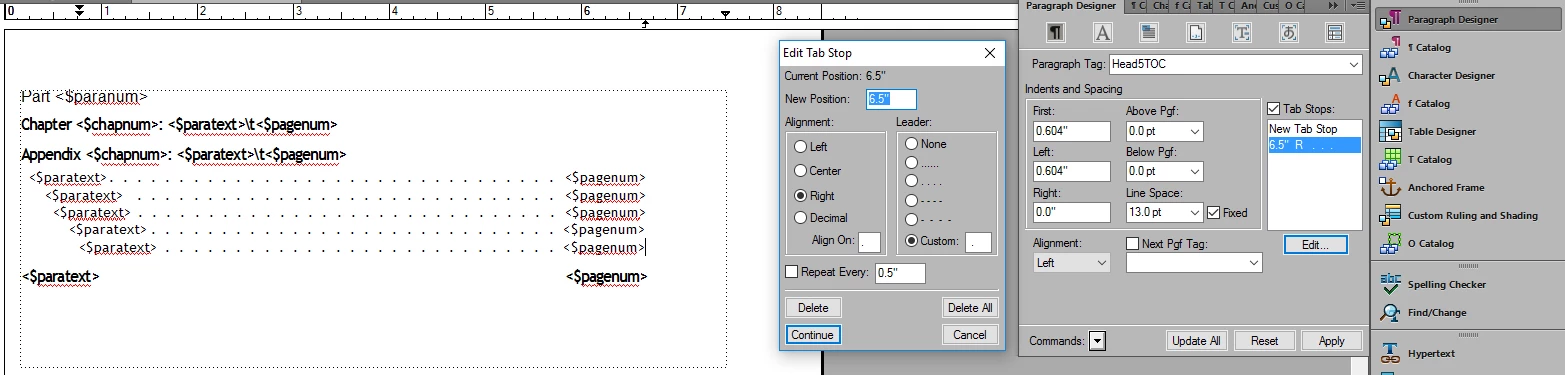
In order to right-align the page numbers, I've tried clicking in one of the Head5 lines, clicking "Right Tab" on the Paragraph Formatting toolbar (3rd arrow below), and then clicking below the ruler across the top directly underneath the rightmost triangle (shown below). However, nothing changes when I take these steps. I was planning on making those changes and then choosing "Update All," but I'm not seeing anything change on the page. I then tried manually right-aligning the page numbers by typing ". . . . . ." all the way across the page in front of the numbers and then using "Update All," but the dots disappear and the numbers move back to the left after I update my book.

I've also tried applying the same tab stop used for the other TOC entries in Paragraph Designer to the Head5 entries, but that isn't doing the trick, either.

Could anyone help me figure out how to get my Head5 TOC entry page numbers on the right side of the page with the same dotted lead as the other entries?

Thank you,

Cameo

    This topic has been closed for replies.
    Correct answer Barb Binder

    Thank you so much, Barb! I'm sorry that this has turned into such a long post. Deleting the other tab stop fixed the Head4TOC lines!

    The Head5TOC line looks like it's fixed now on the reference page, but it still appears the same as it did in my previous post on the body page. Can you see anything else that I should change on the Head5TOC line?

    ~Cameo


    Hi Cameo:

    Head5TOC had an override on it—did you remove the override, and update the book? I had to fuss with it, but got it to work. I wonder if it is because of the second Head5TOC on reference page 7? Of your 15 reference pages, you only need page 7—the rest are not in use or are empty. Make a copy of the file as a back-up and try deleting the other 14.

    ~Barb

    3 replies

    Barb Binder
    Community Expert
    Community Expert
    September 20, 2018

    Hi Cameo:

    Thank you for sharing the file. This file was a little tough to straighten out.

    Here's what I'd do:

    1. Navigate to reference page 8.
    2. Increase the width of the text frame (use the Select Object tool) from the Toolbox. (I'm on 2019, but same tool name in 2015).
    3. For no apparent reason there are two tab characters on the first three lines. Remove them.
    4. Click on the Head1TOC line. Edit the tab stop to 6.5". Repeat for Head2TOC and Head3TOC. Be sure to choose Continue, the Update All after completing each edit.


    5. Click on the Head4TOC line. Edit the tab stop to 6.5" and add the custom leader of space period space. Repeat for Head5TOC. Remember to Update All after both edits. In all cases, Remove Overrides when asked.
    6. Update your book and you should be good to go.

    ~Barb

    ~Barb at Rocky Mountain Training
    Inspiring
    September 20, 2018

    Hi Barb,

    Thank you so much for this answer!

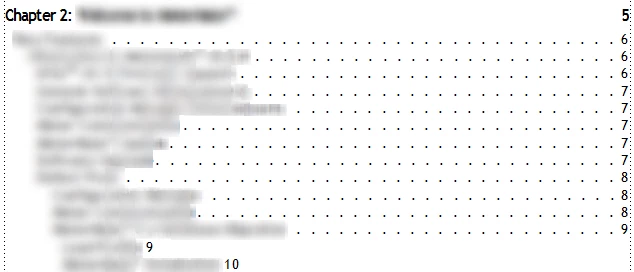
    Everything went well until I made it to Step 5. For some reason, when I choose "Continue" for the Head4TOC and Head5TOC lines, nothing changes on the page. Nothing changes after choosing "Update All," either. Below is a screenshot of the reference page and a screenshot of the body page. Do you have any guesses as to why only the Head4TOC and Head5TOC lines are not cooperating?

    ~Cameo

    Barb Binder
    Community Expert
    Community Expert
    September 20, 2018

    In your screen shot you have two tab stops in Basic properties. One at 5.691 and a second at 6.5". Delete the one at 5.691 and update all, removing overrides and update your book.

    ~Barb

    ~Barb at Rocky Mountain Training
    Barb Binder
    Community Expert
    Community Expert
    September 19, 2018

    If I remember correctly, your document has multiple, extra, unused reference pages. This is where you want to delete the space and add the tab, then format as usual.

    ~Barb

    ~Barb at Rocky Mountain Training
    Inspiring
    September 19, 2018

    Hi Barb,

    The line inside the orange square in your image is a Head4TOC paragraph in my document. I added the tab to this line and then added a new line and marked it Head5TOC. I added the tab to the Head5TOC line, formatted the text, clicked "Update All," and updated my book. However, the body page now looks the same as it did in the screenshot from my original post (one space between the Head5 page number and the Head5 title).

    Below is a screenshot of the changes I made to the reference page.

    ~Cameo

    Barb Binder
    Community Expert
    Community Expert
    September 19, 2018

    Can you share it with me? That would be quickest at this point.

    ~Barb

    ~Barb at Rocky Mountain Training
    Barb Binder
    Community Expert
    Community Expert
    September 19, 2018

    Hi Cameo!

    You will need to add the tab on the TOC reference page first. As a default, Fm uses a space between <$paratext> and <$pagenum>. Once you get to the reference page, click each line until you find the Head5TOC paragraph. Delete the space, add the tab and then format as usual, and update your book. You should be good to go, but let us know if you need more help.

    ~Barb

    ~Barb at Rocky Mountain Training
    Inspiring
    September 19, 2018

    Hi Barb,

    The screenshot above is of the only place on the 15 reference pages that a Head5TOC paragraph appeared. The screenshots below are places where Head1TOC - Head4TOC paragraphs appeared, but no Head5TOC.

    I deleted the space between <$paratext> and <$pagenum> from the Head5TOC paragraph shown above and then tried adding a tab on the reference page in all of the ways that I described in my original post. However, the only change I'm able to produce is that the Head5 page numbers on the body pages of my TOC are now right next to the Head5 titles (as opposed to having one space between the two).

    I think I'm doing something wrong when trying to add the tab. Do you know what that might be?

    Best wishes,

    Cameo