
Inspiring
January 20, 2020
Answered

Formatting Mini Table-of-Content

  • January 20, 2020
  • 3 replies
  • 1907 views

Hi All,

I have a Simple Chapter with Mini Table-of-Content with Heading 2 & Heading 3. See image below:
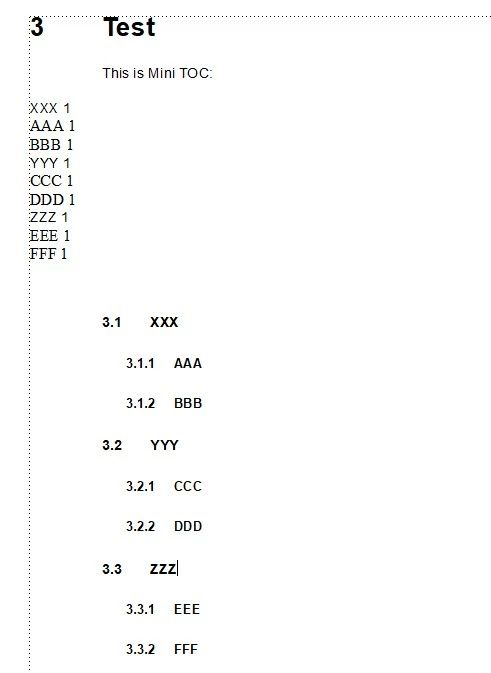
How can I format Mini TOC, so my Mini TOC would look like as follows (including Text Section, Indentation, Leader Line and Page Number), just like the real TOC:

Section 3.1 XXX.....................................................Page #

          Section 3.1.1 AAA........................................Page #

          Section 3.1.2 BBB........................................Page #

Section 3.2 YYY.....................................................Page #

          Section 3.2.1 CCC........................................Page #

          Section 3.2.2 DDD........................................Page #

Section 3.3 ZZZ.....................................................Page #

          Section 3.3.1 EEE........................................Page #

          Section 3.3.2 FFF........................................Page #


Thank you.
This topic has been closed for replies.
Correct answer Barb Binder

Hi Aixtron:


You are very close. It looks like you forgot to include Heading2 in the Mini-TOC. Right click it and delete the Mini-TOC (because you can't edit it), then add the Mini-TOC back in through the Insert menu. Be sure that both Heading2 and Heading3 appear in the Include List on the left before you click OK.


Once both appear, head back to the Reference pages and format Heading2MTOC to look the way you want. 


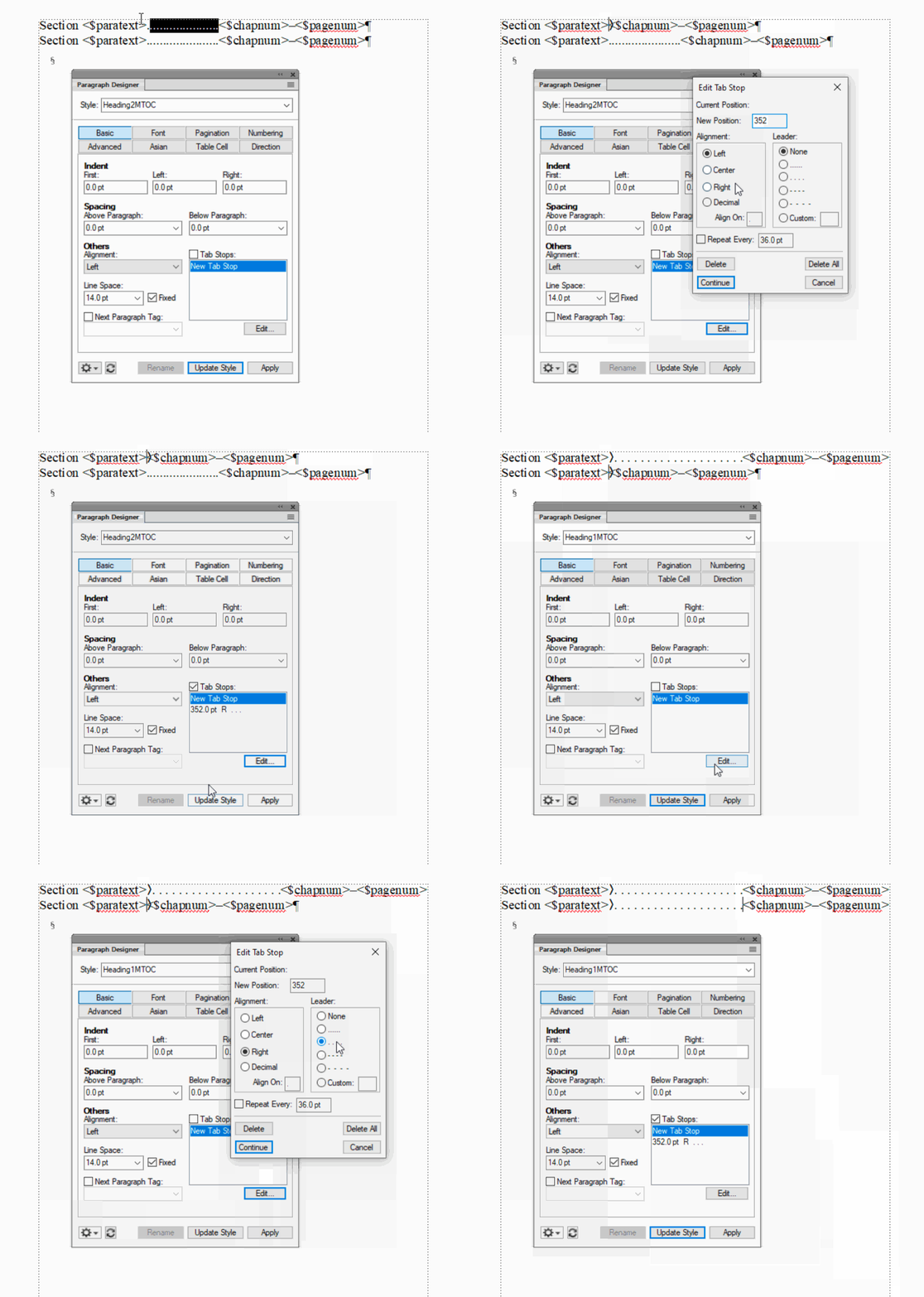
Separately, on your Reference page you are pressing the period key to add leader dots, which is why the page numbers are wavy, and not lined up. Erase the ......s, add a right-align tab and define the leader dot. See below. Oh, and do your really want the page number to appear twice on the line? I think you can remove the first <$pagenum> from your reference page. 


~Barb


3 replies

Barb Binder
Community Expert
Community Expert
January 22, 2020

Great news, Aixtron! We are always happy to help.


~Barb

~Barb at Rocky Mountain Training
AixtronAuthor
Inspiring
February 26, 2020

Hi Barb & All,

I am missing Section Numbers in the Mini Table of Content (such as Section 3.1, 3.1.1, 3.1.2 etc...)


Here is the Body Page:

Here is the Reference Page:


Thanks to all, apprecaite your help. 


LinSims
Community Expert
Community Expert
February 26, 2020

You left out the <$paranum> building block before the <$paratext> block.

Barb Binder
Community Expert
Barb BinderCommunity ExpertCorrect answer
Community Expert
January 21, 2020

Hi Aixtron:


You are very close. It looks like you forgot to include Heading2 in the Mini-TOC. Right click it and delete the Mini-TOC (because you can't edit it), then add the Mini-TOC back in through the Insert menu. Be sure that both Heading2 and Heading3 appear in the Include List on the left before you click OK.


Once both appear, head back to the Reference pages and format Heading2MTOC to look the way you want. 


Separately, on your Reference page you are pressing the period key to add leader dots, which is why the page numbers are wavy, and not lined up. Erase the ......s, add a right-align tab and define the leader dot. See below. Oh, and do your really want the page number to appear twice on the line? I think you can remove the first <$pagenum> from your reference page. 


~Barb


~Barb at Rocky Mountain Training
AixtronAuthor
Inspiring
January 22, 2020

Hello BarbBinder,


Thank you for your support.

In my MiniTOC, I did nclude Head2 and Head3 both but only Head3 appeared on Reference Pages.

But no problem, I duplicated Head3 and then changed its Paragraph Tag to Head2, so now I got Head2 & Head3.


About Leader Line and Page Number alignment, you are correct, I did not use Tab but used Period instead.

However, I followed your process and now everything works fine.

Also, I adjusted the Indentation of Head2 & Head3 in Paragraph designer. Everything worked our well.


Once again, thank you.

AixtronAuthor
Inspiring
January 20, 2020

This Link Helped reslove the issue but only partially.

https://community.adobe.com/t5/framemaker/mini-toc-question/td-p/10811919


I partially esolved this issue through the Reference Page.

I included Heading 2 & Heading 3 but it only displays Heading 3.

How would I know which Tags do I need to include so it would recognize Heading 2 as well?


However, this is the output. It only Prints Heading 3 and Heading 2 is missing.