

Wanda Jane
Inspiring
March 2, 2021
Answered

FrameMaker 16, DITA 1.3, and numbering for MathML Equations

  • March 2, 2021
  • 1 reply
  • 481 views

Greetings,

I'm using FrameMaker 16 (2020) with DITA 1.3.

I need to number equations in the documents I'm working on. I found the equation-number element and I've followed the instructions available on the DITA 1.3 specification site and the FM Help (same content in both places). The difference is this: I'm including MathML equations, not images of equations (even though the MathML equations appear as graphics, they are tagged MathML).

I have tried to both generate a number (which is my preference as tracking the numbers manually defeats the purpose of having the mobility of content provided by DITA) and assign a specific number.

I've provided screenshots of the equation structure in FM, the output in PDF, and the attributes of an equation block.

Any input to users with MathML experience would be most appreciated.

Thanks,

Wanda
This topic has been closed for replies.
Correct answer Wanda Jane

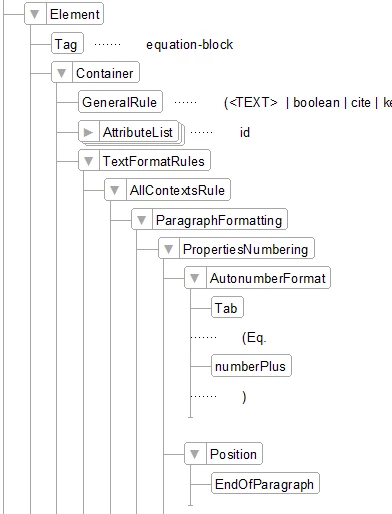
Wow! Thank you, Rick! Your note was enough of a clue for me to fix the problem. My equations now number and the format is perfect.

Thank you!

Wanda


Here's are the settings I needed.

1 reply

Wanda Jane
Inspiring
August 2, 2021

Just to follow up on this issue. Equation numbering is just not working. I have tried the following with no success:


<equation-block id="eq-001">

    <equation-number></equation-number>

    <mathml>

       ...


<equation-block>

    <equation-number id="eq-001"/>

    <mathml>

       ...


Neither of these work. Does anyone use equation numbering in structured documents?


Wanda

frameexpert
Community Expert
August 3, 2021

The FrameMaker template may need to be tweaked to add numbering to the equations. Can you drop a small FrameMaker document here with an equation or two in it? Or send me one directly? rick at frameexpert dot com

Wanda Jane
Inspiring
August 3, 2021

Wow! Thank you, Rick! Your note was enough of a clue for me to fix the problem. My equations now number and the format is perfect.

Thank you!

Wanda