
jackiew51813680
Participant
May 13, 2019
Question

FrameMaker 2019 does not produce files Flare 2019 can import

  • May 13, 2019
  • 2 replies
  • 1187 views

We are using FrameMaker 2019 to convert our pdf files into usable Flare 2019 files and we keep getting these messages:
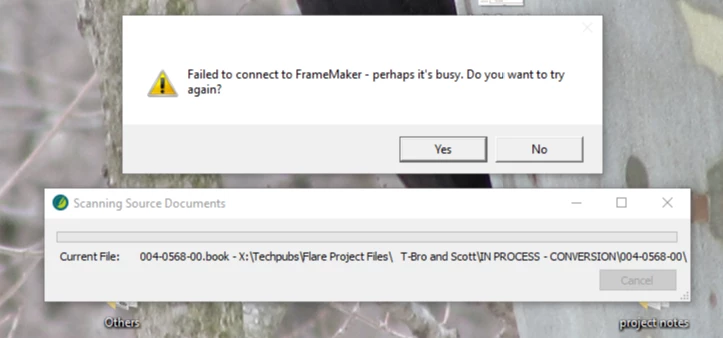
What can we do to get these two programs to communicate with each other.

This topic has been closed for replies.

2 replies

Matt-Tech Comm Tools
Community Expert
Community Expert
May 13, 2019

PDF is an output format.   If you’re looking to convert the content to another application, you should be using the source files and not a PDF

-Matt Sullivan, FrameMaker Course Creator, Author, Trainer, Consultant
Community Expert
May 13, 2019

Flare can import FrameMaker FM, MIF and BOOK files.

See here:

https://help.madcapsoftware.com/flare2017r2/Content/Importing/Flare/Importing-FM-Files.htm

I do not know, whether this import works well or whether you have to adapt the imported content. And I do not know, whether you could round-trip.

Bob_Niland
Community Expert
Community Expert
May 13, 2019

Well, TIL! But I suspect that they haven't fine-tuned it to work with FM2019 yet.


What is often a killer footnote in the process is:
"Note: You must have FrameMaker installed on your computer in order to import FrameMaker files."

It looks as if Flare runs FM to export the material.
No FM installed; no joy.
FM itself can't open source document; no joy.

Because Flare apparently has to run FM, the APIs for doing that would need to be up to date, or again; no joy.

If the "source" document in this instance is a PDF, recovery might have to be via the various export routes from Acrobat itself, or via some other WP/DTP app that can attempt to open a PDF as an editable document.

Jeff_Coatsworth
Community Expert
Community Expert
May 13, 2019

AFAIK there's no communication between Flare & FM - you would have to go through some intermediate step like FM to PDF, PDF to Word doc, Word doc to Flare.