


- Home
- FrameMaker
- Discussions
- Re: FrameMaker 7.2 Blank Page Problems
- Re: FrameMaker 7.2 Blank Page Problems
FrameMaker 7.2 Blank Page Problems

Copy link to clipboard
Copied
Hello,
I am new to FrameMaker, running WinXP SR3 and am editing a book created by someone else.
In one of the "chapters" of this book, There are 7 blank pages at the end that I cannot get rid of.
I am aware of the feature Format - Page Layout - Pagination, then choose to delete blank pages. I did this on the chapter, book and Master Pages. If it were just one or two blank pages, I would suspect a "book layout" option or something, but there are 7 blank pages.
I also checked the next "chapter" to see if it required to start on a certain page and saw no evidence of this.
Thanks in advance for help, I'm not sure where to try next. The rest of the "chapters" appear fine, it's just this one.
Erin


 21
Replies
21
21
Replies
21


Copy link to clipboard
Copied
Erin, the usual reason for multiple blank pages showing up repeatedly is that at some point those pages had a master page applied to them other than the standard default Left or Right. This is a long-standing FM quirk that when you tell it to delete empty pages, those pages will, at first, disappear, only to reappear the next time the book is updated. Very, very confusing!
The solution is to open the problem chapter, apply the standard Left/Right master pages to the 7 problem pages, save the file, do the delete blank pages command, save the file, update the book. The mystery pages should now be purged forever.
Sheila
Copy link to clipboard
Copied
Hi Sheila,
Thank you for the help and quick response. I will try the steps you suggest.
Erin

Copy link to clipboard
Copied
Thanks Sheila - I've had that happen to me as well, never researched it.
I also see a variation of this, where pages in a book chapter "forget" their custom master pages, and revert to the standard. I go in and reapply the custom pages, but as you said, it "reappears" next time around.
I will try your solution the next time I update that book.
Debby
Copy link to clipboard
Copied
Whenever I notice the "master page senility" effect happening I've almost always found that it was because I'd done significant editing so that the chapter had shrunk and then possibly grown again and so the custom master page assignment(s) ends up being applied to the "wrong" page -- quite logical as far as FM was concerned because it didn't know any different, I'd told it that p. 6 and p. 10 should be "MPspecial" so that's what it was continuing to do -- because I hadn't reapplied m.p. yet, but wrong as far as my content authoring view of what should be where.
What's more embarrassing is that it causes confusion in my typical single-user world, so I can imagine this being a mega source of confusion in a multi-author workgroup or when working with chapters that have been inherited.
Dreaming: wouldn't it be wonderful if there was a command that would display a concise visual view of the chapter's page numbers and the master pages applied to each, a tidy little list that one could see the whole chapter at a glance and then jump to any particular page just by clicking on it.
I've never used FM's facility to apply m.p. based on paragraph styles, so I don't know how this might affect things. 95% of my FM usage is via database publishing these days so most of my work is with newly created-on-demand FM docs with only rare excursions into the actual "edit in FM" world, but <gulp> 16 or 17 years of FM usage does seem to promote genetic memory of FM quirks to a sometimes astonishing degree.
Sheila

Copy link to clipboard
Copied
AxialInfo wrote:
Dreaming: wouldn't it be wonderful if there was a command that would display a concise visual view of the chapter's page numbers and the master pages applied to each, a tidy little list that one could see the whole chapter at a glance and then jump to any particular page just by clicking on it.
Sheila
Dream fulfilled: place text a background text frame on each master page with page name and intended side L/R. Apply a text color that's set to non-printing, apply a condition that you'll hide when exporting, change the paragraph format's text color to paper when exporting, or switch to a color view that lacks the text's color when exporting.
HTH
Regards,
Peter
_______________________
Peter Gold
KnowHow ProServices
Copy link to clipboard
Copied
That's an excellent point, the chapter I see this on most often is one that is edited on a regular basis. There is also a considerable amount of conditional text that is displayed/hidden/displayed. I'm pretty sure that is a contributing factor as well.
I agree with your "dream sequence" - that would be great!
Debby

Copy link to clipboard
Copied
Another option would be to just delete those extra pages instead of applying the default left/right master pages. Of course you have to accept and ugly warning about possibly deleting content, but pages are then deleted together with the custom master page settings. If the document gets longer, the default master pages are used unless you change them.
- Michael
Copy link to clipboard
Copied
The only problem with just deleting the blank pages is that does not solve the problem... they come back!

Copy link to clipboard
Copied
I think you hinted at the cause in an earlier post.
If the file uses conditional text, when you show all, FrameMaker adds extra pages to display all the content. Then when you hide some conditional text, there are blank pages at the end. If those are not assigned the default left/right master pages, then they do not delete when the file is saved. At least, that is my experience. If you delete the extra pages, save, close, and open the file, those deleted pages should not reappear until you show all.

Copy link to clipboard
Copied
Hi,
I just stumbled upon this issue mysel, in FM 9.
We need to create a PDF with zero blank pages.
Was this issue REALLY not resolved by version 9? If so, this is terrible. It seems so obvious that you would not want or need blank pages in your pdf.
Adobe should fix this issue easily and put out a bugfix.
-Ian
Copy link to clipboard
Copied
Ian, if you're wishing to do some troubleshooting we'll need significantly more info about your specifics in order to make suggestions.
Blank pages must be included in PDFs if they are to be printed hardcopy (assuming that the pagination is set up for recto/verso sides). FM has terrific capabilities for adjusting pagination for multiple output formats so that one (eventually!) gets the desired output, single or double-sided, blank pages or not -- the catch is in understanding the hierarchy of settings that have an effect on pagination, as there are many: master pages, document settings, paragraph settings, etc.
What I'm saying, bottom line, is that there's nothing to solve/fix because FM's pagination does work correctly. It can definitely be confusing at times, but it does work.
Sheila

Copy link to clipboard
Copied
Hi Sheila,
I have suffered from empty pages for the past two years. Now Ijust leave the blank pages even when printing. Not exactly what I want with a book of 500 pages and 10 or so empty pages.
This is what I tried and failed:
1. Delete empty pages using special delete pages
2. Apply master right/left to empty pages , save and then apply delete empty pages, save and update book.....did not work
3. Tried to apply just left or right master pages
4. Turned view text symbols to see what is on empty pages: nothing
This is why I have given up....I watched all your threads and none worked for me!
regards
Joe
Copy link to clipboard
Copied
Joe,
I am pretty sure that your situation is different from that of the original post. They had a row of empty pages, but I assume you have a single really blank page at the end of a chapter. This is usually intended (or at least FrameMaker sees this as intended) because you might have set the chapter title to appear at the next right page, or the pagination properties set in the book file tell FrameMaker to start a file at the next right page.
FWIW, I am also pretty sure that those cases can be solved.
Of course, sometimes it is harder, like in a customer’s document where I found the master page "Left" to be designed like a right page and master page "Right" designed like a left page. Each file and numbering starting with the left page... ugly consequences...
- Michael
Copy link to clipboard
Copied
Thanks Michael,
Excuse my ignorance: what does FWIW stand for?
regards
Copy link to clipboard
Copied
Excuse my ignorance: what does FWIW stand for?
See <http://en.wiktionary.org/wiki/FWIW>, 1st meaning "For what it’‚ worth"
- Michael
Copy link to clipboard
Copied
Thanks
Is there a documented solution to this problem apart from the one that is suggested by Shelia which did not work for me?
thanks
Joe
Copy link to clipboard
Copied
Joe,
Please create a new thread and start by describing your situation (FrameMaker version), how your books are built, what you expect and what you see. Provide as much information as needed to understand the problem, you can even upload screens shots, if that would help.
This thread is quite old and I guess your problem is different than the original problem.
- Michael
Copy link to clipboard
Copied
Still waiting for an answer to the problem of blank pages. Any solution yet?
thanks
Joe

Copy link to clipboard
Copied
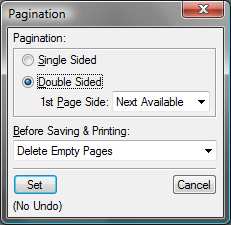
Nowhere in this discussion or several other discussions re blank pages did I find a mention of the "Next Available" option in the Pagination dialog. This is one of those things I've learned and forgotten about Frame every few years.
Copy link to clipboard
Copied
Copy link to clipboard
Copied
Iangull249 wrote:
Hi Sheila,Thanks for the help.Here is our issue in detail:When we hide certain conditions (throughout the book) we're inevitably left with empty pages, because there is less text. We would like to delete ALL of these empty pages created by hidden conditionals.This is because our PDF is NOT for physical print -- it's only for delivered digitally, so there's no reason to have any empty pages.Do you know of a work around?Best,IanP.S. I understand that for physical print, you assign master pages "Left" and "Right," and FM does in fact do a good job of deleting empty pages, yet forcing (when needed) an empty page so as to conform to the next chapter's first page.
Search Google for "framemaker delete empty pages" without quotes. Or search the FM help for delete empty pages. When all is set correctly, but blank pages remain when saving or printing, there is something on the body page; that is, the page is not blank or empty. Turn on View > Text Symbols and look for paragraph or end-of-flow markers.
I suspect that your conditional material leaves paragraph marks (carriage returns) when you hide it.
HTH
Regards,
Peter Gold
KnowHow ProServices


Get ready! An upgraded Adobe Community experience is coming in January.
Learn more
 AdChoices