
Participating Frequently
July 26, 2016
Question

Glitch when printing to PDF

  • July 26, 2016
  • 3 replies
  • 1036 views

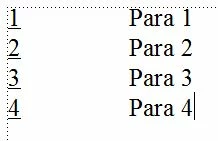
I have an autonumbered paragraph and the numbers are underlined by applying a character style to the Autonumber Format, thus:
When this is printed to PDF a small line/dot is added just before the text (this doesn't happen when printing to paper):
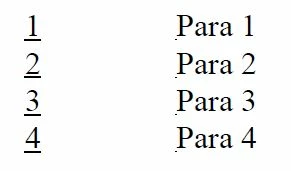
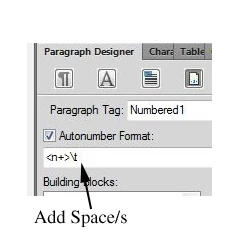
Although this doesn't show in the Framemaker window, even when fully zoomed in, it can be made to appear if a space is added after the tab character in the Autonumber Format box:
Does anybody have any previous experience with this and therefore a solution? (I did try searching the forum but couldn't find anything).

I am using Framemaker 2015 with Acrobat XI.

Update: I have Framemaker 10 installed on the same PC and doing the same thing on that does not show the problem.

Thanks.

Message was edited by: Steven Clark

    This topic has been closed for replies.

    3 replies

    Adobe Employee
    September 7, 2016

    Hi Steve,

    Would it be possible for you to send us your shortened file - that exhibits the issue?

    Thanks,

    Amit

    c88657860Author
    Participating Frequently
    September 7, 2016

    How do I insert a file? I can only see 'Insert Image' and 'Insert Video'. I have added a bug report to the system (Bug 4186133) which contains instructions on how to make a file with the behaviour I described.

    Bob_Niland
    Community Expert
    Community Expert
    September 6, 2016

    Based on a simple test I ran lately (with FM7), FM implements underlining by drawing, beneath the text span, a filled rectangle (as least as it deconstructs in Illustrator).

    This suggests that FM thinks that there's some sort of very narrow character at the positions represented by the tabs. It might be interesting to extract the text from the PDF and examine it in a hex editor (or by some other means that can report character code point values), and see if there's indeed a text character there, and what it is. An example might be the Unicode
    ZERO WIDTH SPACE
    \u200b
    UTF-8: 0xE2 0x80 0x8B

    Knowing that would help the coders debug it; and this does seem to be a bug. Not having FM15, I can't run this test.

    Jeff_Coatsworth
    Community Expert
    Community Expert
    July 26, 2016

    ?If it's still happening after applying the patches to FM2015, I'd use the bug base to report it, giving samples of the FM10 doc that works & the FM2015 one that doesn't.

    c88657860Author
    Participating Frequently
    July 27, 2016

    Ok, thanks.

    Steven Clark

    Senior Technical Author/Illustrator

    (contact information removed. See Email signatures and personal information )

    Participating Frequently
    September 6, 2016

    Hi Steve.  Did you ever find a solution to this?  I have the identical issue with Frame 2015 and Acrobat XI.  I never had this issue with previous versions.