Inspiring
March 9, 2017
Answered

Gujarati and xml

  • March 9, 2017
  • 1 reply
  • 1138 views

Hi. I need to import xml files including some text in Gujarati. Everything I've tried just produces a string of question marks.

I have been able to copy and paste Gujarati text into FM documents, but that only works for a few pages, not for thousands of pages.

Help?

Thanks,

Jack
This topic has been closed for replies.
Correct answer Ian Proudfoot

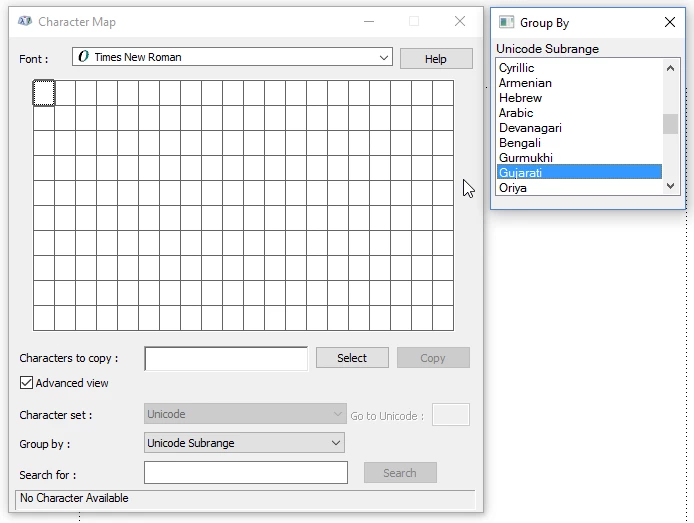
An easy way to see if a font has the character range that you need is to use Windows Character Map.

  1. In the font dropdown select Times New Roman.
  2. In the Group by dropdown select Unicode Subrange.
  3. In the Group By pop-up find Gujarati.

This is showing that the font has no Gujarati characters defined, so you need to choose a font that does have them.

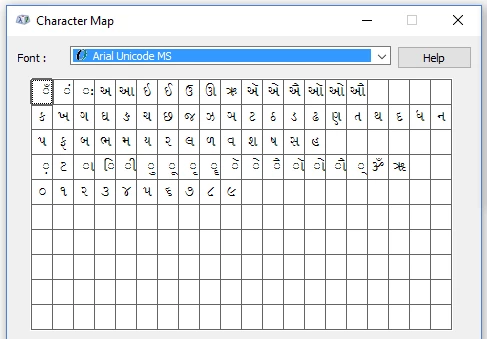
On my system I know that Arial Unicode MS does include them:

You now need to apply that font to the Paragraph and character formats in your document.

I hope that helps?

Ian

1 reply

Ian Proudfoot
Brainiac
March 9, 2017

Jack,

Does the default document font support the Gujarati code points? Is the XML unicode, or does it specify a non-unicode code page?

Ian

Inspiring
March 9, 2017

Hi again, Ian. Thank you for helping me twice in one day.

Default document font: as far as I know that is Times New Roman. I can paste a sample of the Gujarati text into a Times New Roman paragraph and it looks right, so I'm guessing the answer to the first question is "yes".

I believe the answer to the second question is also yes. I saved it from Notepad and selected Unicode in the Encoding selector next to the Save button.

As you can tell, I am a babe in the woods with Unicode. Can you steer me to a general discussion of it? I'd hate to keep imposing on your expertise if I don't have to.

Jack

Ian Proudfoot
Ian ProudfootCorrect answer
Brainiac
March 9, 2017

An easy way to see if a font has the character range that you need is to use Windows Character Map.

  1. In the font dropdown select Times New Roman.
  2. In the Group by dropdown select Unicode Subrange.
  3. In the Group By pop-up find Gujarati.

This is showing that the font has no Gujarati characters defined, so you need to choose a font that does have them.

On my system I know that Arial Unicode MS does include them:

You now need to apply that font to the Paragraph and character formats in your document.

I hope that helps?

Ian