
ericy83354268
Inspiring
June 20, 2017
Question

Headings in bookmarks contain unexpected blank space

  • June 20, 2017
  • 3 replies
  • 753 views

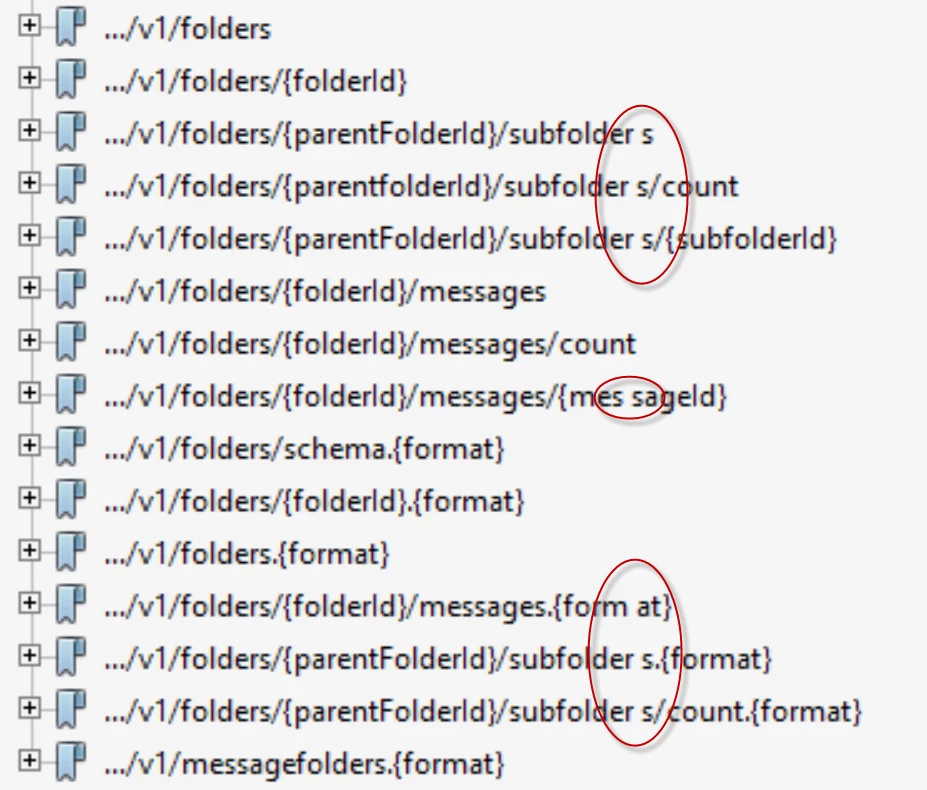
See the snapshot below.

The space where the blankspace is inserted, is the point where the heading text wraps in the FM editor. How can I eliminate this space in the bookmarks?

Please help, thanks.
This topic has been closed for replies.

3 replies

ericy83354268
Inspiring
June 21, 2017

Many thanks to both.

First, to answer your questions, I didn't use SHIFT returns in headings, and I'm using FM 2015.

So, editing the heading links manually in the PDF bookmarks is the only work around now?

When you fix that in the next release, can I get that without buying a new license?

Barb Binder
Community Expert
Community Expert
June 21, 2017

We verified that you don't need to add spaces for this to happen. You have encountered an unusual set of circumstances—most bookmarks are headings and headings have spaces—yours do not. I'll let Stefan from Adobe confirm the second part of your question—I'm just a FrameMaker (and Acrobat) trainer—but I'd expect the patch when added, to be to 2017 and not to 2015.

And yes, the only way I know to fix this is to manually update the bookmarks in Acrobat. Or leave them out of the conversion, and add them in Acrobat, where they will be added correctly.

Not the answers you were hoping for, but at least we figured out what is going on.

~Barb at Rocky Mountain Training
ericy83354268
Inspiring
June 21, 2017

Thanks for your help.

Legend
June 20, 2017

First: Which FM version are you using? I have blurry memories that this effect happened in some very, very old FM version (like FM 6 or so). I tried to reproduce this in FM 2017 and did not get any such additional blanks in bookmarks.

Also, you wrote:

The space where the blankspace is inserted, is the point where the heading text wraps in the FM editor.

This is strange. FrameMaker usually does not wrap in the middle of the word (like in "subfolder s"). Have you inserted manual breaks in FM like with Shift-Return? Shift Returns in headings are translated into spaces in PDF bookmarks.

Barb Binder
Community Expert
Community Expert
June 20, 2017

I'm very curious to see if you can make some headway here, Stefan, but just as a heads up, I got the same results in 2017 with Acrobat Pro DC.

In these screen shots, the only difference is the type size. I didn't make any changes at all on any break settings—text options dialog box, line breaks, or spaces.

~Barb at Rocky Mountain Training
Legend
June 20, 2017

I see. I have tried it in the same way now and rebuild a doc like yours with a "...v1/folders/{folderID}messages{messageID}" heading with a line break just after "folders/" like in you example.

When I print to PS and analyze the code, this bookmark for this heading is produced like this:

[/Dest/G998522/Title<FEFF002E002E002E00760031002F0066006F006C0064006500720073002F0020007B0066006F006C00640065007200490044007D006D0065007300730061006700650073007B006D00650073007300610067006500490044007D>/OUT FmPD2

So, the line wrap is actually translated into a simple space (0020).

I'll check with the devs and will suggest fixing this in the next release.

Barb Binder
Community Expert
Community Expert
June 20, 2017

Yes, it certainly does. I played around with this for a while, ericy83354268, and don't have a good solution for you. When you think of "normal" headings, they have spaces in the between the words, and FrameMaker knows how to transfer them correctly to the bookmarks.

Your heads don't have spaces, and Fm seems determined to add one in the following situations:

  • at the text wrap location
  • at a line break/soft return location
  • even when you change Text Options to Allow Line Breaks After to include a close brace character } (which I was sure was going to be the solution)

The only solution I see is to edit the bookmarks in Acrobat (not a good one!), and report this to Adobe here: Tracker.

~Barb at Rocky Mountain Training