
Participating Frequently
February 23, 2017
Answered

How do I place the value of a paragraph tag in the body of my document without using a cross reference

  • February 23, 2017
  • 1 reply
  • 690 views

FRAMEMAKER 2017, Unstructured

I need to pick up the value of a previous paragraph tag and put it on the following page, along with some symbols and text. I would like to set this up as a paragraph tag, if possible.

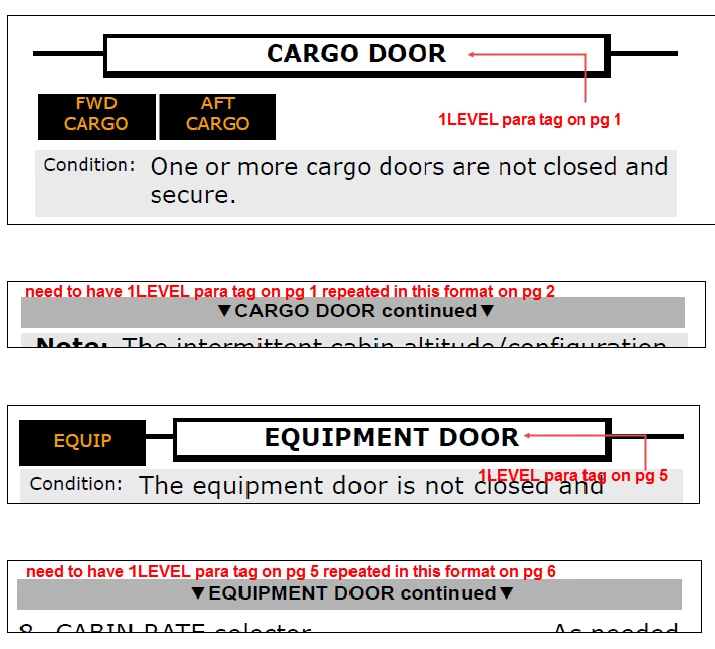
For example, top of page 1 has the title "TITLE A". On page 2, I need to place "< TITLE A continued >" (using downward triangle symbols in place of the angled brackets I've shown here). Then, say page 5 has a title of "TITLE B", on page 6, I need to insert "< TITLE B continued >" - preferably with one or two clicks which will automatically change A to B and insert the symbols. Please see attached example. Any help would be appreciated as doing it manually with a cross reference is prone to error. Thank you.
    This topic has been closed for replies.
    Correct answer Barb Binder

    Any help would be appreciated as doing it manually with a cross reference is prone to error.

    If something is "prone to error", I'm guess you mean it works sometimes and not others? That tends to fall into the user error category. It might be set up correctly in one document, but not in another, or the X-ref is being added differently in different parts of the file.

    In any case, here's what I'd do:

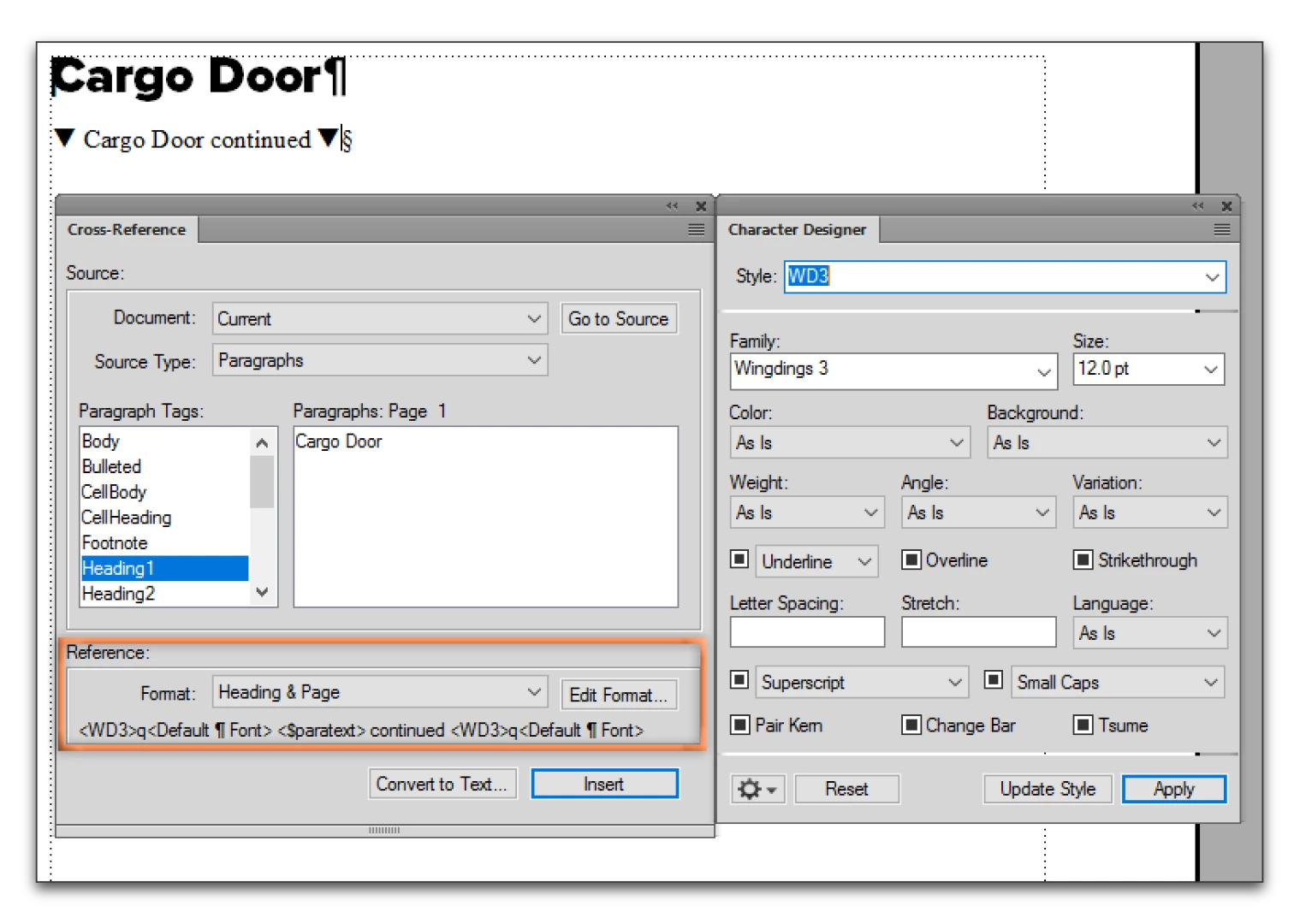
    1. Add the Heading1 "Cargo Door"
    2. Set up a Character style to change "q" to a downward pointing error (I called mine WD3 for Wingdings 3)
    3. Set up an X-ref format:
      1. Add "q" to the beginning and end of the x-ref format.
      2. Change the character style for the "q" to WD3 before and back to Default ¶ font after, on both sides.
      3. Add the word continued.

    Once the X-ref format is defined, Esc s c is the shortcut to add an x-ref.

    It's pretty darn quick and will be consistent.

    1 reply

    Bob_Niland
    Community Expert
    Community Expert
    February 24, 2017

    I presume these Headings all appear in the Body page Flow A?


    (If in Master Page background text frames, other options and challenges arise - ditto for as Tables).

    What's the problem with using cross-references (other than that it would be nice for it to be automatic).

    blh5Author
    Participating Frequently
    February 24, 2017

    Hi, Bob

    Thanks for replying. Yes, all on the body pages.

    Brenda

    Brenda Haynes

    Operations Administrator, Flair Airlines Ltd.

    Bob_Niland
    Community Expert
    Community Expert
    February 24, 2017

    I have the triangle characters set up correctly, and I think I’ll just stick with cross referencing. It seems to be the easiest method.

    Thanks very much for your time and help.

    Cheers

    Brenda

    Brenda Haynes

    Operations Administrator, Flair Airlines Ltd.


    re: ...and I think I’ll just stick with cross referencing. It seems to be the easiest method.

    That's very likely the case. Using Xrefs is no more or less error-prone than a RunningH/F page-map hack, and is apt to be much more comprehensible to any random future document steward - well, as comprehensible as inherited FM documents ever get, speaking of which...

    On my current project, before any actual writing began, I started an entirely separate document that defined all of the elements: book structure, page layouts, tags, colors, color view, formats, variables, etc. all written using that structure. Format changes are then bulk-imported into the actual book files. The definitions document is itself 40 pages long so far, and has easily saved the time needed to create and maintain it. Based on having followed FM forums for over two decades, my impression is that almost no one does this in unstructured Frame.