



Exit
  • Global community
    • Language:
      • Deutsch
      • English
      • Español
      • Français
      • Português
  • 日本語コミュニティ
  • 한국 커뮤니티
1

How to create a Cross-reference to a paragraph from script

Explorer ,
Dec 04, 2023 Dec 04, 2023

Hello,

I am trying to create some cross-references to some paragraphs.
With what I wrote so far, a cross-reference appears to be added to the text Frame, but not text is shown and the Source Type is selected as "Cross-Reference Markers". Here I would like to have "Paragraphs".
Also, the cross-reference doesn't seem to be formated with the format I specify (it is not blue).
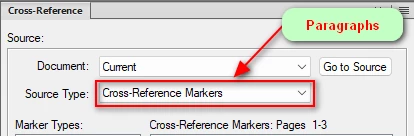
image.png
This is what I wrote so far:


// I wrote this function to get the UID from a table I have.

function getUID(paragraphFormat, text) {
    table = doc.FirstTblInDoc;
    try {
        row = table.FirstRowInTbl;
    }
    catch (e) {
        $.writeln("There was an error. No table found: " + e);
    }
    rowNr = 1;
    while (rowNr < table.TblNumRows) {
        cell = row.FirstCellInRow;
        paragraph = cell.FirstPgf;
        if (paragraph.Name == paragraphFormat && paragraph.PgfNumber == text) {
            paragraphFound = true;
            return paragraph.Unique;
        }
        row = row.NextRowInTbl;
        rowNr++;
    }
}


var graphic = null;
var doc = app.ActiveDoc;
graphic = doc.FirstSelectedGraphicInDoc;
var frameParent = graphic.FrameParent;
var textFrameObj = doc.NewTextFrame(frameParent);
 
textFrameObj.LocX = 20 * MM;
textFrameObj.LocY = 50 * MM;
 
var paragraph = textFrameObj.FirstPgf;
 
startLoc = new TextLoc(paragraph, 0);
endLoc = new TextLoc(paragraph, Constants.FV_OBJ_END_OFFSET);
 
crossreference = doc.NewAnchoredFormattedXRef("Paragraphs",  startLoc);
crossreference.XRefSrcIsElem = false;
   
textRange = new TextRange(
     startLoc,
     endLoc
);
crossreference.TextRange = textRange;
xRefSrcText = getUID("Body", "10") + ":Body:10";
crossreference.XRefSrcText = xRefSrcText;
doc.UpdateXRefs(doc, crossreference);
TOPICS
Scripting
567
Translate
Report
Community guidelines
Be kind and respectful, give credit to the original source of content, and search for duplicates before posting. Learn more
community guidelines
Community Expert ,
Dec 04, 2023 Dec 04, 2023

There are a lot of things going on with this task.

  1. Insert a Cross-Ref marker in the target paragraph.

In order for a Cross-Reference to this marker to display as a "Paragraph" Cross-Reference in the Cross-Reference dialog box, it has to have a specific pattern. You can see this by inserting a cross-reference manually.


image.png


The interesting this is it's not the content of the marker that allows it to show in the Paragraph pane of the dialog box, it is the pattern:

image.png

The main thing FrameMaker is doing with this pattern is ensuring that the Cross-Ref marker text is unique within the document (and likely the entire book).

2. Insert a Cross-Reference to the marker, where the XRefSrcText property of the Cross-Reference matches the Cross-Ref MarkerText property.


If I have time, I will post some code later.

Translate
Report
Community guidelines
Be kind and respectful, give credit to the original source of content, and search for duplicates before posting. Learn more
community guidelines
Community Expert ,
Dec 04, 2023 Dec 04, 2023
LATEST

Here is a YouTube playlist of 7 short videos that will give you the basics of inserting FrameMaker Cross-Referencs:

https://www.youtube.com/playlist?list=PLRPNZaAC4LoTpF9yjBWUQNGX2EyZ_3U8b

Translate
Report
Community guidelines
Be kind and respectful, give credit to the original source of content, and search for duplicates before posting. Learn more
community guidelines
Community Expert ,
Dec 04, 2023 Dec 04, 2023

Hi,

I had an issue with an aspect of your problem. I used Pgf.Unique for the XRef marker, and then the cross-reference was not listed in the cross-reference dialog in the list of paragraphs, but in the list of markers. I had to use only the last 5 digits of Pgf.Unique. Then everything worked.

I did no check your code, and I do not know, if this is your issue, but this helped for me.

Best regards, Winfried

Translate
Report
Community guidelines
Be kind and respectful, give credit to the original source of content, and search for duplicates before posting. Learn more
community guidelines
Community Expert ,
Dec 04, 2023 Dec 04, 2023

A few comments on your code:

table = doc.FirstTblInDoc;

The FirstTblInDoc is not necessarily the first table on the document's body page. It might end up being a table on the reference pages.

 rowNr = 1;
    while (rowNr < table.TblNumRows) {
...
        row = row.NextRowInTbl;
        rowNr++;
    }

You don't need a counter here. You can simply use this:

    row = table.FirstRowInTbl;
    while (row.ObjectValid () === 1) {
...
        row = row.NextRowInTbl;
    }
Translate
Report
Community guidelines
Be kind and respectful, give credit to the original source of content, and search for duplicates before posting. Learn more
community guidelines
Explorer ,
Dec 04, 2023 Dec 04, 2023

Hi, some updated context.
I have only 4 rows in my table, and I have manually added 4 references to the first cells of each row.
I created another function that reads the Xrefs in order to see how they are built in code:

function getAllXrefs(doc) {
    xRef = doc.FirstXRefInDoc;
    $.writeln("XRefSrcText: " + xRef.XRefSrcText);
    links = 1
    while (links < 5) {
        xRef = xRef.NextXRefInDoc;
        $.writeln("XRefSrcText: " + xRef.XRefSrcText);
        links++;
    }

}


This outputs:
XRefSrcText: 24071: Body: 10
XRefSrcText: 24330: Body: 20
XRefSrcText: 64087: Body: 30
XRefSrcText: 52292: Body: 40

Then with the other function of getting the Unique IDs from the paragraphs, I get:
Unique: 49608: Body: 10
Unique: 49619: Body,: 20
Unique: 58109: Body: 30
Unique: 49629: Body: 40

I do not understand the difference in the IDs I get from the paragraphs themselves and the ones I can see in the XRefSrcText from the links added manually.
2. If I hardcode the IDs from the Xrefs added manually it almost works, at least the xrefs added are with the Paragaph Source, but the text still doesn't show.

Translate
Report
Community guidelines
Be kind and respectful, give credit to the original source of content, and search for duplicates before posting. Learn more
community guidelines
Community Expert ,
Dec 04, 2023 Dec 04, 2023

Where you get the numbers doesn't really matter, as long as they are 5-digits and are unique. You are going to insert the markers first, so you can use 5 digits from the target paragraph's Unique property. Or you could use Math.random () to generate your own 5-digit number:

alert (getRandomInt (100000));

function getRandomInt (max) {
    return Math.floor (Math.random() * max);
}

Once you make the pattern and insert the Cross-Ref marker, then you have the text for the corresponding Cross-Reference's XRefSrcText property.

Translate
Report
Community guidelines
Be kind and respectful, give credit to the original source of content, and search for duplicates before posting. Learn more
community guidelines