
Legend
January 8, 2016
Answered

How to get proper runaround/spacing for inline graphics

  • January 8, 2016
  • 1 reply
  • 1205 views

Hi,

(FM2015, Windows 7, structured documents)

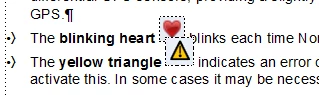
I have yet to figure out how to get automatic runaround (or better yet, automatically-adjusted line spacing) for an "At Insertion Point" anchored frame. Is this possible? See the sample pic... the anchored frames always overlay any surrounding content. Can this be fixed? The runaround properties of the graphic inside don't seem to change anything.
Thanks,

Russ

    This topic has been closed for replies.
    Correct answer Bob_Niland

    That overlap is probably due to Paragraph Format > Basic

    Line Spacing:

  • Fixed
    being selected. Unselect it and see what happens.

    You might also consider, for those little Anchored Frames:
    * tighten up the cropping

    * set Distance Above Baseline to zero or even slightly negative

  • 1 reply

    Bob_Niland
    Community Expert
    Bob_NilandCommunity ExpertCorrect answer
    Community Expert
    January 8, 2016

    That overlap is probably due to Paragraph Format > Basic

    Line Spacing:

  • Fixed
    being selected. Unselect it and see what happens.

    You might also consider, for those little Anchored Frames:
    * tighten up the cropping

    * set Distance Above Baseline to zero or even slightly negative

  • Russ WardAuthor
    Legend
    January 8, 2016

    Bob, that did the trick, thanks. I guess I don't really know what "Fixed" setting really means. Maybe just that if you uncheck it, the specified line spacing is a minimum only?

    Russ

    Bob_Niland
    Community Expert
    Community Expert
    January 8, 2016

    re: I guess I don't really know what "Fixed" setting really means.

    It means use the Line Spacing as specified, period, and do not adjust for anchored frames, oversize text in the line, content from adjoining lines, and probably other intruders.