
Link in Zwischenablage kopieren
Kopiert
Who can explain this absurdity?
When I publish an HTML Help file, some pages show an image of text where an anchored frame ought to be.
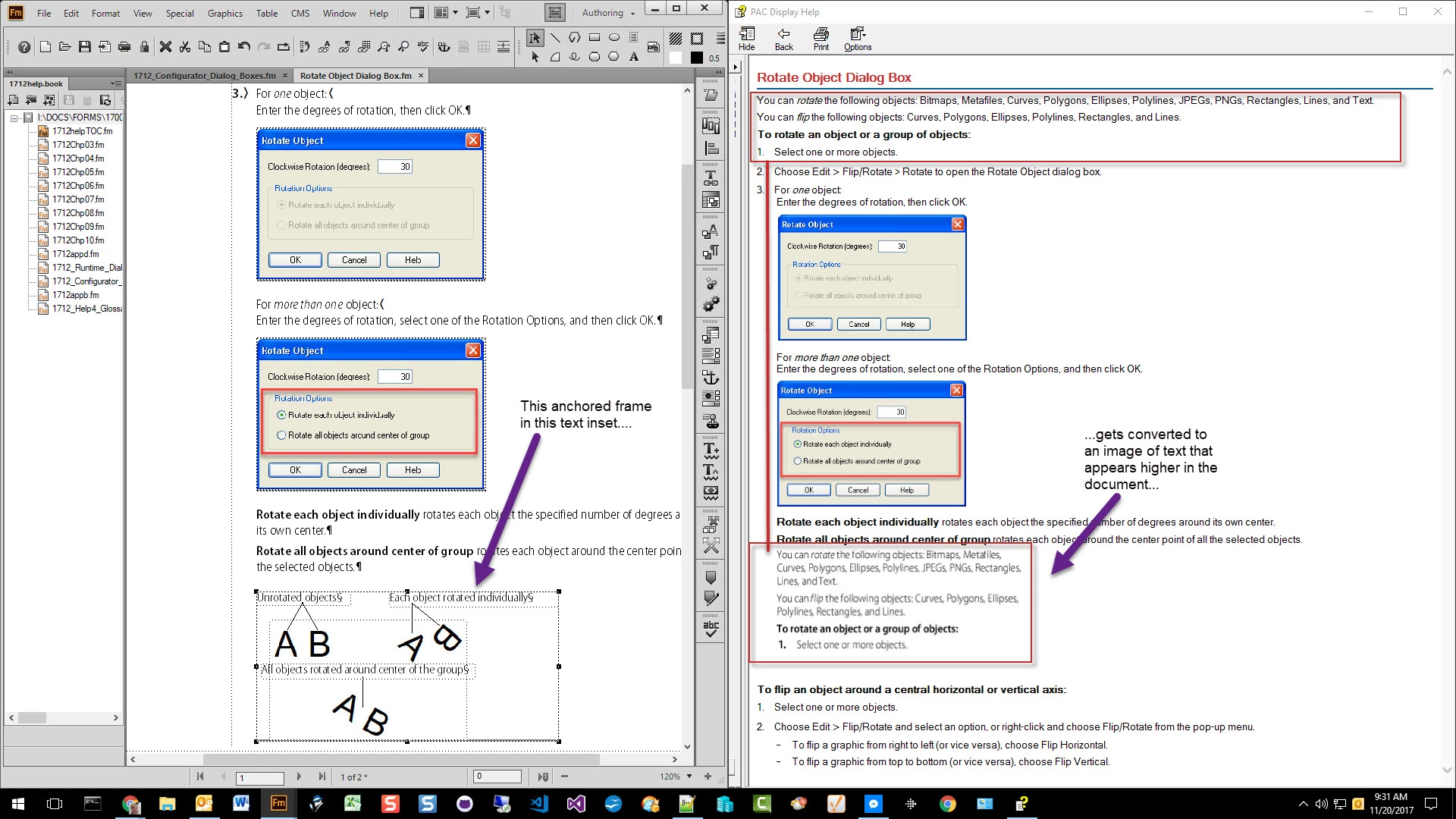
I have seen this error on different pages in the output file, and the only way I can correct it is to convert the text inset to text (which means I have lost the benefit of the text inset).
Ok, so the anchored frame is likely set to At Insertion Point.
Still no explanation as to the cause, but what about setting the frame to Below Current Line? Same result?
If so, it looks like Rotate Object Dialog Box.fm is the text inset, and that your anchored frame in that file has a large number of objects in it.
I'd reconfig the content in the frame by either:
In F
...Link in Zwischenablage kopieren
Kopiert
Robnurflugel : Have you ever seen this issue?
Link in Zwischenablage kopieren
Kopiert
I'm using FrameMaker 2015, version 13.0.5.547.
Link in Zwischenablage kopieren
Kopiert
I can't explain it, but I have a question: Your screenshot from Fm appears to have text at the very bottom of the anchored frame. Do you have white, or very small text added at the bottom of the frame?
Link in Zwischenablage kopieren
Kopiert
Yes, mattrsullivan—that's one of the tags we apply to anchored frames in order to indent them.
Sometimes those tags are accidentally applied to text, but I double-checked this instance and that's not the case this time.
Link in Zwischenablage kopieren
Kopiert
Clarification: What you are seeing—the small gray area at the bottom of the frame that looks like tiny text—is the result of applying one of those special graphics tags. They have a point size of 4 pts.
Link in Zwischenablage kopieren
Kopiert
Ok, so the anchored frame is likely set to At Insertion Point.
Still no explanation as to the cause, but what about setting the frame to Below Current Line? Same result?
If so, it looks like Rotate Object Dialog Box.fm is the text inset, and that your anchored frame in that file has a large number of objects in it.
I'd reconfig the content in the frame by either:
In FrameMaker - Working with Content, I had a similar issue with a couple of equations...in the end it was easier to take a screenshot of the equations, rather than to track down the details.
Link in Zwischenablage kopieren
Kopiert
Thanks, mattrsullivan. Again, you're correct that the anchored frame is set to At Insertion Point.
I tried your suggestion of changing it to Below Current Line—now the image of text is centered! LOL
I'll reconfigure the content as you suggested.
Argh!

Link in Zwischenablage kopieren
Kopiert
Update: I captured the info in the anchored frame as a graphic, and then imported the graphic, and now the area looks "good enough."

Machen Sie sich bereit! Im Januar erwartet Sie ein verbessertes Adobe Community-Erlebnis.
Mehr erfahren