
Exit
  • Global community
    • Language:
      • Deutsch
      • English
      • Español
      • Français
      • Português
  • 日本語コミュニティ
  • 한국 커뮤니티
0

Icon colors in FrameMaker 2020

Community Expert ,
Jan 23, 2023 Jan 23, 2023

When 2022 was released, I complained that the colors of the icons are all the same. Book and fm files are indistinguishable from one another. 

Adobe promised this would be fixed in the first update. But now I have the first update and it is  not fixed. Or is it? Is this what it looks like for everybody else or is it just my install?
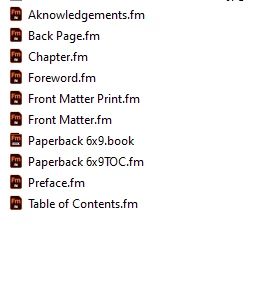
 

StudioSm_4-1674469882068.png


Bjørn Smalbro - FrameMaker.dk
333
Translate
Report
Community guidelines
Be kind and respectful, give credit to the original source of content, and search for duplicates before posting. Learn more
community guidelines
Community Expert ,
Jan 23, 2023 Jan 23, 2023

Interesting. In my FrameMaker update 1 the book icon looks similar to a book. The icon of the parent book and of books in a book are the same.

Translate
Report
Community guidelines
Be kind and respectful, give credit to the original source of content, and search for duplicates before posting. Learn more
community guidelines
Community Expert ,
Jan 23, 2023 Jan 23, 2023

Thank you @Winfried Reng Seems like it is my machine that is somehow acting strange 🙂


Bjørn Smalbro - FrameMaker.dk
Translate
Report
Community guidelines
Be kind and respectful, give credit to the original source of content, and search for duplicates before posting. Learn more
community guidelines
Community Expert ,
Jan 23, 2023 Jan 23, 2023

That doesn't look right at all. Do you have a .book file inside another book file?


This is what a book listing looks like for me (2022):

framemaker-icon-differences.png


Translate
Report
Community guidelines
Be kind and respectful, give credit to the original source of content, and search for duplicates before posting. Learn more
community guidelines
Community Expert ,
Jan 23, 2023 Jan 23, 2023
LATEST

No, it is merely a standard book setup. I think something is wrong with the installation. I have just installed another FM2022 on a client machine and it looks much better there.


Bjørn Smalbro - FrameMaker.dk
Translate
Report
Community guidelines
Be kind and respectful, give credit to the original source of content, and search for duplicates before posting. Learn more
community guidelines