
Exit
  • Global community
    • Language:
      • Deutsch
      • English
      • Español
      • Français
      • Português
  • 日本語コミュニティ
  • 한국 커뮤니티
0

Index Specification Reference Page

Explorer ,
Jun 11, 2014 Jun 11, 2014

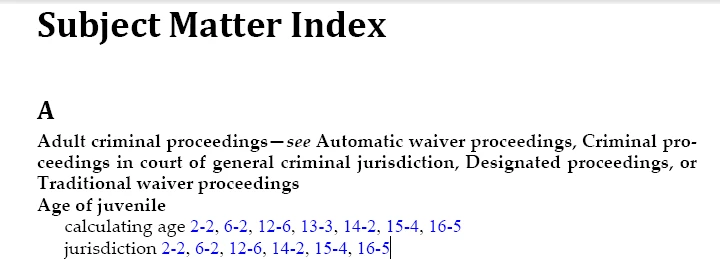
I am trying to create a subject matter index using the marker type Index (using unstructure FM 12). The output should look like this (the image below was created using the "Subject" marker type; I need to use "Index" because that is what generates in the ePub output):

index right.png

However, when I generate using the Index marker type, I lose the blue text and the chapter number before the page number. From what I can tell, FM is somehow inserting <$pagenum> into the index specification reference page, even though I have specified in there that it should be  <hyperlink><$chapnum>-<$pagenum><Defalut Para Font>.

Any ideas how I can get it to stop inserting the <$pagenum> into the reference page?

546
Translate
Report
Community guidelines
Be kind and respectful, give credit to the original source of content, and search for duplicates before posting. Learn more
community guidelines

correct answers 1 Correct answer

LEGEND , Jun 11, 2014 Jun 11, 2014

Check the paratag names (i.e. compare what FM created with what you had). FM will only add new entries if it can't find corresponding ones for the levels used in the Index markers. The paratags should all end in "IX" when using the "Index" marker.

Translate
LEGEND ,
Jun 11, 2014 Jun 11, 2014

Exactly which paratag are you editing on the Reference page and in which Flow? FM uses the Flow name to know what to pick up for formatting the entries. [A screen capture of your Index reference page would help].

Translate
Report
Community guidelines
Be kind and respectful, give credit to the original source of content, and search for duplicates before posting. Learn more
community guidelines
Explorer ,
Jun 11, 2014 Jun 11, 2014

This is the reference page from the custom template I was using:

Index Spec Page Cases.png

And this is the reference page that I get after generating the index in the book:

Index Spec Page JJBB.png

Translate
Report
Community guidelines
Be kind and respectful, give credit to the original source of content, and search for duplicates before posting. Learn more
community guidelines
LEGEND ,
Jun 11, 2014 Jun 11, 2014

Check the paratag names (i.e. compare what FM created with what you had). FM will only add new entries if it can't find corresponding ones for the levels used in the Index markers. The paratags should all end in "IX" when using the "Index" marker.

Translate
Report
Community guidelines
Be kind and respectful, give credit to the original source of content, and search for duplicates before posting. Learn more
community guidelines
Explorer ,
Jun 11, 2014 Jun 11, 2014
LATEST

Yes! I got it to work in an index of subjects (rather than standard index) by changing the paratags in the reference pages from SIX to IX suffixes. Thank you!!

Translate
Report
Community guidelines
Be kind and respectful, give credit to the original source of content, and search for duplicates before posting. Learn more
community guidelines