


- Home
- FrameMaker
- Discussions
- Re: Installing TCS 3.5 over existing apps not inst...
- Re: Installing TCS 3.5 over existing apps not inst...

Copy link to clipboard
Copied
I have been using all of the apps in TCS apps but installed individually. Now I want to install the TCS 3.5 and it is failing to install FrameMaker and Robohelp, as well as a bunch of other stuff associated with Captivate ("failed due to bad configuration").
Before I start un-installing everything in sight I am hoping for some guidance.
Please advise. I am dying to get this sw installed so I can create a powerful demo to comit my group to it.
Thanks!


 1 Correct answer

Conflicting processes were running in your machine, thats why the installer exited without proper installation. Please close Outlook or any Microsoft Office product and then again run the set-up. You should not get this problem again.

 16
Replies
16
16
Replies
16


Copy link to clipboard
Copied
The TCS apps have some internal components that are different than the stand-alone versions. You should uninstall all versions of the apps that are duplicated by the ones in the TCS. Please also de-activate those apps before un-installing, so that they can be used on another machine. A re-boot between uninstalling the old ones and installing the new ones would also be prudent to ensure that you have a relatively clean, stable environment.
Copy link to clipboard
Copied
TCS 3 and TCS 3.5 have same version of FrameMaker and RoboHelp, hence they cannot co-exist. You have to uninstall them first and then install through TCS3.5, the rest of the products can be installed.
Regarding the other Captivate products, what might be failing is Captivate Quiz Results Analyzer and Captivate Reviewer, again due to different versions supported in TCS 3 and TCS 3.5. Also, these products do not get uninstalled with uninstall of Captivate. Hence, you should uninstall them separately from Add/Remove Program. After that you should get a clean install.
Copy link to clipboard
Copied
Hm, I uninstalled all the components and whatever got installed of TC3.5, then restarted and initiated a fresh install of TC3.5 only none of the applications installed. I have nothing now.
Copy link to clipboard
Copied
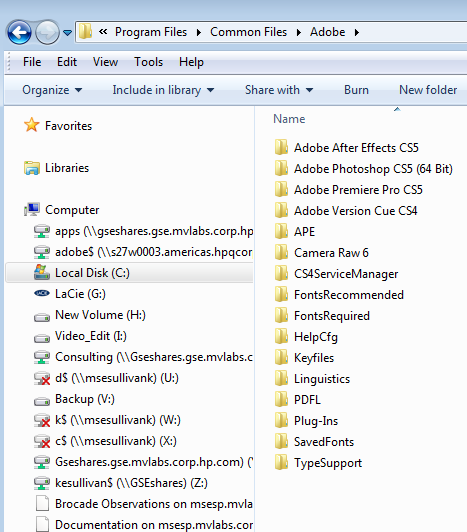
Can you please share the installer logs with us so that we can isolate the issue. You can find the log at <Root>\Program Files\Common Files\Adobe\Installers\Adobe Technical Communication Suite 3/3.5 <timestamp>.log.gz
Copy link to clipboard
Copied
That path does not exist to me.


Copy link to clipboard
Copied
That might be your problem - check to see that you have full admin rights to your C:\ drive - in Win7 you have to manually "give" yourself these rights
Copy link to clipboard
Copied
OK but I did run the install by rt clicking and selecting "Run as administrator". I will check as you suggest.
Copy link to clipboard
Copied
OK, local tech support folks say i do have full admin rights to C:whatever...
Copy link to clipboard
Copied
Try creating that folder, and if you can, check to see if anything was installed through the Control Panel - if it was, uninstall it, re-boot and install again; if it wasn't, try installing again.
Copy link to clipboard
Copied
<Root>\Program Files\Common Files\Adobe\Installers\Adobe Technical Communication Suite 3/3.5 <timestamp>.log.gz
My system has upto the Adobe folder. I assume you're saying to add an "Installers" folder and not every folder from that point forward.
Copy link to clipboard
Copied
yes
Copy link to clipboard
Copied
If you are working on a 64-bit machine then the log will be created inside Program Files(x86) and not Program Files. Please verify.
Copy link to clipboard
Copied
Installation failed
Copy link to clipboard
Copied
So did anything get created in that Installer folder?
Copy link to clipboard
Copied
Yes the log was there. Not sure how you want me to share it. It's long. I will just plop it down as I see no other way. Please correct if necessary.
------------------------------------
[ 35884] Wed Oct 12 09:40:24 2011 INFO
*=*=*=*=*=*=*=*=*=*=*=*=*=*=*=*=*=*=*=*=*=*=*=*=*=*=*=*=*=*=*=*=*=*=*=*=*=*=*=*=*=*=*
Visit http://www.adobe.com/go/loganalyzer/ for more information
*=*=*=*=*=*=*=*=*=*=*=*=*=*=*=*=*=*=*=*=*=*=*=*=*=*=*=*=*=*=*=*=*=*=*=*=*=*=*=*=*=*=*
*=*=*=*=*=*=*=*=*=*=*=*=*=*=*=*=*=*=*=*=*=*=*=*=*=*=*=*=*=*=*=*=*=*=*=*=*=*=*=*=*=*=*
START - Installer Session
*=*=*=*=*=*=*=*=*=*=*=*=*=*=*=*=*=*=*=*=*=*=*=*=*=*=*=*=*=*=*=*=*=*=*=*=*=*=*=*=*=*=*
RIBS version: 4.2.4.0
Win OS version: 6.1.0.0 64 bit Type: 1
::START TIMER:: [Total Timer]
CHECK: Single instance running
CHECK : Credentials
[edited for brevity by Host]
[ 1252] Wed Oct 12 14:10:38 2011 ERROR
DW046: Following Conflicting processes were running -
block:OUTLOOK.EXE
[ 1252] Wed Oct 12 14:10:38 2011 INFO
:: END TIMER :: [Total Timer] took 18335.5 milliseconds (18.3355 seconds) DTR = 7.63548 KBPS (0.00745652 MBPS)
-------------------------------------- Summary --------------------------------------
- 0 fatal error(s), 2 error(s), 4 warning(s)
WARNING: DS013: Payload {A8798E04-96FF-4564-9157-0D4C89CB794C} DynamiclinkSupport 5.0.0.0 is already installed and the session payload {1A1E5FF9-D0FD-42A3-8E18-E5E7E95E1AB4} DynamiclinkSupport 5.5.0.0 has no upgrade/conflict relationship with it.
WARNING: DS013: Payload {78A53622-CDBA-49D1-A3D0-D563FB398D0C} AdobeColorCommonSetRGB 3.0.0.0 is already installed and the session payload {45063C56-A2A2-4FD1-A56A-A964723EEE1E} AdobeColorCommonSetRGB 3.1.0.0 has no upgrade/conflict relationship with it.
WARNING: DS013: Payload {39CB2E53-5326-4939-8B5A-0402C6EFBFE3} AdobeColorCommonSetCMYK 3.0.0.0 is already installed and the session payload {54D89F03-8EED-4FF9-BCDF-3B2E11D448A6} AdobeColorCommonSetCMYK 3.1.0.0 has no upgrade/conflict relationship with it.
WARNING: DS013: Payload {925ED7E4-E1B6-4544-8141-1C98A18D2E2E} AdobeOutputModule 3.0.0.0 is already installed and the session payload {AC003BC0-704F-4F02-A72E-AC8B7044DE24} AdobeOutputModule 3.1.0.0 has no upgrade/conflict relationship with it.
ERROR: DS013: Verifying payload integrity : Failed with code 1
ERROR: DW046: Following Conflicting processes were running -
block:OUTLOOK.EXE
Please search the above error/warning string(s) to find when the error occurred.
These errors resulted in installer Exit Code mentioned below.
-------------------------------------------------------------------------------------
Exit Code: 19 - Conflicting Processes running.
*=*=*=*=*=*=*=*=*=*=*=*=*=*=*=*=*=*=*=*=*=*=*=*=*=*=*=*=*=*=*=*=*=*=*=*=*=*=*=*=*=*=*
END - Installer Session
*=*=*=*=*=*=*=*=*=*=*=*=*=*=*=*=*=*=*=*=*=*=*=*=*=*=*=*=*=*=*=*=*=*=*=*=*=*=*=*=*=*=*
Copy link to clipboard
Copied
Conflicting processes were running in your machine, thats why the installer exited without proper installation. Please close Outlook or any Microsoft Office product and then again run the set-up. You should not get this problem again.


Get ready! An upgraded Adobe Community experience is coming in January.
Learn more
 AdChoices