
Exit
  • Global community
    • Language:
      • Deutsch
      • English
      • Español
      • Français
      • Português
  • 日本語コミュニティ
  • 한국 커뮤니티
0

Is it possible to place colored borders around pages?

Explorer ,
Nov 26, 2018 Nov 26, 2018

Hi,

I'm wondering if the capability exists in FrameMaker 2017 to place a colored border (similar to the one in this partial image) completely around the white space on a page?  I would like to have a border surrounding the text on the page.  If so, how is it done?

demo.png

Thanks for any help.

Cheers,

Elizabeth
564
Translate
Report
Community guidelines
Be kind and respectful, give credit to the original source of content, and search for duplicates before posting. Learn more
community guidelines

correct answers 1 Correct answer

Community Expert , Nov 26, 2018 Nov 26, 2018

Hi Elizabeth:

Yes, you can add repeating graphic objects to the master pages.

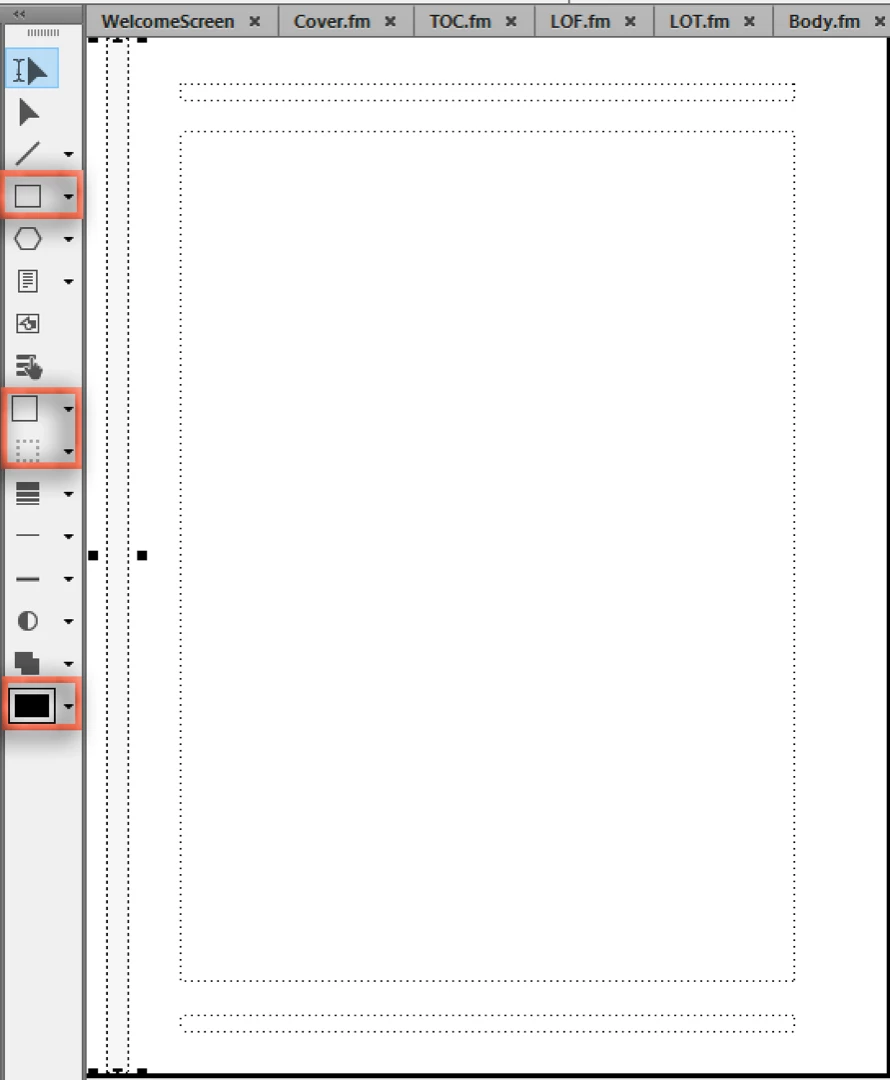
In your case, it looks like you want a very simple, light gray rectangle so you can create it in FrameMaker using the drawing tools:

  1. View > Master Pages
  2. View > Toolbars > Graphics Toolbar
  3. Select the rectangle tool and draw the shape
  4. Set the Fill Pattern and Pen Patterns
  5. Choose the color
  6. Repeat on the facing page
    Screen Shot 2018-11-26 at 8.33.33 AM.png

~Barb

Translate
Community Expert ,
Nov 26, 2018 Nov 26, 2018

On a Master Page, create a rectangular graphics object, offset 0,0, size of page, fill none, border strength and color as desired, run-around off, send to back. Copy to all master pages.

Translate
Report
Community guidelines
Be kind and respectful, give credit to the original source of content, and search for duplicates before posting. Learn more
community guidelines
Explorer ,
Nov 26, 2018 Nov 26, 2018
LATEST

Thanks for your help!

Elizabeth

Translate
Report
Community guidelines
Be kind and respectful, give credit to the original source of content, and search for duplicates before posting. Learn more
community guidelines
Community Expert ,
Nov 26, 2018 Nov 26, 2018

Hi Elizabeth:

Yes, you can add repeating graphic objects to the master pages.

In your case, it looks like you want a very simple, light gray rectangle so you can create it in FrameMaker using the drawing tools:

  1. View > Master Pages
  2. View > Toolbars > Graphics Toolbar
  3. Select the rectangle tool and draw the shape
  4. Set the Fill Pattern and Pen Patterns
  5. Choose the color
  6. Repeat on the facing page
    Screen Shot 2018-11-26 at 8.33.33 AM.png

~Barb

Translate
Report
Community guidelines
Be kind and respectful, give credit to the original source of content, and search for duplicates before posting. Learn more
community guidelines
Explorer ,
Nov 26, 2018 Nov 26, 2018

Thanks very much for your help!

Elizabeth

Translate
Report
Community guidelines
Be kind and respectful, give credit to the original source of content, and search for duplicates before posting. Learn more
community guidelines