Inspiring
February 8, 2018
Answered

Is there a Framemaker Extendscript object model?

  • February 8, 2018
  • 5 replies
  • 1497 views

I am looking for any information on this topic. I have used FM for decades, but never delved into scripting. Now that I wish to do so, I find that all sorts of Adobe products have object models available, but there does not seem to be anything for FM. I am very new to scripting, as well, so perhaps I am not even asking the right question?

Please assist, if you can?

This topic has been closed for replies.
Correct answer Ian Proudfoot

Yes there is an Object Model for FrameMaker. The most visible representation is in the ExtendScript Tool Kit's Object Model Viewer. You can access it from the ESTK help menu or by simply pressing F1.
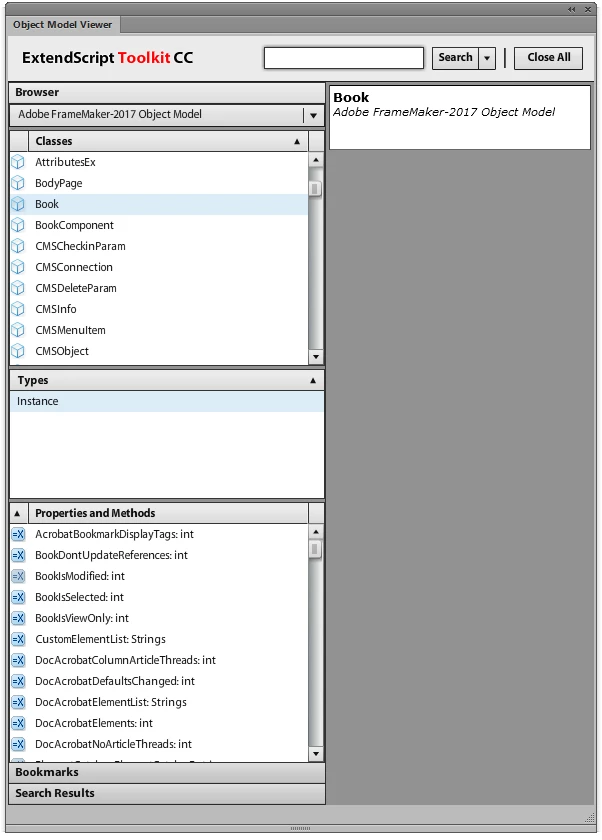
There is also a PDF file with a great deal of essential FrameMaker information for all Objects, Properties and Methods. However before you get into FrameMaker scripting, you will need to get familiar with JavaScript programming because the core of ExtendScript is a rather elderly version of the popular scripting language. Again from the ESTK Help menu click on Adobe Intro To Scripting. The full detail is in JavaScript Tools Guide CC.

It may be that your FrameMaker installation does not include the ESTK. That can be downloaded as a free component of the Adobe Creative Cloud. https://helpx.adobe.com/creative-cloud/kb/creative-cloud-apps-download.html

Once you get started there's always help and encouragement on this forum. Enjoy your scripting!

Ian

5 replies

Inspiring
February 8, 2018

Hi Again,

Lots of great information! I will follow up. Unfortunately, I also have to get my regular work done, so this will be a free-time project. If I ever get any!

I don't want to slight anyone by picking one of you as "correct." but if I need to do that to close this thread (or whatever) you can choose amongst yourselves, if you please, and let me know?

Thanks again!

Andy

Inspiring
February 8, 2018

Hi All,

I want to thank you for the quick responses. I have no idea what "intellisense" is, so I don't think that's what I'm looking for.

I know I have a lot to learn, but I was (and am still) hoping to work from both ends--i.e., Learn JS and ES concurrently--and I will definitely explore the resources mentioned.

Unfortunately, I am doing this at my office, and that link to the InDesign JScript help is blocked. I'll see if I can get an exception added to be able to view it. And (I must ask) how applicable will the InDesign information be to FrameMaker?

Anyway, thanks again, and any more information or resources would be greatly appreciated.

Andy

frameexpert
Community Expert
Community Expert
February 8, 2018

Although the Jongware site has mostly InDesign information, he provides the FrameMaker chm and html files as a courtesy.

Otherwise, the InDesign and FrameMaker object models are quite different.

frameexpert
Community Expert
Community Expert
February 8, 2018

Also, check out my blog. I haven't posted much lately, but there is some good ExtendScript information on it:

http://frameautomation.com

Here are a couple of more links:

Extending FrameMaker

FrameMaker ExtendScript Samples - West Street Consulting

The last site is by Russ Ward who is a frequent contributor to this forum.

frameexpert
Community Expert
Community Expert
February 8, 2018

You should also go to the site below and get the chm or html files based on the XML file that feeds the Object Model Viewer. I find it easier to use the chm file rather than ExtendScript's Object Model Viewer.

Indesign JavaScript Help

Scroll down until you see the FrameMaker 12 entry.

Also, I recommend downloading the FrameMaker FDK (Frame Developers Kit). The user manual is a good "theory guide" for understanding the FrameMaker object model. The examples will all be in C, but since ExtendScript (and FrameScript) is a wrapper for the FDK, you get a good idea of how FrameMaker objects and properties are organized. The ExtendScript documentation is pretty weak.

Ian Proudfoot
Legend
February 8, 2018

If you do choose to use the CHM files you may need to unblock them before they show anything but the table of contents. Just right click on the chm file ten select Properties. In the dialog box check Unblock.

Ian Proudfoot
Ian ProudfootCorrect answer
Legend
February 8, 2018

Yes there is an Object Model for FrameMaker. The most visible representation is in the ExtendScript Tool Kit's Object Model Viewer. You can access it from the ESTK help menu or by simply pressing F1.

There is also a PDF file with a great deal of essential FrameMaker information for all Objects, Properties and Methods. However before you get into FrameMaker scripting, you will need to get familiar with JavaScript programming because the core of ExtendScript is a rather elderly version of the popular scripting language. Again from the ESTK Help menu click on Adobe Intro To Scripting. The full detail is in JavaScript Tools Guide CC.

It may be that your FrameMaker installation does not include the ESTK. That can be downloaded as a free component of the Adobe Creative Cloud. https://helpx.adobe.com/creative-cloud/kb/creative-cloud-apps-download.html

Once you get started there's always help and encouragement on this forum. Enjoy your scripting!

Ian

Inspiring
February 8, 2018

No sure what you mean with object model. Yes of course it has one

if you are asking for "IntelliSense", check the small dropdown right to the debugging Buttons and activate it, if no IntelliSense appears, when you select object model in left dropdown.

If you are asking for help, press F1 for a quick overview and use ExtendScript reference from here:

FrameMaker Developer Center

Hope this helps.

Markus
