
Left and right master pages not applying properly from reference table
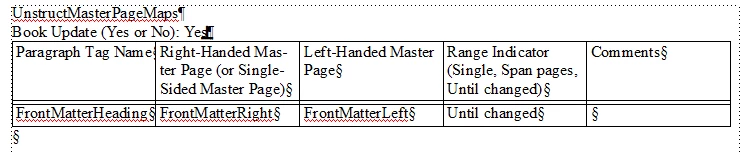
I set up right-hand and left-hand custom master pages for my document and added them to the UnstructMasterPageMaps reference table as the right-handed and left-handed page for when the relevant paragraph tag is used. Then I saved, applied the master pages, and hoped for the best...
Well, the master pages don't appear to be applying as-intended. While the apply function did update on my first test page (a left-hand page), typing to the end of the page and carrying over adds a new standard Right page and then one of my custom left-hand pages to continue the text flow, rather than continuing the text flow on the right-hand custom page I entered in the reference table. Both text frames in my custom master pages have tag "B" and autoconnect checked.
If I force it to have a left-hand custom page and start typing on that, the text overflow on that will start a new left-hand version of the custom page rather than a right-hand one to follow.
The pagination of the document is set to double-sided. The standard Left/Right master pages, which I have edited some, do not have this issue. Any custom pages I try to create and add to the reference table do. The spelling and capitalization of all the tag names is exact. What am I missing?
 AdChoices