Known Participant
Nov 2, 2022 3:47 PM UTC
Answered

Line Formatting in List of Figures/Tables

Hi, 


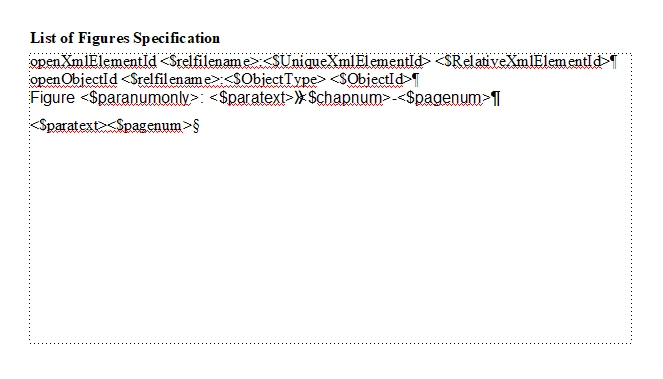
I am creating a List of Figures and a List of Tables for my document. Some of my figure and table headings are fairly long, and, the description text in the list continues onto a second line. I placed an extra tab before the <$chapnum> and a nonbreakable hyphen between <$chapnum> and <$pagenum> on my reference page (see below). However, when the text length is such that the number is split between the first and second line, the alignment does not work. Please see the example below and let me know if there is anything that I can do to get the chapter and page numbers to align right.



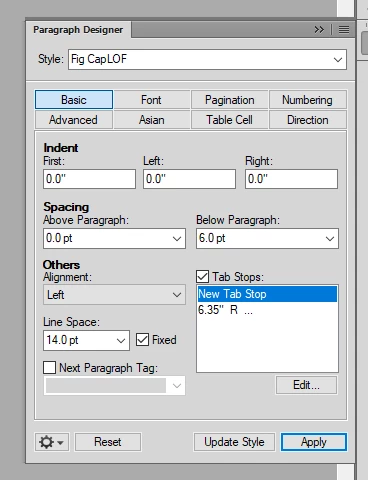
Tab Setup:


Reference Page:


Thank you,

Nick 

    This topic is closed to new replies. Start a new post to keep the conversation going.
    Barb Binder
    Barb BinderCorrect answer
    Community Expert
    Nov 10, 2022 9:45 PM UTC

    Hi Nick:


    I'm out of class but unclear if you are good to go, or not, since you marked answers as correct, but just in case:


    On the reference page, remove the two tabs and the space between <$paratext> and <$chapnum>, replace with a single tab.


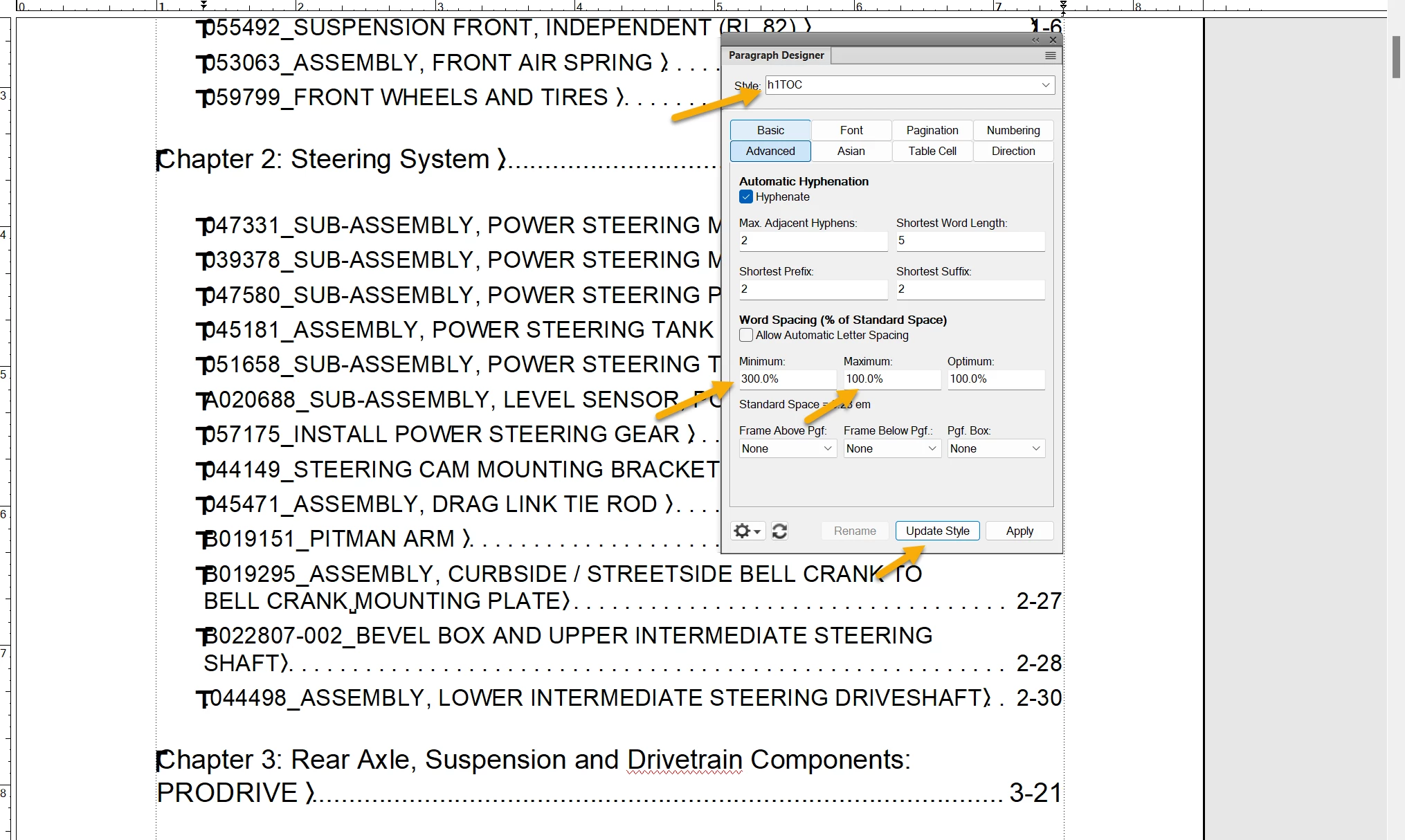
    On the body pages, edit the h1TOC style as shown below and click Update Style.


    ~Barb

    ~Barb at Rocky Mountain Training

    13 replies

    Barb Binder
    Community Expert
    Community Expert
    Nov 12, 2022 12:02 AM UTC

    We are always happy to help, Nick.


    ~Barb

    Translate
    ~Barb at Rocky Mountain Training
    Barb Binder
    Community Expert
    Barb BinderCommunity ExpertCorrect answer
    Community Expert
    Nov 10, 2022 9:45 PM UTC

    Hi Nick:


    I'm out of class but unclear if you are good to go, or not, since you marked answers as correct, but just in case:


    On the reference page, remove the two tabs and the space between <$paratext> and <$chapnum>, replace with a single tab.


    On the body pages, edit the h1TOC style as shown below and click Update Style.


    ~Barb

    Translate
    ~Barb at Rocky Mountain Training
    Known Participant
    Nov 11, 2022 4:27 PM UTC

    That worked! Thank you Barb.

    Nick

    Translate
    Barb Binder
    Community Expert
    Community Expert
    Nov 10, 2022 2:19 PM UTC

    Hi Nick:


    Here is a trick for older versions of FrameMaker that I learned from @Winfried Reng: restore the single tab between <$paratext> and <$pagenum> and update your book.


    Then click in the problem style:

    Paragraph Designer > Advanced: set the Minimum Spacing to 200% and the Maximum Spacing to 100%. Update the style. 


    Let us know if that works for you.


    ~Barb


    EDIT: It's early here. @LinSims referenced the same answer in the post directly above mine on November 3. Did you give it a shot?

    Translate
    ~Barb at Rocky Mountain Training
    Known Participant
    Nov 10, 2022 2:47 PM UTC

    That worked! Thanks. Btw, just saw @LinSims response. Thanks a buch y'all!

    Nick


    Translate
    Known Participant
    Nov 10, 2022 3:08 PM UTC

    I may have spoken a bit too soon. I made the spacing changes, and all but the two entries shown below look great. Should I make a change to the spacing values? 


    Translate
    Barb Binder
    Community Expert
    Community Expert
    Nov 2, 2022 5:45 PM UTC

    What version are you on, @Nick26557183qsr8? If you are on Fall 2022, then this is a good use for the brand new last line right indent. The bonus is it will push ROOFTOP to the next line, so the page number won't be alone. 

    https://www.rockymountaintraining.com/adobe-framemaker-last-line-right-indent/


    Translate
    ~Barb at Rocky Mountain Training
    LinSims
    Community Expert
    Community Expert
    Nov 2, 2022 5:50 PM UTC

    I was going to suggest that, but her screenshot of the Basic tab doesn't show the new Last Line Right field. She's at least on 2020 and maybe earlier.

    Translate
    Known Participant
    Nov 2, 2022 6:54 PM UTC

    @Barb Binder I think from @Nick26557183qsr8 's prior posts they're on FM2017.


    Hi Lin, Barb and Jeff. Thank you for your responses. My company is on FM2017. I can talk to them about upgrading, but I'd rather not do that on my own, since I have a company subsrciption.


    Lin, will it fix my issue if I insert a tab into the paragraph definition?


    Thanks again,
    Nick

    Translate
    LinSims
    Community Expert
    Community Expert
    Nov 2, 2022 5:38 PM UTC

    You put an extra tab in on the reference page, but not on the paragraph definition.

    Translate