


Participant
December 15, 2010
Question

line width on framemaker table

  • December 15, 2010
  • 3 replies
  • 1187 views

hi there... i've got an issue on generated the framemaker9 - pdf.

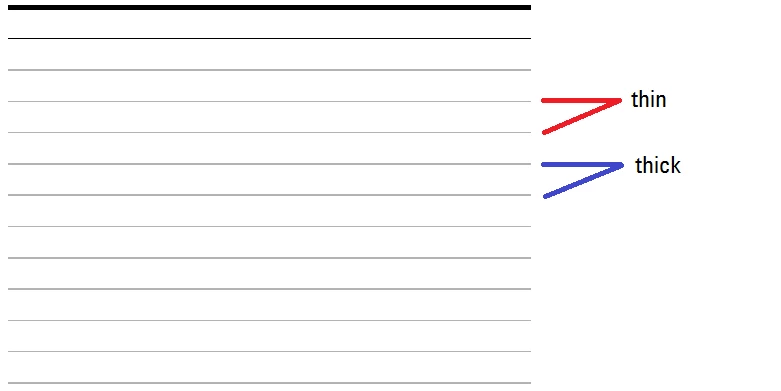
First, After generated to pdf, the table line width looks like not consistent. There are some thin and thick.. how must i do to get the table look nice with the all line is thin...

procedure that i use to build the table is ------> Custom ruling and shading - choose from table (apply ruling style)

Second - what is the difference between click or not at convert CMYK to RGB at settings in PDF Setup ? What exactly the function of convert CMYK to RGB ?
    This topic has been closed for replies.

    3 replies

    December 15, 2010

    sha dien, further to Michael's explanation of the visual distortion in ruling lines in the PDF, you will also find that when viewing the PDF on-screen that the apparent inconsistencies on the lines changes (and disappears then reappears) when you change the zoom level higher/lower on the PDF. I've also seen the appearance change as I move the visible part  up/down within the Acrobat window.

    It's very disconcerting, there's no doubt about that.

    Sheila

    Van Kurtz
    Inspiring
    December 15, 2010

    Sha,

    In the Custom Ruling and Shading box, selecting Apply Ruling Style From Table, tells FrameMaker to apply the ruling specified in the table's format, which is a named table format created in the Table Designer. Custom Ruling and Shading is most often used to override the table's format for part of the table. Therefore, making the selection you are making changes nothing that is already in the table itself.

    So, select the table and open the Table Designer. Select the Ruling tab and set all the thicknesses to Thin, or whatever you want. Note that there are separate settings for row rules, column rules, heading and footing rules, and outside rules. These rules can all be different.

    Furthermore, if you do not like the default rule thicknesses (very thin, thin, medium, etc), you can change them in Custom Ruling and Shading by clicking the Edit Ruling Style button.

    Hope this helps,

    Van

    Michael_Müller-Hillebrand
    Legend
    December 15, 2010

    Sha,

    If you have two separate questions, please create two posts. (Converting CMYK to RGB is the default behaviour of all previous versions of FrameMaker on Windows. Switching off this conversion is supposed to pass through the CMYK data when saving as PDF. Whether you need this or whether it works completely as you need it, you have to test.)

    Regarding line widths: Have you printed the page?

    Assuming your line with is set to be 0.5pt. With 72pt/inch and 25.4mm/inch you get a theoretical line width of 0.1764mm.

    Your screen has a resolution of maybe 96ppi (pixel per inch) so each pixel has a width of 0.2645mm. You can see that with pixels so wide, you can not successfully show 0.1764mm in 100% zoom size. The software (e.g. Adobe Reader) tries its best, but sometimes fails. The human eye is very good at detecting patterns and recognizes even slight changes inside a pattern very easily.

    Your printer may have a resolution of 600dpi (dot per inch) so each dot is as tiny as 0.0423mm. This time the printer may use about 4 dots to create the 0.5pt line, with a 1200dpi printer it could be 8 dots.

    So in the end what you see is just a technological limitation. If the so-called "Retina" display makes its way into mass market with >300ppi resolution those effects will fade away...

    - Michael