
christopherf7897462
Known Participant
January 9, 2017
Question

Microsoft HTML Help

  • January 9, 2017
  • 2 replies
  • 1265 views

Hello,

Our team is having difficulty with publishing to Microsoft HTML Help.

We can produce the help file, but the "Contents" tree is messed up.

Here are the problems:

-Everything is appearing at the same level in the tree
-The very first contents topic shown is the name of the document rather than the first Chapter title

In "Style Mapping, I selected the "Split into topics based on this style" check-box for first three Headings.

This is the result I get:
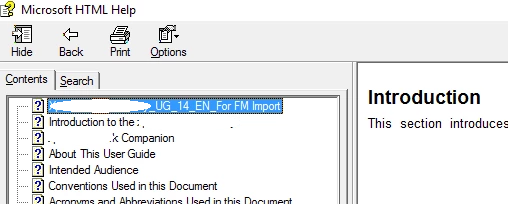
The first topic is the name of the file, not the section in FrameMaker (Introduction). And everything is at the same level.

Can someone please walk me through the basic steps to produce an HTML help file with a proper contents tree?

There is virtually no help in the FrameMaker Help Document, nor online.

Thank you,

CJ

This topic has been closed for replies.

2 replies

Robert_^_W
Inspiring
March 16, 2017

I found there was a little bit of a learning curve with the help publishing on 2015, with regard to where it splits the documents, the nesting in the TOC and the context sensitive help points. The biggest thing was getting the TOC right and up to date to avoid having file names in the help file, and that breaking up the TOC hierarchy. I've worked through most of the issues but stuck on search keywords being limited to first level headings, and the size of the help window.

Ritkumar
Adobe Employee
Adobe Employee
January 10, 2017

Hi,

I am assuming you are publishing Unstructured FM documents.

Generate TOC document in your content using the below help -

http://help.adobe.com/en_US/framemaker/2015/using/index.html#t=using-framemaker-2015%2Ffrm_books_bk%2FGenerate_a_table_of_contents_or_list-.htm

Use Heading styles to generate the TOC and then publish your output.

Please revert if you have any more queries.

Thanks

christopherf7897462
Known Participant
January 10, 2017

I've generated the TOC, but the help file is still giving me the exact same results (everything at the same level within the contents tree, using the name of the file for the first topic rather than the heading)

What should the settings within Style Mapping be?

Is there not a step by step to create a help within the FM 2015 help?

Thanks.

Jeff_Coatsworth
Community Expert
Community Expert
January 10, 2017

IIRC, FM is using the indent levels of the headings to figure out how to create the TOC in the published output. There’s an Adobe Techcomm blog post about it.