

Exit
  • Global community
    • Language:
      • Deutsch
      • English
      • Español
      • Français
      • Português
  • 日本語コミュニティ
  • 한국 커뮤니티
0

Mirrored shadow letters in titles

Explorer ,
May 14, 2021 May 14, 2021

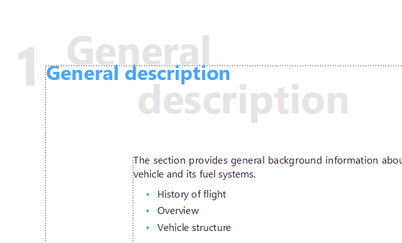
I guess, many noticed these grey mirrored shadow letters in titles of some templates:
186543007_513414386705845_3642160566390864361_n.png

How to get access to it in some settings to delete or to set it up in a different way?

TOPICS
Formatting and numbering
619
Translate
Report
Community guidelines
Be kind and respectful, give credit to the original source of content, and search for duplicates before posting. Learn more
community guidelines

correct answers 1 Correct answer

Community Expert , May 14, 2021 May 14, 2021

Sorry, Master page

Translate
Community Expert ,
May 14, 2021 May 14, 2021

Probably on the Reference page

Translate
Report
Community guidelines
Be kind and respectful, give credit to the original source of content, and search for duplicates before posting. Learn more
community guidelines
Explorer ,
May 14, 2021 May 14, 2021

There is something very strange. It does not look like an ordinary refence page. It is some HTML mapping table. I found there Chapter Title, but I have no idea how to edit this shadow. Should I delete the mark "throw away" or change it to N?


186224975_314724986722403_59826760047874589_n.png

Translate
Report
Community guidelines
Be kind and respectful, give credit to the original source of content, and search for duplicates before posting. Learn more
community guidelines
Adobe Employee ,
May 16, 2021 May 16, 2021

No, this is the HTML Mapping Table. This has nothing to do with the "shadow" effect.

As Jeffe mentioned, the shadow paragraph is on the Master Page.

See also your other post, where I have answered how to edit it.


P.S.: For everyone who wants to look at it, it's one of the sample file shipped with newer versions of FrameMaker here:

C:\Program Files\Adobe\Adobe FrameMaker 2020\Samples\UserGuide(Arabic,English,Hebrew)\English

Translate
Report
Community guidelines
Be kind and respectful, give credit to the original source of content, and search for duplicates before posting. Learn more
community guidelines
Community Expert ,
May 14, 2021 May 14, 2021

Sorry, Master page

Translate
Report
Community guidelines
Be kind and respectful, give credit to the original source of content, and search for duplicates before posting. Learn more
community guidelines
Explorer ,
May 14, 2021 May 14, 2021

Oh! Now I see. I just need to change color of the shadow from grey to white. And it becomes unvisible. But how to create this shadow by himself in any document?

Translate
Report
Community guidelines
Be kind and respectful, give credit to the original source of content, and search for duplicates before posting. Learn more
community guidelines
Community Expert ,
May 16, 2021 May 16, 2021
LATEST

When you need this text in all other documents, then import the master pages and paragraph formats into the other files.

However, be careful! There are files like TOC or title pages or copyright pages which should keep there own layout!

Translate
Report
Community guidelines
Be kind and respectful, give credit to the original source of content, and search for duplicates before posting. Learn more
community guidelines

