
Exit
  • Global community
    • Language:
      • Deutsch
      • English
      • Español
      • Français
      • Português
  • 日本語コミュニティ
  • 한국 커뮤니티
0

Missing DLL being reported on XML file load

Explorer ,
Dec 19, 2024 Dec 19, 2024

Hi

I have FrameMaker 2022 17.0.5.725 installed on my laptop and use it to maintain a structured application which requires XSL transformations on XML load and save. I have a modified maker.ini file which specifies a different path for the SAXON XSL processor rather than the one which us delivered with FrameMaker. Everything is working fine in my environment.

This week I have been inducting a colleague into the FrameMaker world so that they can take over some of the responsibilities for the application. We've installed the identical version of FM, correctly specified the Saxon path for their environment, and gone through loading, editing and saving a number of our documents. So far as we can tell the inputs and outputs are identical, but when their FM runs the import or export XSL transform, their FM console echoes the following line hundreds or thousands of times:
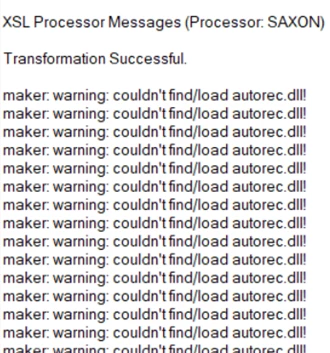
saxon_dll_warning.png

There are two autorec.dll libraries, one is in "Program Files\Adobe\Adobe FrameMaker 2022\Legacy32" and the other is in "Program Files\Adobe\Adobe FrameMaker 2022\filters". Both of us have both of these libraries. I presume it is the DLL in filters that is being accessed (or not), but I cannot for the life of me see why my installation is locating it while my colleague's is not.

It's not a maker.ini problem or a failed installation/upgrade. I'm not sure what else it could be though. The DLL is there, my laptop sees it, theirs does not.

Anything else I could check?

cheers

T


552
Translate
Report
Community guidelines
Be kind and respectful, give credit to the original source of content, and search for duplicates before posting. Learn more
community guidelines
Community Expert ,
Dec 23, 2024 Dec 23, 2024

Has the DLL been installed on your machine? Maybe there's a Registry entry for it on yours that doesn't exist on theirs?

Translate
Report
Community guidelines
Be kind and respectful, give credit to the original source of content, and search for duplicates before posting. Learn more
community guidelines
Explorer ,
Dec 25, 2024 Dec 25, 2024

There's no DLL of that name in my registry (where I don't get this message). I'll check with my colleague after the holiday break and see if it is found in theirs.

A thought I have just had is to check if there is a different file association for XML files on their machine, because that might trigger a filter step when loading the document that isn't considered necessary on mine.

Translate
Report
Community guidelines
Be kind and respectful, give credit to the original source of content, and search for duplicates before posting. Learn more
community guidelines
Explorer ,
Jan 22, 2025 Jan 22, 2025
Translate
Report
Community guidelines
Be kind and respectful, give credit to the original source of content, and search for duplicates before posting. Learn more
community guidelines
Explorer ,
Jan 22, 2025 Jan 22, 2025

Thank you for your suggestion. I don't see the relevance though.

Despite the transform reporting that it can't find the DLL, both machines have DLLs of the same name in the same locations; one instance of Frame reports an error, the other does not. Neither of us have (or need) Visual Studio.

Translate
Report
Community guidelines
Be kind and respectful, give credit to the original source of content, and search for duplicates before posting. Learn more
community guidelines
Community Expert ,
Jan 22, 2025 Jan 22, 2025

I'd give the FM folks a ping - see https://helpx.adobe.com/contact/enterprise-support.other.html#framemaker for your Adobe Support options. I'd recommend using the tcssup@adobe.com e-mail address as it reaches a team dedicated to Technical Communication Suite products including FrameMaker.

Translate
Report
Community guidelines
Be kind and respectful, give credit to the original source of content, and search for duplicates before posting. Learn more
community guidelines
Explorer ,
Jan 22, 2025 Jan 22, 2025
LATEST

日本語ですみません。

同じ現象になり、解消するにはどうすればよいのかという観点でのみ調査をしていました。


ランタイム コンポーネントなので、Visual StudioがPCに入っているかは関係ありません。

FrameMaker側でautorec.dllを動かすのに必要なランタイム(MSVCR120.dll)と思います。

FrameMaker2019では自動的にインストールされていそうで、FrameMaker2022ではインストールされません。

FrameMaker2019⇒FrameMaker2022とインストールするとこの現象は発生しないところから今の解消方法を出しています。

Translate
Report
Community guidelines
Be kind and respectful, give credit to the original source of content, and search for duplicates before posting. Learn more
community guidelines