
Known Participant
January 9, 2020
Answered

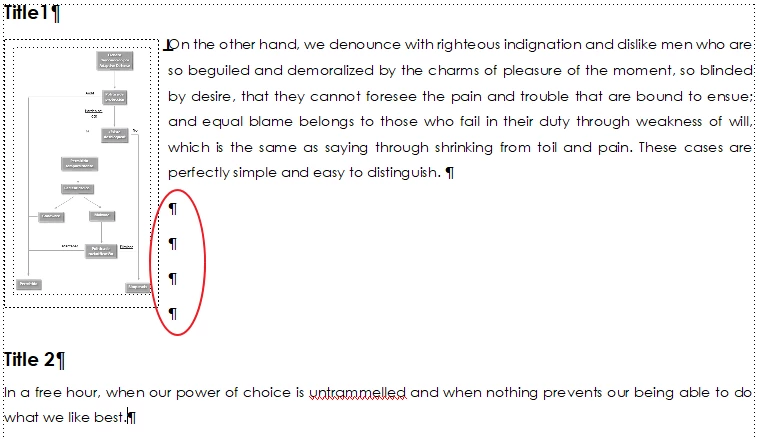
Move paragraph under picture

  • January 9, 2020
  • 4 replies
  • 947 views

Hi all

It's a very simple question but I'm unable to find a solution. Is it possible to move the "Title 2" under the image without insert line breaks manually? The anchoring position of the image frame is set to "Run into paragraph".  I'm using FM 2019 unstructured and pdf output.

Thanks a lot
This topic has been closed for replies.
Correct answer Bob_Niland

Some quick hacks to do that are:

  1. Borderless table anchored to Title 1, 1 row, 2 column
  2. AF: Anchored frame (to Title 1) with art element and a text frame within (I'm doing this for a current project because the art element is irregular and I want run-around)
  3. As is, but add an empty AF below "and easy to distinguish", aligned center or right, and use its lower edge to shove the subsequent text down.
  4. Assign a specific paragraph format to the side text, with generous Space Below

This is all fine for a PDF target. Might not be ideal for other workflows.

4 replies

Jeff_Coatsworth
Community Expert
Community Expert
January 13, 2020

You're probably going to need to set up 2 sets of conditional tags - one for PDF output and one for HTML5 output. If you publish directly out of FM, you'll need to adjust your Show/Hide settings to filter the content for the appropriate output format before creating the output. If importing into RH, you can choose to filter it before in FM or afterwards in RH before creating the output.

Jeff_Coatsworth
Community Expert
Community Expert
January 10, 2020

You're copying & pasting FM content in RH? Why? Just create a new project and import it 😁

Known Participant
January 13, 2020

Jeff, we're copying content in RH due to issues like the one included in this topic 🙂

When we made the first version of the documentacion there is no html version in mind, only pdf output. Now we have to make html version too and there are several problems like "anchored frames", "run into paragraphs" and othe things that don't fit very well when output to html.


Jeff_Coatsworth
Community Expert
Community Expert
January 10, 2020

Why are you converting to RH? You only mentioned PDF as your output & FM is better at that then RH. If you're also creating HTML5 help, you can do that straight out of FM you know.

Known Participant
January 10, 2020

Hi Jeff


We maintain both pdf and html5 versions of the same documentation. Our workflow first produces pdf output with FM and then we publish to html5. Actually this process is manual (copy & paste from FM to RH), but we are setting up FM to output html5 too.

Bob_Niland
Community Expert
Bob_NilandCommunity ExpertCorrect answer
Community Expert
January 9, 2020

Some quick hacks to do that are:

  1. Borderless table anchored to Title 1, 1 row, 2 column
  2. AF: Anchored frame (to Title 1) with art element and a text frame within (I'm doing this for a current project because the art element is irregular and I want run-around)
  3. As is, but add an empty AF below "and easy to distinguish", aligned center or right, and use its lower edge to shove the subsequent text down.
  4. Assign a specific paragraph format to the side text, with generous Space Below

This is all fine for a PDF target. Might not be ideal for other workflows.

Bob_Niland
Community Expert
Community Expert
January 17, 2020

I might add that it wouldn't be FM if there weren't at least 42 ways to do it.


In a former assignment, we ended up dealing with this by using a 2-column page layout, and alternating between matched In-Column (e.g. Body), and Across-All-Columns (e.g Body.aac) ¶formats. The transistion forces a "quad-left". It was explored in this old shaggy dog thread.


I didn't suggest it in the present case, because 2-col likely introduces new problems for workflows other than PDF & print.