
Exit
  • Global community
    • Language:
      • Deutsch
      • English
      • Español
      • Français
      • Português
  • 日本語コミュニティ
  • 한국 커뮤니티
0

Not a complete reference location

New Here ,
Nov 07, 2011 Nov 07, 2011

Hi everyone,

I am technical author and have a reasonable understanding of framemaker and various other types of software. My question is:-

When I insert files into anchored frames e.g. Photos, I reference them to their file location on our company network to save memory instead of copying them straight in. Once I have saved and closed the framemaker file I move its location to a different area on our network this is necessary for how we oganise our files. When i re-open the file the referenced photo becomes grey and when I right click on the photo and go onto object properties a half reference appears. (See below)
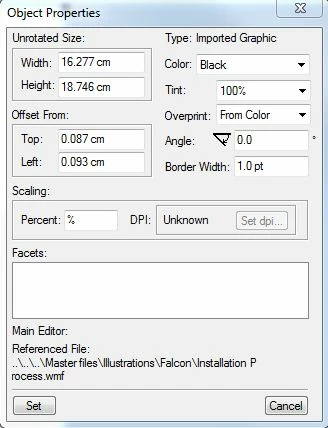
Objet properties.JPG

Why does this happen and how do I prevent this from occurring?

724
Translate
Report
Community guidelines
Be kind and respectful, give credit to the original source of content, and search for duplicates before posting. Learn more
community guidelines
Community Expert ,
Nov 07, 2011 Nov 07, 2011

Frame stores the reference to imported objects as a relative file path.

If the Frame document file is moved to a position in your filesystem hierarchy where the referenced files are no longer at that same  location relative to the document, the imports fail and go gray.

You have to open the document, in Frame, at a working location, then re-save it at the new final location.

Alternatively, you can save it as MIF and hack the MIF for file paths (we do that for translation prep).

There are also aftermarket tools for prepping references for a file move.

Translate
Report
Community guidelines
Be kind and respectful, give credit to the original source of content, and search for duplicates before posting. Learn more
community guidelines
Community Expert ,
Nov 07, 2011 Nov 07, 2011

I might add that although it would be nice if Frame had ...

Format > Document > Imports

[ * ] Use relative file paths

[   ] Use absolute file paths

... the problem is that the root specifier syntax historically was (and remains) entirely different for the Windows, Unix and Mac platforms.

Even now that Frame is Windows-only, the syntax of the root directory specifier is at least mostly constant (it could be UNC), but its value remains unstable (thanks a lot, Mr.Bill).

True, the root is often "C:\", but if it's a mapped network or removable media path, the letter can change unexpectedly, causing the import references to all fail once again.

Translate
Report
Community guidelines
Be kind and respectful, give credit to the original source of content, and search for duplicates before posting. Learn more
community guidelines
Advocate ,
Nov 07, 2011 Nov 07, 2011
LATEST

St John,

to force FrameMaker to use absolute paths (if you are sure the location of the images never changes) you can create the files on another drive than the images, e.g. your local drive.

Another option to maintain the relativ paths is to Save-As the files to their new location instead of copying them via Explorer; using this method all paths are automatically adjusted by FrameMaker.

- Michael

Translate
Report
Community guidelines
Be kind and respectful, give credit to the original source of content, and search for duplicates before posting. Learn more
community guidelines