


- Home
- FrameMaker
- Discussions
- Re: Note element with additional paragraphs
- Re: Note element with additional paragraphs
Note element with additional paragraphs

Copy link to clipboard
Copied
FrameMaker 11.0.2.384
DITA 1.2
We need to have our <note> element so that the first or only paragraph is *not* wrapped in a <p> element. However, we want to add additional <p> elements after the first paragraph when necessary.
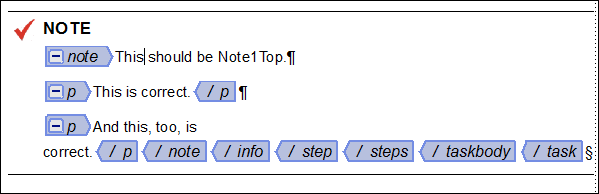
Here is what we want:
Here is what we get:
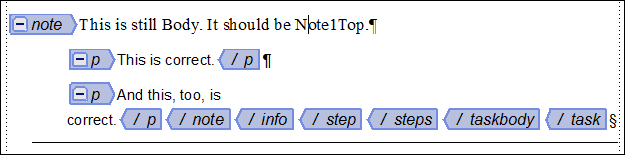
I have defined the following paragraph tags:
Note1Top (includes the frame above with the Note graphic and the rule)
Note1Middle (no rules and no graphic)
Note1Bot (a bottom rule and no graphic)
Note1 (use for scenarios where there are no additional paragraphs)
I have defined the <p> elements in my EDD and they are working correctly. I need to figure out how to define my <note> element in the EDD so that it uses Note1Top when they are child paragraphs or Note1TopBot when there are no child paragraphs.
Currently I have this in my <note> element in the EDD:
Else, if context is: note < (stepxmp | stepresult | info) < step
1.1.7. If context is: {first}
Use paragraph format: Note1Top
Else, if context is: {only}
Use paragraph format: Note1
I think the reason that the {first} and {only} sibling indicators are not working is that there are no siblings.  But what is my alternative?
Thanks in advance for any help you can provide.
Marsha


 18
Replies
18
18
Replies
18


Copy link to clipboard
Copied
Make that Note1 when there are not child paragraphs.
Marsha

Copy link to clipboard
Copied
Hi Marsha...
I'm not sure that you can do that (I could be wrong .. and if so, someone will point that out).
But if you can, you'll need to jump through a lot of hoops .. my question to you is WHY? It's generally considered to be bad practice to use mixed content like this. Why not just use <note> with child <p> tags in all cases? (If it's because the OT renders your note/p on separate lines .. that's a bad reason to do it! That can be fixed.)
Sorry to respond to your question with another question!
...scott

Copy link to clipboard
Copied
Hello Marsha,
what you are trying, is to use something like an XPATH expression, like in a XSLT stylesheet.
With FM this simply doesn't work. You cannot test for child nodes in a context rule.
If you are working with raw XML files and not FM files you could define a XSLT to be used as preprocessor, that could set an attribute which could do the trick.
But as Scott already mentioned, that is something not being exactly best practice for such a case.
It would indeed be easier to not place text directly into the note element and use a <p> element even if there's only one paragraph.
You could then test for this in the context rules for <p>, as parent/sibling rules are included in EDDs.
-Alex

Copy link to clipboard
Copied
Marsha,
As others have said, it is not possible to test for child paragraphs within context rules. And I agree with the sentiment about your structural setup being suboptimal. Could you explain the requirement for this setup? Perhaps somebody might have some thoughts about how to do it differently.
Russ
Copy link to clipboard
Copied
Thank you Scott, Alex, and Russ.
The requirement comes from our corporate office. Up until now, we used the <p> element even if there was only one paragraph. Corporate is saying that a <p> in a note is not acceptable. Corporate uses Arbortext Editor with DITA OT output. We use FrameMaker 11 (soon to be 12) but must still use their DITA OT output. Their DTD allows what we want to do and the output works well.
So far we've been successfully stubborn  in our attempts to stay on FrameMaker rather than moving to Arbortext. (We do have access to Arbortext.) It was and is an easier transition to DITA for our writers who have been using FM for years.
Marsha
Copy link to clipboard
Copied
As I suspected. I keep expecting them to fix this oversight (bug) in the OT that renders the note label on a separate line from the note content if you use a note/p. This can be fixed by making a minor tweak to the OT (OK, I haven't done it, but I'm sure it's easy).
Forcing the authoring model to use an undesirable element structure to accommodate a bug in your publishing tools doesn't sound like a good idea to me. I'd push back and tell them to fix their tools.
The only other solution you have is to use ExtendScript or other scripting to perform a publishing cleanup task to retag the notes.
Cheers,
...scott
Copy link to clipboard
Copied
OK .. here's how to "fix" the problem with the OT.
All that's needed is a little CSS tweak. When the OT generates HTML from a note/p it creates the following ..
<div class="note note"><span class="notetitle">Note:</span> <p class="p">Note in a <p></p> <p class="p">Second para in a <p></p> </div>
So .. by default, this gets rendered as ..
Note:
Note in a <p>
Second para in a <p>
Just add the following rule to your CSS and it should work "properly" ..
.note > .p:first-of-type { display: inline; }You'll get this ..
Note: Note in a <p>
Second para in a <p>
Now .. you can use the "proper" structure in your DITA files and get the right output in HTML.
Cheers,
...scott
Copy link to clipboard
Copied
I am so-o-o-o-o close. I'm sure that there's a way to do this. (Okay, I admit it. I'm stubborn.  )
)
Here is what I have now:

In step 1 with the multiple paragraph note, all is well.
Unfortunately, in step 2, with just a single paragraph note, I'm not getting my bottom line. It is outputting Note1Top rather than Note1.
Here are my rules (in the <note> element):
Format rules for first paragraph in element
1. If context is: (stepxmp | stepresult | info) < step
1.1 If context is: {only}
Use paragraph format: Note1
The above rule is not working as evidenced by the fact that I don't have a line under my second note.
Else
Use paragraph format: Note1Top
This is working because whether I have extra paragraphs or not, I still get the frame above with the glyph and the line above.
Format rules for last paragraph in element
1. If context is: (stepxmp | stepresult | info) < step
Use paragraph format: Note1Bot
This is almost working because when there are multiple paragraphs in the note, the final one has the frame below which gives it the properly-sized line under it. So this is telling me that FM does not recognize an "only" paragraph as both first and last.
Under the Text format rules, because it isn't a first or last paragraph rule, I have:
Else, if context is: (stepxmp | stepresult | info) < step
Use paragraph format: Note1Middle
This is working because the paragraphs that aren't first and aren't last are properly tagged with Note1Middle.
Does anyone have an idea how I can get a Note with no extra paragraphs to work?
Thanks in advance.
Marsha

Copy link to clipboard
Copied
Marsha,
As I understand it, your <note> element can either consist of a sequence of <p> elements or of data characters (and I suppose inline elements as well). I disagree with Scott in that I believe this is a quite reasonable design. I see no reason why users should have to deal with <p> elements that are unnecessary. Even if they are autoinserted, they clutter the Structure View.
It sounds like you can't change the design whether you like it or not, however, and your question is how to get the desired formatting. You'll need to split the formatting between rules for <note> and rules for <p>. In particular, <note> should simply apply pgf fmt Note1. This rule will take care of the case where there are no <p> elements in a <note>. Formatting of <p> within <note> needs to be done in a rule for <p>.
In particular, use one rule that tests whether a <p> is within a <note> (distinguishing notes in steps from others if necessary) and then consider the different formats within a <note in a subrule:
1. If context is: note
1.1 If context is {first}
Use paragraph format: Note1Top
Else, if context is {middle}
Use paragraph format: Note1Middle
Else
Use paragraph format: Note1Bot
A more robust variation is to use Note1 in a <p> that is the only <p> in the Note:
1. If context is: note
1.1 If context is {only}
Use paragraph format: Note1
Else, if context is {first}
Use paragraph format: Note1Top
Else, if context is {middle}
Use paragraph format: Note1Middle
Else
Use paragraph format: Note1Bot
--Lynne
Copy link to clipboard
Copied
Just to be clear .. I don't have a problem with text in a <note>, if there's just a single paragraph .. but when you need multiple paragraphs within a <note>, all of them (including the first) should be in a <p>. Just because the model allows for mixed markup doesn't mean that it's a good idea.
Page 95 of the DITA Style Guide (by Tony Self) ..
The simplest form of mark-up reflects the best practice.
If there is just one block of text in the note, then the note should be left as string-only. This stores the minimum of mark-up, and simplifies the processed output. If there are multiple blocks in the note, then paragraphs, lists (or other block elements) should be used. Never start with string data followed by a block.
In a set of notes, if there is a need for one note to include block elements, then all notes in the set should be consistently treated. Using mixed mark-up methods (blocks in some notes and string-only in others) are likely to result in inconsistent rendering of the output.
String-only text should not be used in the same note alongside block elements.
Copy link to clipboard
Copied
Scott,
Thanks for the clarification, I did misunderstand. My own preference in FM is not permitted in XML and subject to misinterpretation in SGML:
<TEXT>, p*
This approach make is easiest on the writer. He can start typing data characters and add <p> elements if they are needed later on without having to go back and wrap the existing content in <p>. This model prohibits the unfortunate situation of data characters between two <p> elements. To make it work if an XML representation is needed, I use (<TEXT> | p)* in XML which accepts the XML version of content that is valid in FM. The XML model permits undesireable content but as long as the content is maintained in FM, that situation won't occur.
--Lynne
Copy link to clipboard
Copied
I agree with you Scott. However, we have no choice based on the demands of corporate. (Although I have been known to argue with their demands. )
However, I still don't know how to format the string-only Note so it behaves as expected. (See my response to Lynne above.)
Marsha
Copy link to clipboard
Copied
I assume that you saw my post on how to fix the problem (the assumed problem) that corporate has with the OT? That seems like a win-win to me .. no?
Copy link to clipboard
Copied
Hi Scott,
Yes I saw your note. I will certainly use that information if/when I go to bat with corporate about the OT styling. We aren't only generating HTML, but PDFs also. If it were just HTML, this would be relatively easy; we could control that for our output.
And it isn't just an output issue. We have to have our DITA files reviewed by someone outside of our group (someone not using FrameMaker) to ensure that we are playing well in the sandbox. Otherwise, I would have just left the auto-inserted <p> in the note and not bothered with all of this. (The corporate writers are using Arbortext Editor as their writing tool and they do not have this problem. However, as I said in the first article in this thread, we do not want to move to Arbortext.)
Marsha
Copy link to clipboard
Copied
I assume that the PDF output comes from Frame? I certainly hope you're not going to all this effort to control the authoring view .. ?
It's OK .. I really don't need to understand. There are things beyond that which may be sensible when it comes to the corporate world.
Cheers! : - )
...scott
Copy link to clipboard
Copied
Yes, Scott, the output comes from Frame. And I'm going to all this trouble to control the raw xml view. Crazy, but true.
Thanks for your help and sympathy. 
Marsha
Copy link to clipboard
Copied
Hi Lynne,
I am splitting the rules between my <p> element and my <note> element in my EDD. Here's what I have for the <p> element:
Else, if context is: note < (stepxmp | stepresult | info)
If context is: {only}
Use paragraph format: Note1
If context is: {first}
Use paragraph format: Note1Top
If context is: {middle}
Use paragraph format: Note1Middle
If context is: {last}
Use paragraph format: Note1Bot
Here's what I have for the <note> element:
Else, if context is: (stepxmp | stepresult | info)
Use paragraph format: Note1
Unfortunately, that results in the following output:
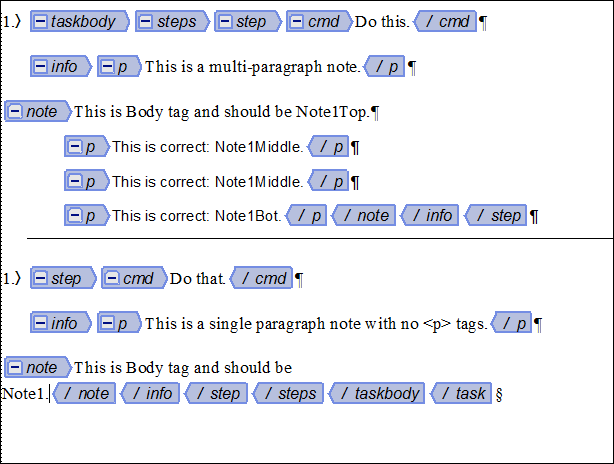
Notice that the first "paragraph" (no <p> tags) in both notes is the FM Body tag.
If I add the following to the <note> element, I get a better result, but still with no rule under the note with no <p> tags.
Format rules for first paragraph in element
If context is: (stepxmp | stepresult | info)
If context is: {only}
Use paragraph format: Note1
Else
Use paragraph format: Note1Top
Format rules for last paragraph in element
If context is: (stepxmp | stepresult | info)
Use paragraph format: Note1Bot

Again, the only thing missing is the rule under the note with no <p> tags.
I tried to add an "In all contexts" definition to my <note> element in the EDD to add the frame below with the rule, but I can't do that because the frame below that contains the rule is different in different contexts (different lengths).
Copy link to clipboard
Copied
Marsha,
Your example has untagged text followed by several <p> elements. I was unaware that you have documents with both untagged text and <p> elements in the same <note>.
How do the four pgf tags: Note1, Note1Top, Note1Middle, and Note1Bot differ? If they are the same except for the frames above and below, I would consider having three rules for <note> and none for <p>. In particular, in the definition of <note>, I would include:
1) A text format rule that assigns pgf fmt Note1Middle
2) A first pgf rule that sets the frame above
3) A last pgf rule that sets the frame below
Note that 2) and 3) produce the same result as applying pgf fmts Note1Top and Note1Bot except when the note contains only one paragraph, in which case that paragraph has the frame above of Note1Top and the frame below of Note1Bot. Further note that these rules apply both to paragraphs resulting from untagged text and those that are <p> elements.
With this approach you don't need to define pgf fmts Note1, Note1Top, and Note1Bot.
Of course, if there are other differences among the four current pgf fmts, the EDD may be more complicated.
--Lynne


Get ready! An upgraded Adobe Community experience is coming in January.
Learn more
 AdChoices