 Adobe Community

- Home
- FrameMaker
- Discussions
- Odd published result of cross-reference format con...
- Odd published result of cross-reference format con...

Copy link to clipboard
Copied
Hello. Here is a strange problem ...
I am using FM 2015 in a Win 10 environment.
My document uses cross-reference formats that sometimes include a page number variable.
This cross-reference setup:
<Hyperlink>Figure\ <$paranumonly> on page\ <$pagenum><Default Para Font>
produces this cross-reference in the .fm file:
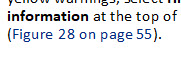
For online help, I want only the figure number with no page number. In the Publish Settings/Style Mapping options, I select <$paranum> only:
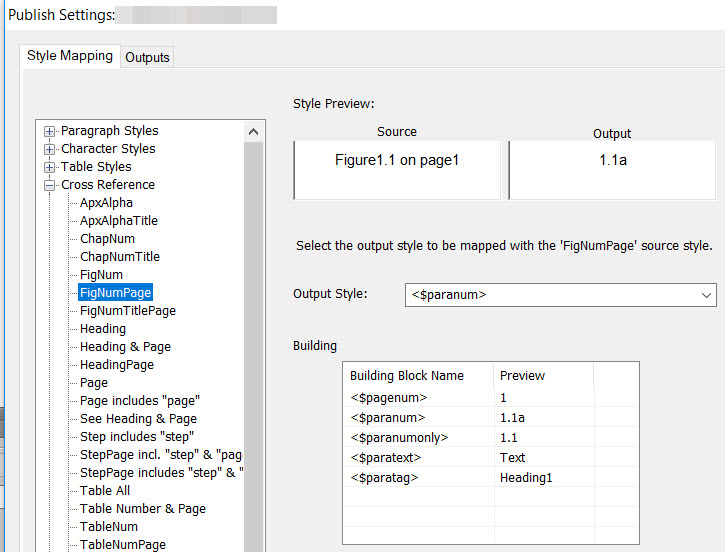
The result consistently appends empty spaces to the link. I can't figure out where they are coming from. (This problem does not occur when I convert my HeadingPage formats, which follow almost the exact same pattern.)
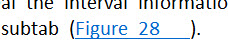
I would think the spaces come from the spaces in the cross-reference format (like the space between "on" and "page") but, as I say, the same result does not occur with my HeadingPage conversion.
All suggestions welcome. I'll simply create parallel xrefs and put conditions on them for the different outputs, if I must, but the conversion settings are so much easier when they work ...


 1 Correct answer


Can you show us your Auto-number properties of the figure numbers in Para Designer?
~Barb

 5
Replies
5
5
Replies
5

Copy link to clipboard
Copied
Can you show us your Auto-number properties of the figure numbers in Para Designer?
~Barb
Copy link to clipboard
Copied
Hi, Barb.
The auto-numbering properties include spaces:
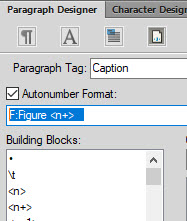
Holy cow, that was it. The cross-reference pulls in everything in the autonumber format. Dang, this means I'll have to redo everything and insert the spaces in the text instead of having them inserted in the format itself. However, this solves my problem.
Thank you!!!
Copy link to clipboard
Copied
Great news, Nancy. Glad you are back on track. 
~Barb

Copy link to clipboard
Copied
Try mapping to <$paranumonly>
Copy link to clipboard
Copied
Hi, Matt.
I got the same result. However, Barb put her finger on the problem!
Thanks for all your help on this question and others.
--Nancy


 AdChoices