


- Home
- FrameMaker
- Discussions
- Re: Open .fm file - unknown file type?
- Re: Open .fm file - unknown file type?
Open .fm file - unknown file type?

Copy link to clipboard
Copied
Hi - has anyone seen this happen? Try to open a .fm file, and Framemaker brings up the "Unknown File Type" dialog for conversion. This doesn't happen with all files, just some, and these are all files that previously could be opened at some point. I've got both 9.0 and 8.0 installed on one machine (latest updates). 9.0 is the trial version. I've got hundreds of .fm files, most originated in version 8.0, but I've had this happen for both 8.0 and 9.0 files using both the 8.0 and 9.0 versions of Framemaker. This has occurred recently on two machines. What could cause Framemaker to not recognize a file, and what can I do about it?
Windows XP Professional.
Any help/advice appreciated.
Thanks,
Linda


 10
Replies
10
10
Replies
10


Copy link to clipboard
Copied
Linda,
It's not clear from your message if this is a Windows error message that comes up when you double-click an .fm document file, or a message from Frame that occurs when you do File > Open in Frame and get a message about "... the file format appears to be a FrameMaker file, but ... "
Or it's something that occurs in another situation.
Could you clarify, please?
Copy link to clipboard
Copied
It's a frame error when opening the file from within frame.
File > Open > <filename>.fm
Result:
Dialog box with title: Unknown File Type
File:
\\<path-to-file>\...
Convert from:
... List of document formats
Two buttons: "Convert" or "Cancel"
Thanks,
Linda
Copy link to clipboard
Copied
Are you using a document version control tool / repository?
It sounds a bit like the type of file corruption that happens if the version control tool is set up for ASCII files instead of binary...
Copy link to clipboard
Copied
Hi - no, this is not in version control. It's on a network share. When I'm editing these files at work, I open them directly from the share. If I'm working on any of the files at home, I take copies of the files home with me and save them on the local machine, then copy the modified files to the share the next day.
I've never seen this before until recently, when I was working on a project with a lot of text insets and was doing a lot of work at home, so was copying the entire project directory of frame files back and forth rather frequently. There was a group of files used as text insets that started exhibiting this behavior a day or two after they were created. I got around it by either using a backup copy (if there was one) or re-creating the file. Then today I needed to work on a project from january, created in version 8.0, and all of the .fm files in this particular directory display the "Unknown file type" dialog when opened from within Framemaker (this is version 8). I haven't tried backup copies of the files yet, because now I'd like to find out why this is happening, before more of my files become inaccessible.
Thanks,
Linda

Copy link to clipboard
Copied
Open a problemsome file in a TEXT editor (not a Word Processor). What does the beginning of the file look like?
Copy link to clipboard
Copied
Thanks, so I just did this for the two copies of an affected file that I mentioned in my last reply (this is how it looks with Notepad++)
Good version starts with:
<MakerFile 8.0H>
rest is ascii characters interspersed with non-ascii
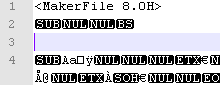
Bad version is all non-ascii -

So, could this kind of damage occur during a file transfer?
Thanks,
LInda
Copy link to clipboard
Copied
I think something caused the file corruption other than just transferring the file.
Some of the usual causes could be a physical shock to the drive, a power fluctuation or something happening to the data cable during a write, maybe some kind of magnetic interference with the drive.
Can you run Microsoft or other diagnostics on the drive itself to make see if there are any hard errors?

Copy link to clipboard
Copied
Linda,
If a USB drive is removed improperly, i.e. you do not get the "Safe to remove drive" message when going through the eject routine, you can damage files on the drive.
Copy link to clipboard
Copied
We had this problem, when people were opening files in directories they had not been granted write access to. If the network locking file cannot be created, this message will come up. Try dragging the file to desktop/local drive and see if the error still comes up. We are using 7.2 on XP
Copy link to clipboard
Copied
I've narrowed it down to the day that this last set of files became corrupted. I back these files up (simple file copy) usually at least once a week, sometimes every day. Some days I copy the files from the backup usb disk to my home laptop to work on at home. I usually just copy everything in a project, so I don't have to decide what files I need. Then, if I've made any changes in any of the files, I copy the entire folder to my backup usb disk, then back to the network share at work.
So, for example, I have the following on the backup usb disk (names changed to protect the guilty):
\Monday afternoon\From Work\file1.fm
\Tuesday morning\To Work\file1.fm
file1.fm had not been modified - the copy of this file in both directories has the same modifcation date, number of bytes, etc. It was just copied from the backup disk, to my home machine, and then back to the backup disk to take to work. The first instance of file1.fm will open, the second will not.
So it would seem that somehow just copying the file from one system to another (via the intermediary usb disk) caused the corruption - is that possible? Is there any way to compare the two binary files?
Thanks,
Linda


Get ready! An upgraded Adobe Community experience is coming in January.
Learn more
 AdChoices