


- Home
- FrameMaker
- Discussions
- Re: PDF bookmarks are not indented correctly
- Re: PDF bookmarks are not indented correctly

Copy link to clipboard
Copied
I have a single, small unstructured FrameMaker 2015 document. When I generate a PDF, the bookmarks are not indented correctly.
The document has headings in this order:
Level 1
Level 5
Level 5
Level 4
Level 5
Level 5
My PDF bookmark settings are:
Level 1
. Level 2
.. Level 4
... Level 5
When I generate a PDF, I get the following:
Level 1
Level 2
Level 5
Level 5
Level 4
Level 5
Level 5
It is indenting relatively, treating level 4 as another level 5 and then further indenting the level 5s that belong under the level 4.
Anyone ever see this before? Any suggestions for fixing (short of changing the order of the headings)?


 1 Correct answer

It's a design problem. You'll have to either manually adjust the PDF bookmarks using Acrobat or come up with different paratags and levels to not break the implicit structure. Have a hard look at the semantic meaning of the paratags that you're using in case there may be alternatives for the Level 5 in the location that you placed them. Also what happened to Level 3 and how will that work in the bookmarks when it gets used somewhere in your documentation? 

 14
Replies
14
14
Replies
14

Copy link to clipboard
Copied
Examine the PDF Setup for the Book file. This controls the Bookmark levels and indents as specified by the spaces in front of the paratags on the left side. The book settings override any individual file settings.
Copy link to clipboard
Copied
The PDF setup for the book is exactly the same as for the file. The problem occurs at the book level and also occurs if I create a PDF for the chapter itself.
Copy link to clipboard
Copied
Are all of the paratag used for the bookmarks in the same text flow? FM processes the contents of the flows in creation order, i.e. Flow A, then Flow B, etc.
Also, are you all patched up for FM2015? There have been two patches released.
Copy link to clipboard
Copied
We only have a single text flow (Flow A) and yes, I am up to date on FM 2015 (at 13.0.2.433).
This is very perplexing...
Copy link to clipboard
Copied
Are any of the paratags used in the bookmarks located within tables?
Copy link to clipboard
Copied
No, no tables.
I even made a very short (3 pages) test file and the issue seems to be the order of the levels, a (Level 1, 5, 4).
Copy link to clipboard
Copied
Can you post a screenshot of your PDF Setup > Bookmarks tab?
Copy link to clipboard
Copied
I just noticed that in your initial post, the structure of your levels is broken, as you have no parent level 4 for the two level 5 paratags. IIRC, in that situation FM has to place the child levels at the parent level. Even though you are using unstructured FM, many of the features behave in a structured fashion. When you skip levels with your headings, you are breaking the perceived logical structure for the reader/user.
Copy link to clipboard
Copied
Yes, you are correct that we broke the 'logical order' of headings but sometimes we need to do that. In my example above, sometimes we need to use Level 5 just to have a heading in the normal flow of text.
Copy link to clipboard
Copied
It's a design problem. You'll have to either manually adjust the PDF bookmarks using Acrobat or come up with different paratags and levels to not break the implicit structure. Have a hard look at the semantic meaning of the paratags that you're using in case there may be alternatives for the Level 5 in the location that you placed them. Also what happened to Level 3 and how will that work in the bookmarks when it gets used somewhere in your documentation? 
Copy link to clipboard
Copied
I did end up adjusting the heading levels in the chapter and it is okay now but I really don't agree that I should have HAD to do that. FrameMaker/Acrobat should just use my settings as is. This is very Microsoft-like of them, adjusting the settings to the way they think they should behave!!!
BTW, we don't actually have a Level 3 anymore; we did away with it awhile ago.
Thanks for your help!
Copy link to clipboard
Copied
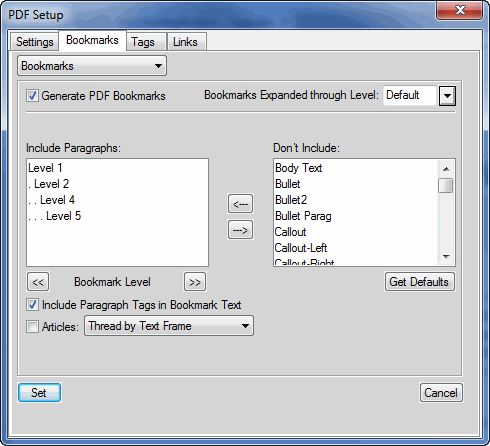
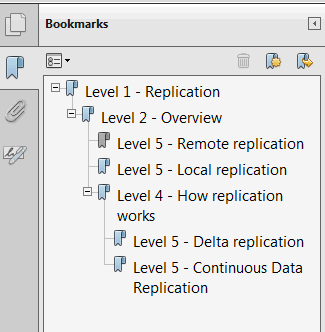
I attached both the Bookmarks tab and the bookmarks pane from the PDF. I included paragraph tags to make it easier to see...

Copy link to clipboard
Copied
@Arnis Gubins kindly provide me the correct solution for the mentioned issue in attachment


Copy link to clipboard
Copied
Arnis retired from the FM forums awhile ago.


Get ready! An upgraded Adobe Community experience is coming in January.
Learn more
 AdChoices
