


- Home
- FrameMaker
- Discussions
- Re: RHFrameMaker12.dll error message on opening Fr...
- Re: RHFrameMaker12.dll error message on opening Fr...

Copy link to clipboard
Copied
Hi,
One of my team has just installed FrameMaker 2017 and has installed the latest update. Whenever they open FrameMaker, they get the following error:
Cannot initialize API client c:\program files
(x86)\adobe\adobe framemaker 2017\fminit\plugins\RHFrameMakerServer12.dll.
Check for errors in the APIClients section of the maker.ini
file in FrameMaker install location or your %appdata% folder, verify that the
client program exists, and make sure you have enough swap space to run the
client.
Any ideas as to how to resolve/prevent this?
I have looked in the maker.ini and the referenced dll is not referenced.
Thanks


 1 Correct answer

Thank you both for you replies.
Well....I installed Adobe Acrobat DC as well (I realised I only previously had Reader, and FM complained I didn't have the Distiller for creating PDFs) and FM no longer shows the error message when it starts up. So I guess problem solved.

 7
Replies
7
7
Replies
7



Copy link to clipboard
Copied
Does the dll mentioned even exist in that location? Was FM installed as an admin on the machine & is it being run as an admin?
Copy link to clipboard
Copied
Hi Jeff
Thanks for your reply, this is actually happening on my computer so I'll try and answer your questions.
Yes the .dll file does exist in that location and Framemaker was installed and run as an administrator.
Thanks
Copy link to clipboard
Copied
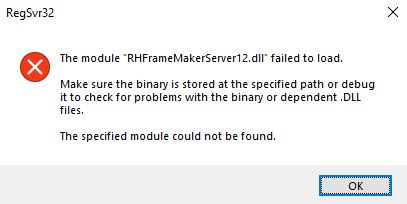
Try manually registering that dll?
Copy link to clipboard
Copied
I just gave that a try and I got the following error message
Copy link to clipboard
Copied
Time to contact Adobe Support at techcomm@adobe.com

Copy link to clipboard
Copied
I agree with Jeff that it's a question for Adobe support, but that sounds like something that is used for either linked Fm to Rh projects, or the Fm Publishing Server.
If you aren't using either option, you might try temporarily moving the DLL to your desktop and restarting Fm.
FrameMaker Course Creator, Author, Trainer, Consultant
Copy link to clipboard
Copied
Thank you both for you replies.
Well....I installed Adobe Acrobat DC as well (I realised I only previously had Reader, and FM complained I didn't have the Distiller for creating PDFs) and FM no longer shows the error message when it starts up. So I guess problem solved.


Get ready! An upgraded Adobe Community experience is coming in January.
Learn more
 AdChoices