Inspiring
February 15, 2025
Answered

save as PDF makes a big PDF file

  • February 15, 2025
  • 1 reply
  • 779 views

Hello,


I have a Word file made from a conversion : Word has converted a PDF file in text.


I have done this :

1) I copy a one page text from Word.

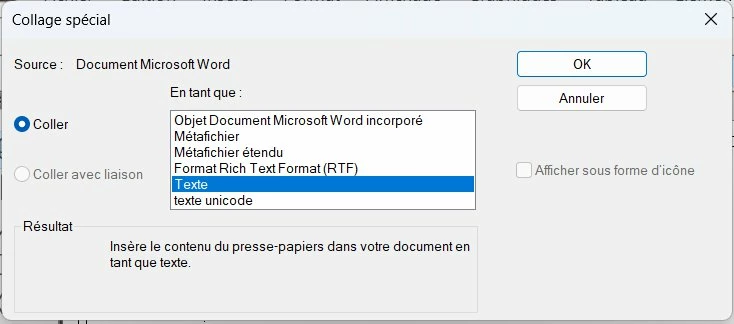
2) In FM I do "special paste" + I select "text"  : 
 

3) in FM I do File / Save as PDF.


Problem : the saved PDF has 600 KB file size. Why is it so big for a single page of text ?
Correct answer FrameMaker-dk

You can work with the output size of the PDF, if you use the Publish function.

  1. Go File->Publish
  2. Select PDF
  3. Click on the Change Settings icon
  4. Click Edit
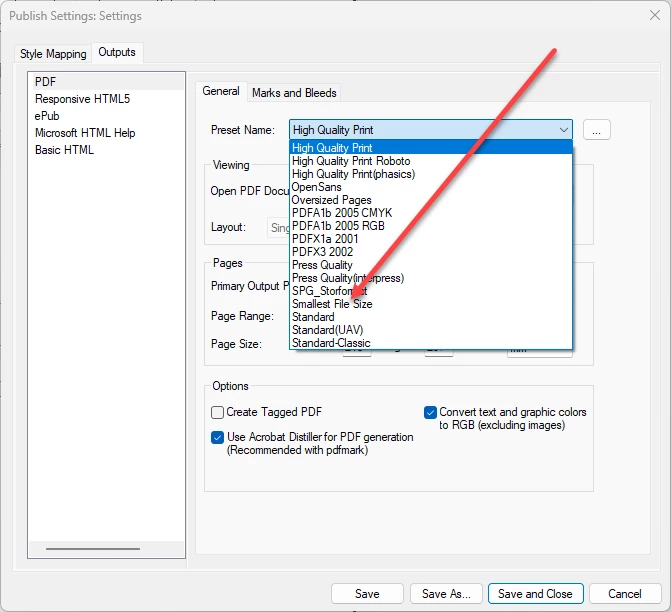
  5. Change the PDF settings to Smallest File Size
  6.  

  7. Click "Use Acrobat Distiller"
  8. 8: Click Save and Close
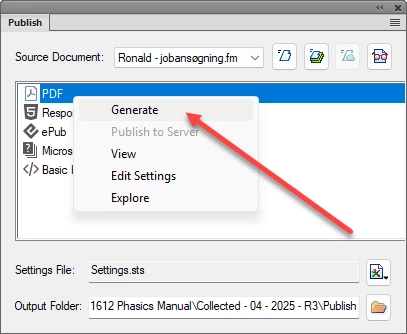
  9. Right click PDF in the Publish Panel and click Generate
  10.  

  11. With a little luck, you will get a small pdf file.

1 reply

FrameMaker-dkCommunity ExpertCorrect answer
Community Expert
February 15, 2025

You can work with the output size of the PDF, if you use the Publish function.

  1. Go File->Publish
  2. Select PDF
  3. Click on the Change Settings icon
  4. Click Edit
  5. Change the PDF settings to Smallest File Size
  6.  

  7. Click "Use Acrobat Distiller"
  8. 8: Click Save and Close
  9. Right click PDF in the Publish Panel and click Generate
  10.  

  11. With a little luck, you will get a small pdf file.
Bjørn Smalbro - FrameMaker.dk
Inspiring
February 15, 2025

Hi Bjorn,

I have noticed that if I uncheck "acrobat distiller", I have always a 600 KB file size. So it is distiller that help me to have a very small file size.


In FM, if I do File/save as PDF, it opens acrobat distiller window with an alert window. So I click "Yes" in the acrobat distiller alert window. When I do File/Save as PDF, Is it a way to  do not display the acrobat distiller window/acrobat distiller alert window ?

Inspiring
February 18, 2025

You have to remember that there are 2 PDF creating engines in FM2022 - the older Print to Adobe PDF printer instance that uses Acrobat Distiller, or the newer PDF Publish method (includes Save as PDF). The newer Publish route has the option to flip back to use the older engine (as @FrameMaker-dk has shown).


In that case, my problem is only when I don't check "acrobat distiller" in FM publish settings. In that case, the PDF created by FM gives me the same file size for "smallest file size" and "high quality print", ie 600 KB.