
Known Participant
August 2, 2016
Answered

Script to sort table in ascending order

  • August 2, 2016
  • 1 reply
  • 2536 views

Hi,

I am not able to find any frame maker function to sort the table in ascending order with respect to column 1. Please, guide me how I can write the extended script in frame maker to sort the table.

Thanks & Regards

Lohith
This topic has been closed for replies.
Correct answer frameexpert

Here is how you can sort a table with ExtendScript:

#target framemaker

var doc = app.ActiveDoc;

// Set a variable for the selected table.

var tbl = doc.SelectedTbl;

// Select the table.

tbl.MakeTblSelection (Constants.FF_SELECT_WHOLE_TABLE);

// Sort the table.

CallClient ("TableSort", "row nocase 0 ascending -1 ascending -1 ascending");

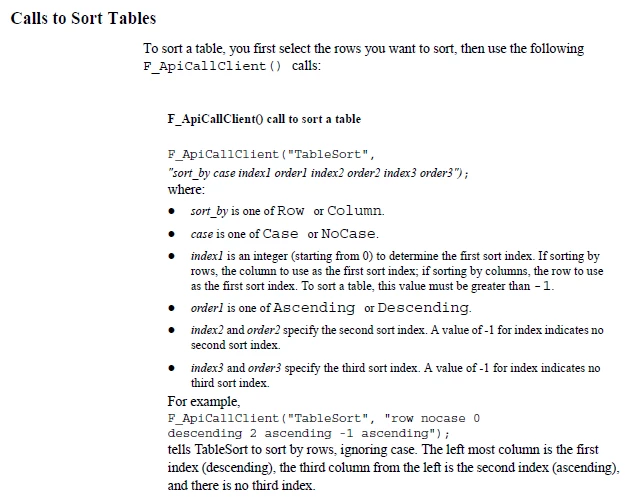
Here is information from the FDK Programmers Reference for the TableSort parameters:

1 reply

K.Daube
Community Expert
Community Expert
August 2, 2016

Hi, Lohith,

I do not understand Your question, because there is the menu Table > Sort:

I have set in the dialogue to sort at first by the first column, then by the second. If there are no heading rows then the drop-down list mention the columns by "1st column" etc.

Known Participant
August 2, 2016

Hi K.Daube,

I know how to sort a table in Frame Maker but I need ESTK script to sort a table.

I am creating a macro for one of my application using ESTK script. In that script, I want to sort a table, for that I need ESTK script to sort the table.

frameexpert
Community Expert
frameexpertCommunity ExpertCorrect answer
Community Expert
August 2, 2016

Here is how you can sort a table with ExtendScript:

#target framemaker

var doc = app.ActiveDoc;

// Set a variable for the selected table.

var tbl = doc.SelectedTbl;

// Select the table.

tbl.MakeTblSelection (Constants.FF_SELECT_WHOLE_TABLE);

// Sort the table.

CallClient ("TableSort", "row nocase 0 ascending -1 ascending -1 ascending");

Here is information from the FDK Programmers Reference for the TableSort parameters: