


- Home
- FrameMaker
- Discussions
- Re: scrolling two or more documents together
- Re: scrolling two or more documents together
scrolling two or more documents together

Copy link to clipboard
Copied
how can I scrolling together two or more documents such as the "synchronized scrolling" in MS Office Word?
- Thanks, Marco


 13
Replies
13
13
Replies
13


Copy link to clipboard
Copied
I do not believe you can. You used to be able to compare documents to see changes between versions. I haven’t used it in awhile, but I’d be surprised if it wasn’t there.
You can of course make a new document (with twice the page size) with two different columns using two different flows and import each document into their own flow. That should give you synced scrolling.
Copy link to clipboard
Copied
Thank you, but it isn't what I want to do. You know if it's possible with a script?
Copy link to clipboard
Copied
Sorry, not a clue.
Copy link to clipboard
Copied
No problem, I know that is a very difficult question! Now I try to find a solution and if I discover something new I'll post it here.
Copy link to clipboard
Copied
Marco,
Very Good. By the way in my suggestion about having two flows, while not perfect, if you have the two flows to import the documents by reference, you can easily change to the original documents make changes that will be reflected back in the bifurcated document.
Copy link to clipboard
Copied
I know, but my problem is that I need to compare many documents (sometimes eight at the same time) because I work with many manuals in more than two languages, so I think the only way to resolve my problem is make a script that consent me to move together the scrollbars of the documents.
Michael, your solution is a very good way if someone need to compare few documents, but this isn't my case.
Copy link to clipboard
Copied
I found a solution, who are intresting about it must contact me privately. My email is: marco.dona1996@gmail.com
-Marco


Copy link to clipboard
Copied
Why don’t you just post what you’ve found out?
Copy link to clipboard
Copied
Good question, if you read how some people answered me here: Re: synchronized scrollbars of differents documents (using FM10) you can understand my position. I'm sorry to other people who were kind with me but, if they want, they can contact me to talk about my solution privately.
Copy link to clipboard
Copied
I’ve sent you a PM.
[Edit] Marco's solution is an external script inspired by Klaus Daube's post in the scripting thread linked to above. He claims it goes further than Klaus's and is available for purchase from him.

Copy link to clipboard
Copied
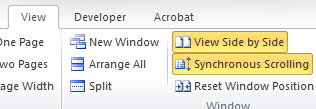
I use MS Word 2010. Open two documents> click View tab> Select View Side by Side> Synchronous Scrolling.
bada boom bada bing
Copy link to clipboard
Copied
Wow, you're amazing! But I think you haven't read all the question.
Copy link to clipboard
Copied
glad to be of helping.


Get ready! An upgraded Adobe Community experience is coming in January.
Learn more
 AdChoices