New Participant
August 25, 2022
Question

Second level bullets look different in PDF

  • August 25, 2022
  • 2 replies
  • 373 views

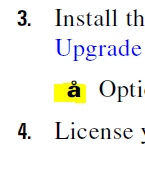
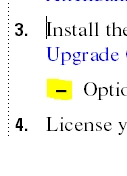
I recently updated my TCS version to 2020. When I edit my documents in FrameMaker, everything looks perfectly normal, but once I generate a PDF, the second level bullets look like å.


I went through similar topics on the forum and saw people suggesting converting the font used for that style from ttf to otf - I have been unable to do that (or I haven't figured out how), and also suggesting setting the colors from RGB to CMYK, but it's already set to CMYK for me.


Any ideas how to resolve this issue?
 

This topic has been closed for replies.

2 replies

Dave Creamer of IDEAS
Braniac
August 25, 2022

Try changing it to an en dash [ \= ] in the numbering tab. Should look about the same.

David Creamer: Community Expert (ACI and ACE 1995-2023)
New Participant
August 25, 2022

Hi David, thanks for the suggestion, but it didn't work. I also tried changing both the font and the format, and no changes, I still get å.

Bob_Niland
Braniac
August 26, 2022

You might try saving the document as MIF.
Open in a plain text editor.
Look for the 

<Para

that contains the affected

<String `Option…
see what the

<PgfNumString `\x13 –\t'>
contains. That "–" character would be key. If it's also "å", then this would seem to be an FM problem. Otherwise, it's later in the workflow. I presume you get the same result for Publish-to-PDF, Save-As-PDF, Print-to-PDF, and Print-to-Ps & Distill?

Bob_Niland
Braniac
August 25, 2022

What is the font-family for the sub-bullet paragraph format?
What character is the "-"? The embed is a raster image, so I can't guess.


Unicode has a dozen or so codepoints whose glyphs look like a hyphen or dash, and any of them except:
U+002D Hyphen-Minus
could raise font issues.


Now as to why it's {apparently} being rendered as
U+00E5 Latin Small Letter A with Ring Above
is rabbit hole into which it is too early to dive.

New Participant
August 25, 2022

Hi Bob, thanks for the reply!


The font is Times, and I'm not sure which character it is (I'm using a client's template), but if I go to Numbering > Format, it says \sn–\t.


Another commenter suggested I change the format to an en dash, and it looks basically the same in FrameMaker, but when I publish the PDF, it still shows up as å.

Bob_Niland
Braniac
August 26, 2022

re: The font is Times…

See what's actually being rendered. Select the bullets from the PDF, and paste them into some code reporting site, such as Unicode code converter. see what U+hex is read back.


Since you've already tried a different font, what's below here probably isn't a productive clue trail.


Times (vs. Times New Roman) was originally a Type 1 font, 8-bit, so had ISO/IEC 8859 glyphs (which do include - & å, but no Unicode) for a couple of decades. Apart from any Unicode issues, Adobe is discontinuing app support for T1 fonts next year, and has already done so in some apps. If found to be T1, it would be worth figuring what vintage of .PFB & .PFM files were used to install it. If the c:\windows\fonts\… files are instead found to be TTF, OTF or something else, check the file size. If under 50Kb or so, it's probably a legacy 8-bit font. BabbleMap can also show you what's in the font.